
CAP Theorem:
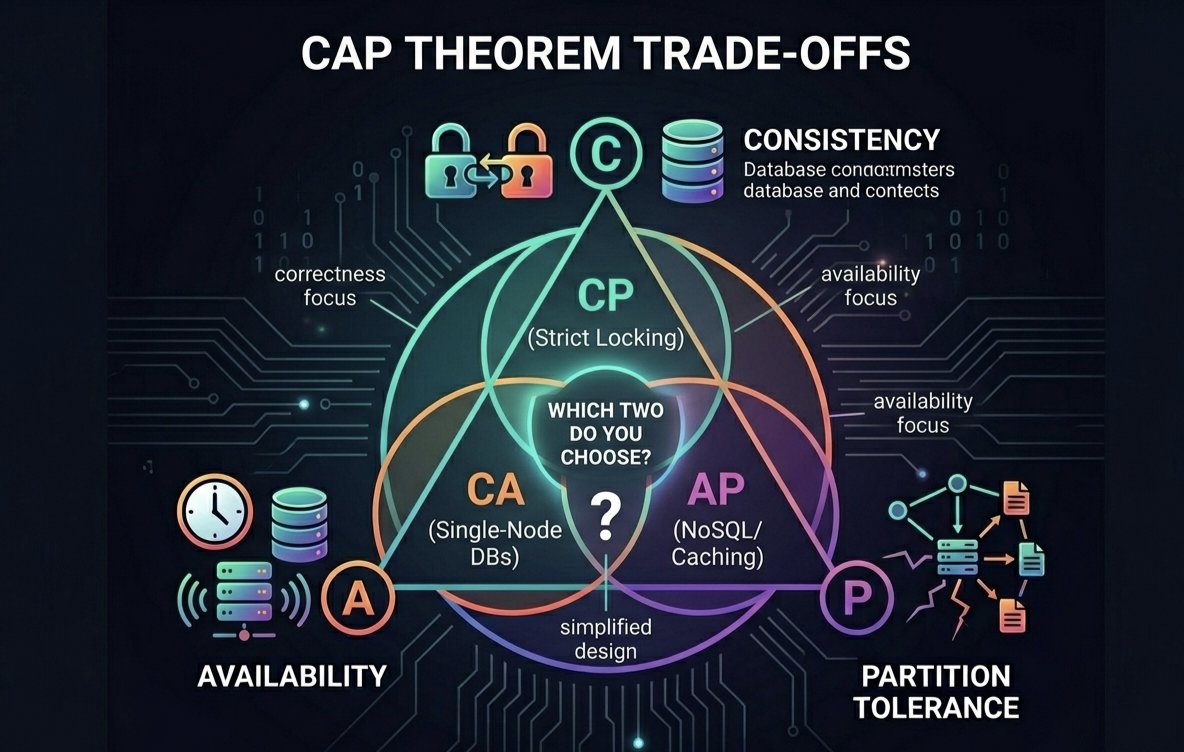
A distributed database can provide only 2 out of 3 guarantees at the same time:
Consistency (C)
Availability (A)
Partition Tolerance (P)
During network failures, a system must choose between Consistency and Availability.
#DBMS #CAPTheorem #DistributedSystems
9

Distributed systems 101: The CAP Theorem. 💻💡
Consistency (C)
Availability (A)
Partition Tolerance (P)
Pick TWO. Plan your trade-offs wisely. 📊
#DistributedSystems #SystemDesign #CAPTheorem
35

May 14
డిస్ట్రిబ్యూటెడ్ సిస్టమ్స్లో తెలుగు ఇంజనీర్లు తప్పకుండా తెలుసుకోవాల్సిన 10 ముఖ్యమైన కాన్సెప్ట్స్ 🔥
సిస్టమ్ డిజైన్ ఇంటర్వ్యూలు లేదా స్కేలబుల్ సిస్టమ్స్ బిల్డ్ చేయాలనుకునే వారికి ఇవి అనివార్యం.
ఇక్కడ సింపుల్ ఎక్స్ప్లనేషన్తో లిస్ట్ ఇస్తున్నాను:
CAP Theorem ⚖️
Consistency, Availability, Partition Tolerance మధ్య ట్రేడ్-ఆఫ్
Raft Consensus 🗳️
లీడర్ ఎలక్షన్ ద్వారా డేటా కన్సిస్టెన్సీని నిర్వహించే అల్గారితం
Eventual Consistency ⏳
కొంత సమయం తర్వాత అన్ని నోడ్స్ ఒకే డేటా చూస్తాయి
Sharding 🧩
డేటాను చిన్న భాగాలుగా విభజించి స్కేలబిలిటీ పెంచడం
Replication 🔄
డేటాను బహుళ నోడ్స్లో కాపీ చేసి ఫాల్ట్ టాలరెన్స్ పెంచడం
Leader Election 👑
ఒక నోడ్ను లీడర్గా ఎన్నుకునే ప్రక్రియ
Circuit Breaker Pattern ⚡
ఫెయిల్యూర్లను డిటెక్ట్ చేసి తాత్కాలికంగా రిక్వెస్ట్లను బ్లాక్ చేయడం
Saga Pattern 🔗
డిస్ట్రిబ్యూటెడ్ ట్రాన్సాక్షన్స్ను సురక్షితంగా నిర్వహించే పద్ధతి
Idempotency 🔁
ఒకే రిక్వెస్ట్ను పలుమార్లు పంపినా ఒకే ఫలితం వచ్చేలా చేయడం
Distributed Tracing 🔍
రిక్వెస్ట్ యొక్క పూర్తి ఫ్లోను ట్రాక్ చేసి డీబగ్ చేయడం
#DistributedSystems #TeluguEngineers #SystemDesign #TeluguTech #SoftwareEngineering #CAPTheorem
1
2
53

Apr 26
🧵 Day 14/30 — #SystemDesign
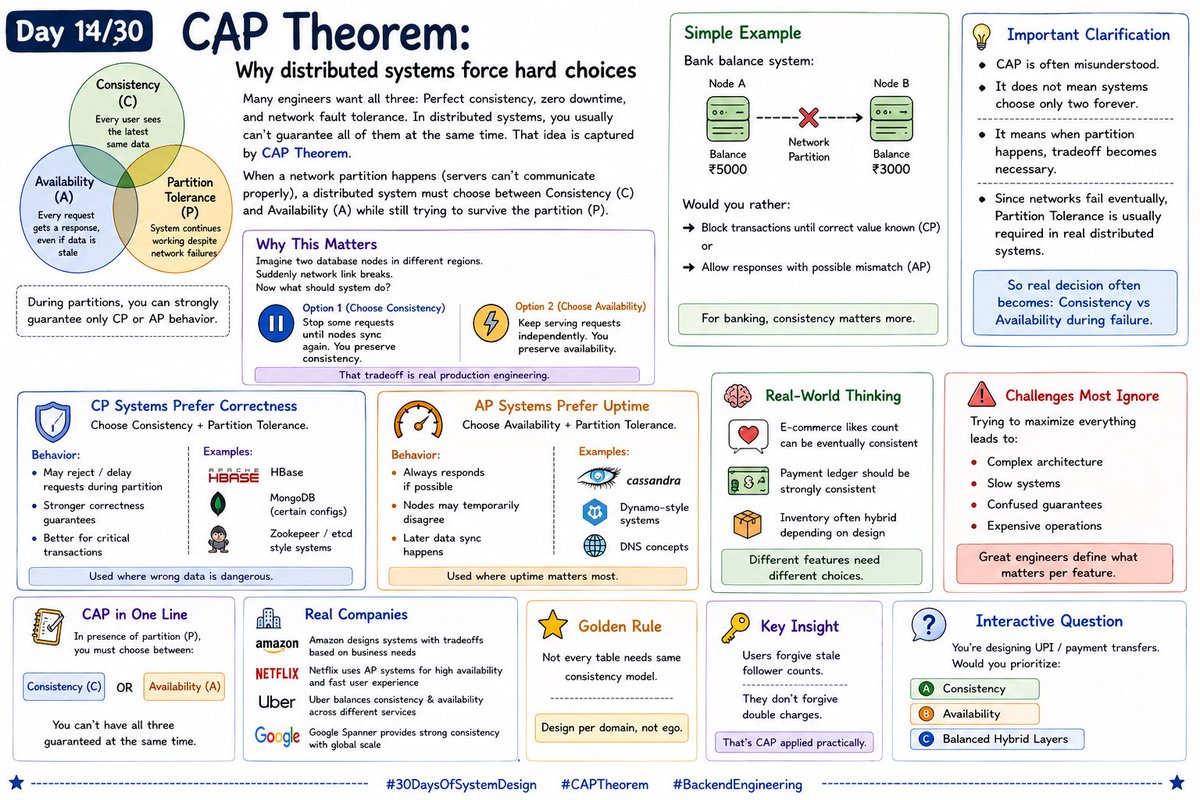
CAP Theorem: Why distributed systems force hard choices
Many engineers want all three:
→ Perfect consistency
→ Zero downtime
→ Network fault tolerance
In distributed systems, you usually can’t guarantee all of them at the same time.
That idea is captured by CAP Theorem.
When a network partition happens (servers can’t communicate properly), a distributed system must choose between:
Consistency (C)
Every user sees the latest same data.
Availability (A)
Every request gets a response, even if some data may be stale.
Partition Tolerance (P)
System continues working despite network failures between nodes.
During partitions, you can strongly guarantee only CP or AP behavior.
⸻
Why This Matters
Imagine two database nodes in different regions.
Suddenly network link breaks.
Now what should system do?
Option 1:
Stop some requests until nodes sync again.
You preserve consistency.
Option 2:
Keep serving requests independently.
You preserve availability.
That tradeoff is real production engineering.
⸻
Simple Example
Bank balance system:
If Node A says ₹5000
Node B says ₹3000
Would you rather:
→ Block transactions until correct value known (CP)
or
→ Allow responses with possible mismatch (AP)
For banking, consistency matters more.
⸻
CP Systems Prefer Correctness
Choose Consistency Partition Tolerance.
Behavior:
→ May reject / delay requests during partition
→ Stronger correctness guarantees
→ Better for critical transactions
Examples:
→ HBase
→ MongoDB (certain configs)
→ Zookeeper / etcd style systems
Used where wrong data is dangerous.
⸻
AP Systems Prefer Uptime
Choose Availability Partition Tolerance.
Behavior:
→ Always responds if possible
→ Nodes may temporarily disagree
→ Later data sync happens
Examples:
→ Cassandra
→ Dynamo-style systems
→ DNS concepts
Used where uptime matters most.
⸻
Important Clarification
CAP is often misunderstood.
It does not mean systems choose only two forever.
It means when partition happens, tradeoff becomes necessary.
Since networks fail eventually, Partition Tolerance is usually required in real distributed systems.
So real decision often becomes:
Consistency vs Availability during failure.
⸻
Real-World Thinking
E-commerce:
→ Product likes count can be eventually consistent
→ Payment ledger should be strongly consistent
→ Inventory often hybrid depending design
Different features need different choice
#30DaysOfSystemDesign #CAPTheorem #BackendEngineering
Apr 25

🧵 Day 13/30 — #SystemDesign
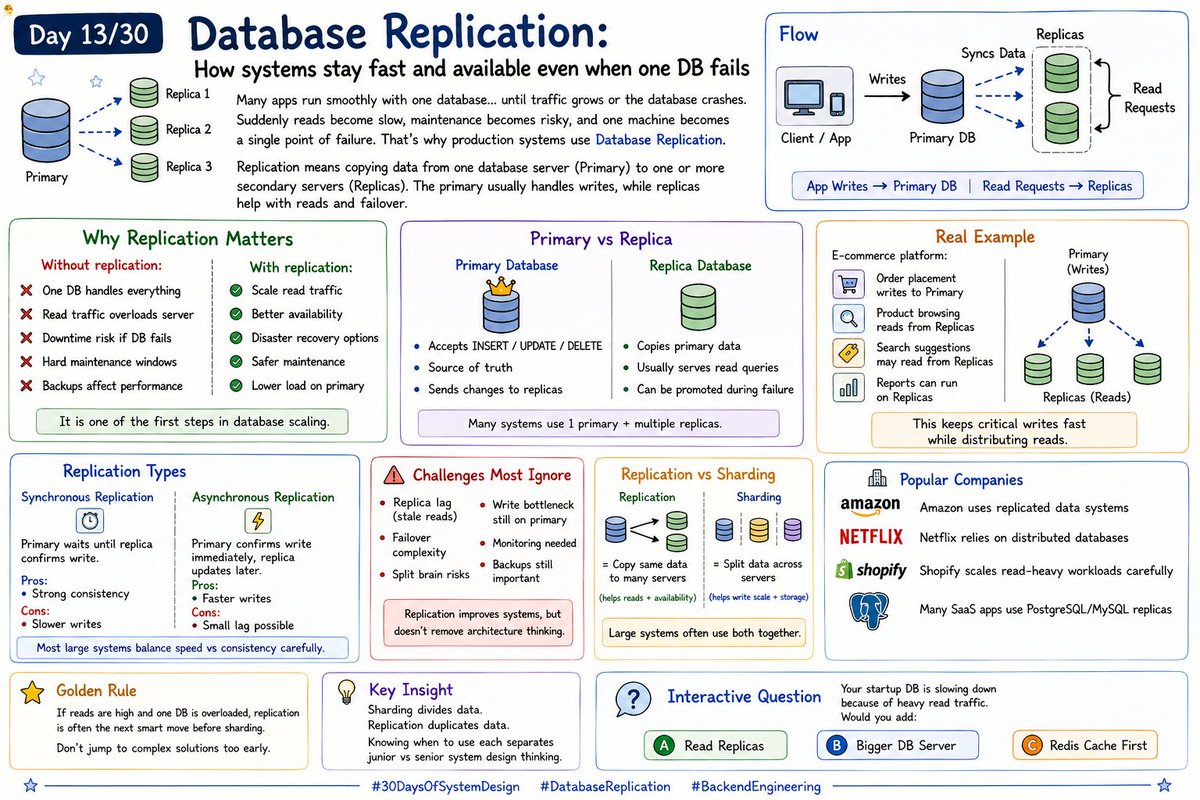
Database Replication: How systems stay fast and available even when one DB fails
Many apps run smoothly with one database… until traffic grows or the database crashes. Suddenly reads become slow, maintenance becomes risky, and one machine becomes a single point of failure.
That’s why production systems use Database Replication.
Replication means copying data from one database server (Primary) to one or more secondary servers (Replicas). The primary usually handles writes, while replicas help with reads and failover.
Flow:
App Writes → Primary DB
Primary Syncs Data → Replicas
Read Requests → Replicas
This improves performance and reliability.
-----------------
Why Replication Matters
Without replication:
→ One DB handles everything
→ Read traffic overloads server
→ Downtime risk if DB fails
→ Hard maintenance windows
→ Backups affect performance
With replication:
→ Scale read traffic
→ Better availability
→ Disaster recovery options
→ Safer maintenance
→ Lower load on primary
It is one of the first steps in database scaling.
-------------------
Primary vs Replica
Primary Database
→ Accepts INSERT / UPDATE / DELETE
→ Source of truth
→ Sends changes to replicas
Replica Database
→ Copies primary data
→ Usually serves read queries
→ Can be promoted during failure
Many systems use 1 primary multiple replicas.
-------------------
Real Example
E-commerce platform:
→ Order placement writes to Primary
→ Product browsing reads from Replicas
→ Search suggestions may read from Replicas
→ Reports can run on Replicas
This keeps critical writes fast while distributing reads.
-------------------
Replication Types
1. Synchronous Replication
Primary waits until replica confirms write.
Pros:
→ Strong consistency
Cons:
→ Slower writes
2. Asynchronous Replication
Primary confirms write immediately, replica updates later.
Pros:
→ Faster writes
Cons:
→ Small lag possible
Most large systems balance speed vs consistency carefully.
---------------------
Challenges Most Ignore
Replication helps a lot, but adds tradeoffs:
→ Replica lag (stale reads)
→ Failover complexity
→ Split brain risks
→ Write bottleneck still on primary
→ Monitoring needed
→ Backups still important
Replication improves systems, but doesn’t remove architecture thinking.
15
48
271
17,753

Apr 13
CAP Theorem — The Hard Truth
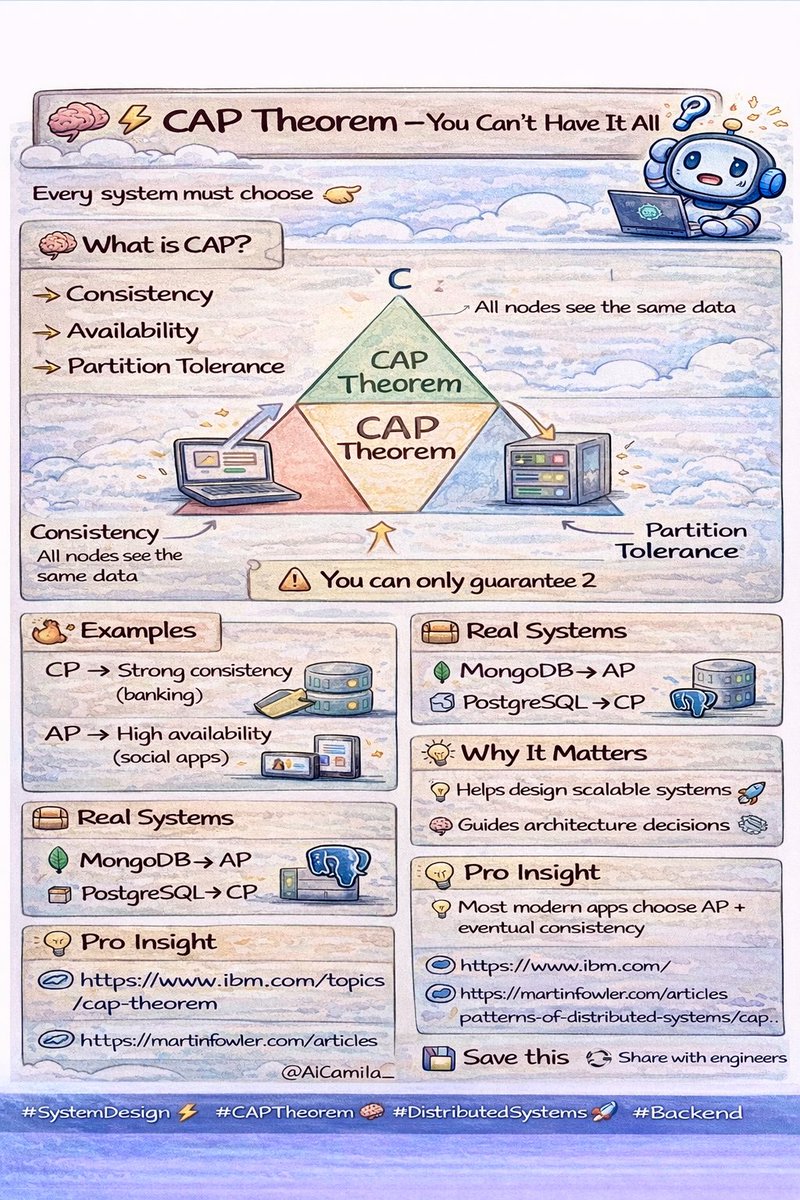
🧠⚡ CAP Theorem — You Can’t Have It All 🔥
Every system must choose 👇
🧠 What is CAP?
👉 Consistency
👉 Availability
👉 Partition Tolerance
⚠️ Rule
👉 You can only guarantee 2
🔥 Examples
• CP → Strong consistency (banking) 💳
• AP → High availability (social apps) 🌐
📦 Real Systems
• MongoDB → AP
• PostgreSQL → CP
🏆 Why It Matters
• Helps design scalable systems 🚀
• Guides architecture decisions 🧠
💡 Pro Insight
👉 Most modern apps choose AP eventual consistency
📚 Learn More (Trusted)
🔗 ibm.com/topics/cap-theorem
🔗 martinfowler.com/articles/pa…
💾 Save this
🔁 Share with engineers
#SystemDesign ⚡ #CAPTheorem 🧠 #DistributedSystems 🚀 #Backend
1
6
56

"Black Friday' de sistem yavaşlarsa sepeti değil, müşteriyi kaybedersiniz." 🛑🛒
Hepimiz o anı biliyoruz...
youtu.be/jZW0DnFw2ps?si=sK49…
#yazılımmimarisi #systemdesign #microservices #redis #sql #captheorem #developer #yazılımgeliştirme #softwarearchitecture #tech
3
256

Your cloud app isn’t gaslighting you...you just met the CAP theorem! The CAP theorem is why something can succeed… then fail… then succeed again without being broken:
shankuehn.io/post/the-cap-th…
#distributedsystems #captheorem #consistency #partitiontolerance #availability
3
201

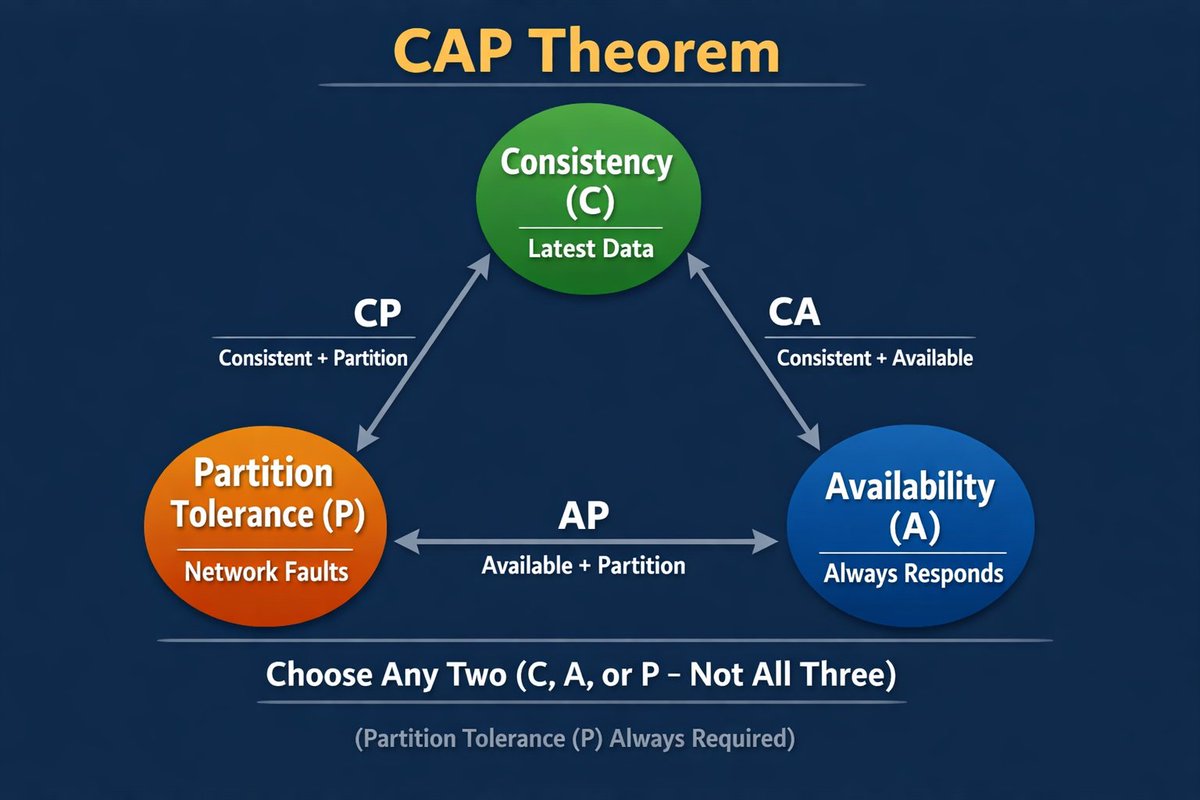
Explain CAP Theorem in 2 minute
In distributed systems you can ONLY pick 2 out of 3:
C – Consistency(everyone sees the latest write)
A – Availability(every request gets a response)
P – Partition tolerance (system keeps working when network splits)
Real World Application
→ P is basically mandatory (networks fail)
→ You actually choose CP or AP during partitions
CP systems → sacrifice availability (some requests fail/time out)
→ banking, orders, balances, CockroachDB, Spanner (strong)
AP systems → sacrifice consistency (stale/old data is ok)
→ feeds, recommendations, caching, Cassandra, DynamoDB, Redis Cluster
Bonus: PACELC
Even with no partition → you still trade Latency vs Consistency
Most real systems are PA/EL or PC/EL
Which side do you usually pick in your designs? 👇
CP or AP?
#SystemDesign #DistributedSystems #CAPTheorem
1
5
66

Jan 31
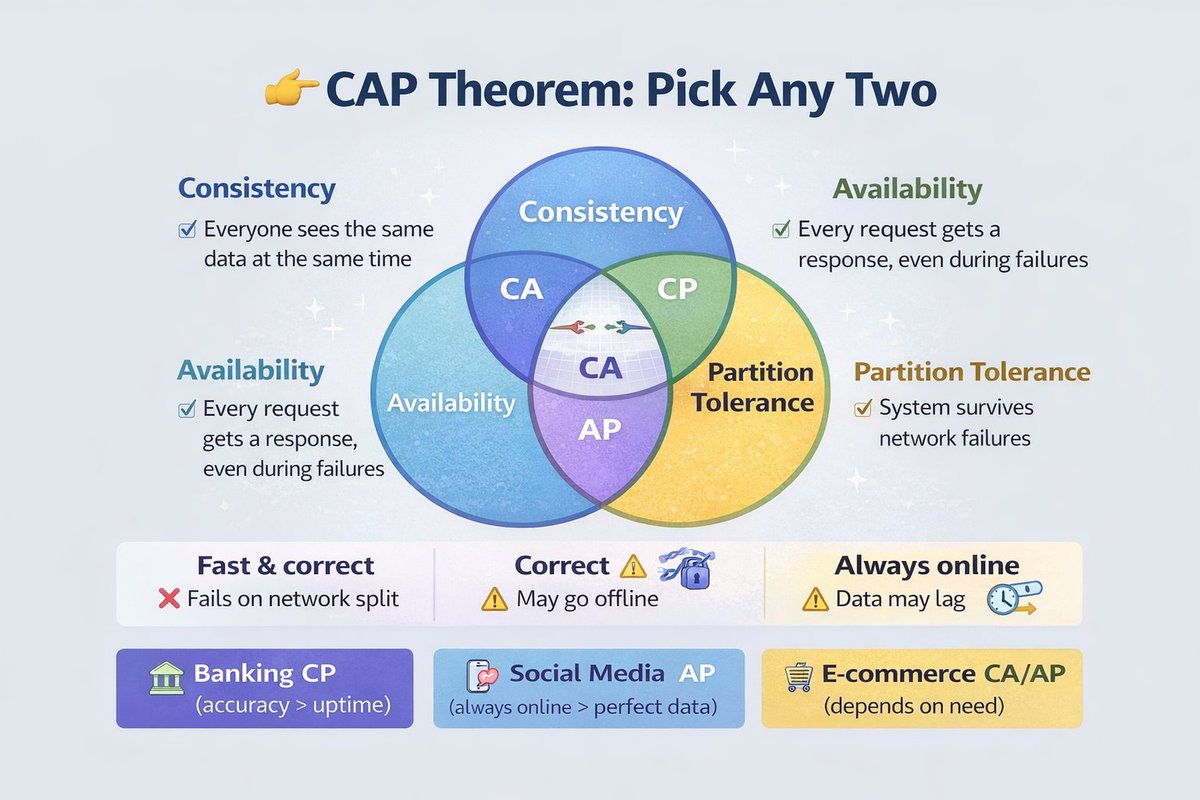
🚨Ever wondered why your favorite apps sometimes glitch during outages?
Enter the CAP Theorem – the ultimate trade-off in distributed systems!
CAP stands for:
Consistency: Everyone sees the same data at the same time.
Availability: System always responds, no matter what.
Partition Tolerance: Handles network splits like a boss.
The catch? You can only pick TWO! 😲
In a world of massive data, most systems sacrifice perfect consistency for speed (e.g., eventual consistency in NoSQL).
Which would YOU trade off? Drop your thoughts below!
#TechTalk #DistributedSystems #CAPTheorem
2
4
954

Jan 31
Vector Databases Explained | GenAI, LLM Search & AI‑Native Data Platforms
Vector databases are the backbone of Generative AI and LLM‑powered applications.
In this video, we deep‑dive into vector databases in 2025, explaining why they have become essential for semantic search, retrieval‑augmented generation (RAG), and AI‑native data platforms.
🔍 What you’ll learn (vector‑focused):
What vector databases are and how they work
Why LLMs and GenAI need high‑dimensional vector search
How vector databases differ from relational and NoSQL systems
Where traditional databases fail for semantic similarity search
How CAP & PACELC influence vector database design
Why serverless and auto‑scaling vector databases fit AI workloads
Managed vs self‑hosted vector databases and data compliance trade‑offs
This video is designed for data engineers, ML engineers, AI engineers, and cloud architects building LLM pipelines, RAG systems, and GenAI platforms.
🎯 Why vector databases matter in 2025
Modern AI applications depend on:
Fast embedding similarity search
Low‑latency LLM retrieval
Cost‑efficient AI‑scale infrastructure
Choosing the wrong data store can break your GenAI relevance, latency, and cost model.
⏱️ Chapters (Retention Suggested boost)
00:00 Why Vector Databases Matter for GenAI
01:20 What Is a Vector Database?
03:10 Vector DB vs Relational vs NoSQL
05:00 Vector Search for LLM & RAG
06:50 CAP & PACELC in Vector Systems
08:30 Serverless Vector Databases
09:50 Compliance & Deployment Models
#VectorDatabases #GenAI #LLM #RAG #SemanticSearch #DataEngineering #AIInfrastructure
#DistributedSystems #CAPTheorem
youtu.be/rIPSXLjSspI?si=J4Tg…
4
4
41

Jan 24
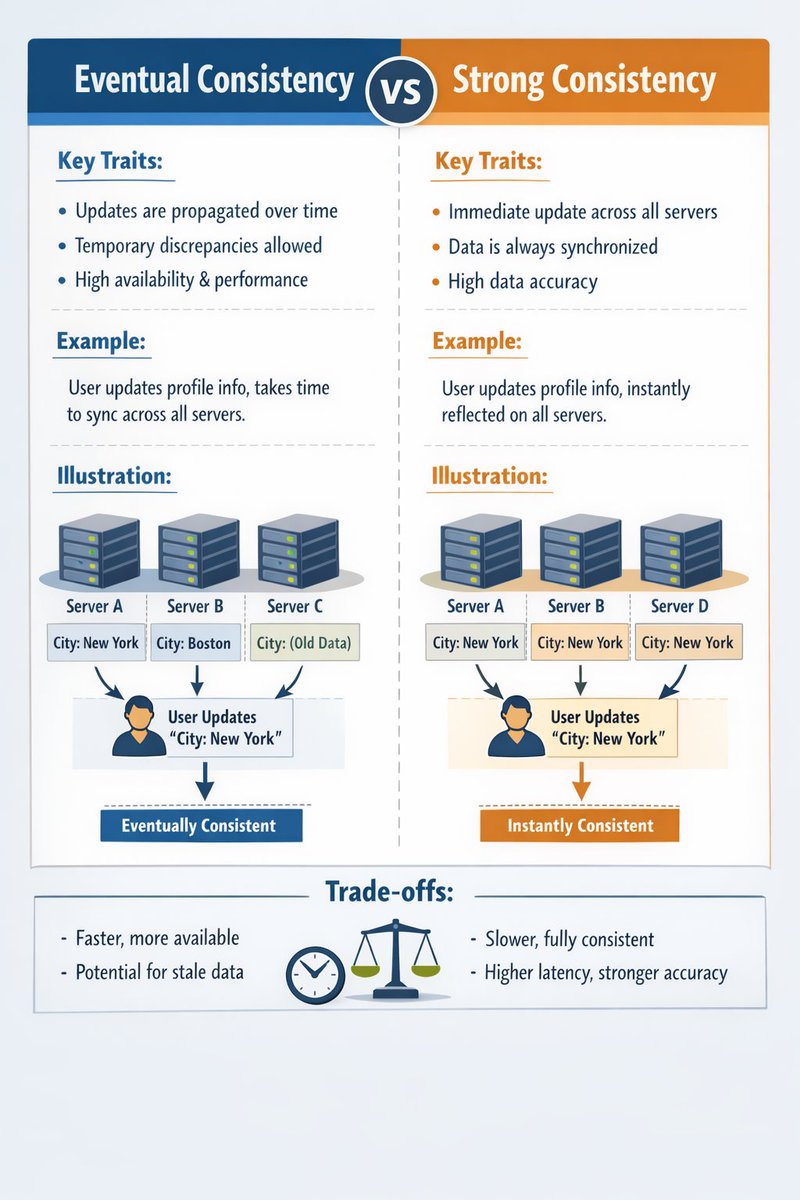
Eventual Consistency vs Strong Consistency — explained ⚖️
👉Eventual Consistency
Updates don’t appear everywhere immediately. Given enough time (and no new writes), all replicas converge.
- High availability
- Better scalability
- Temporary stale reads
Used by systems like caches, social feeds, DNS, NoSQL stores.
👉Strong Consistency
Every read reflects the most recent write across all nodes.
- Guaranteed correctness
- Simplifies reasoning
- Higher latency & coordination cost
Used by banking systems, inventory, leader-based databases.
This is the real-world tradeoff behind CAP theorem:
👉 Availability vs Consistency under partitions
There’s no “better” choice — only the right choice for your use case.
#SystemDesign #DistributedSystems #CAPTheorem #Databases #Backend #Engineering
1
1
3
1,888

14 Dec 2025
How to tune Consistency with Quorum Reads/Writes. 📐
In eventually consistent systems (like DynamoDB), you can balance the CAP theorem using R (Read replicas) and W (Write replicas) out of N total replicas.
Rule: For strong consistency: R W>N.
e.g., N = 5, R = 3,W = 3 ==> 3 3 > 5. Any read is guaranteed to see the latest write.
This gives you tunable consistency—a key advanced HLD skill.
#CAPTheorem #Consistency #DynamoDB #DistributedComputing #SoftwareEngineering
2
102
10 Dec 2025
The CAP Theorem is not a choice you make once! 🧠
In a distributed system, you must constantly trade-off Consistency and Availability (Partition Tolerance is guaranteed).
Strong Consistency: Best for financial transactions (e.g., payments).
Eventual Consistency: Best for timelines/comments (prioritize the user seeing something fast).
Your HLD should clearly label which services prioritize which.
#CAPTheorem #HLD #Consistency #DistributedComputing
1
2
218

21 Oct 2025
So, for y’all learning about data, this is why the A in CAP is so important.
#AWS #CAPTheorem
3
105

15 Sep 2025
🧵 Thread: The CAP Theorem—Distributed Systems’ Impossible Choice! ⚖️
In distributed systems, the CAP Theorem is a core rule: You can’t have it all. Let’s unpack what it means for your backend design! #CAPTheorem #DistributedSystems #WebDev
1
2
26

10 Sep 2025
SYSTEM DESIGN BASICS #3 :- CAP THEOREM linkedin.com/pulse/system-de…
#LearnInPublic #SystemDesign #captheorem #buildinginpublic #Consistency
2
8

16 Jul 2025
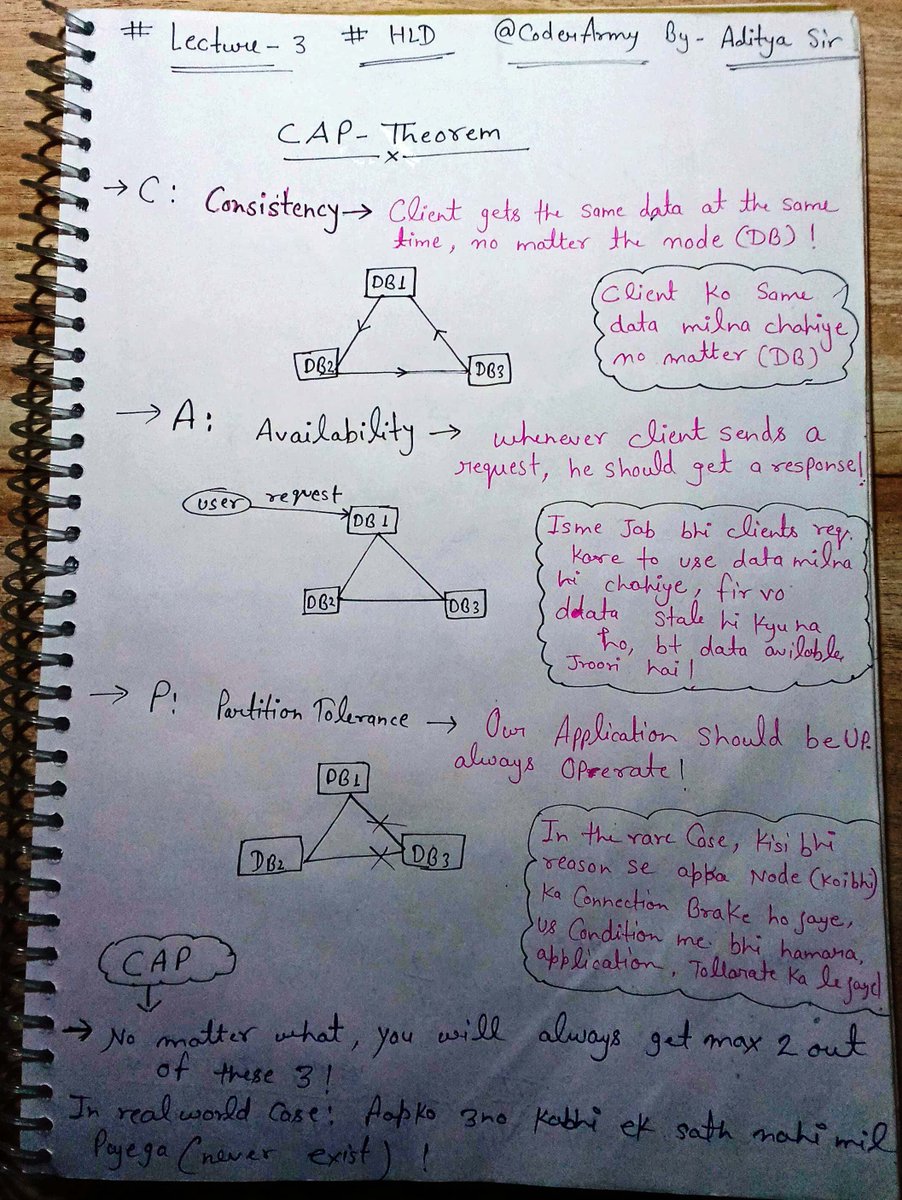
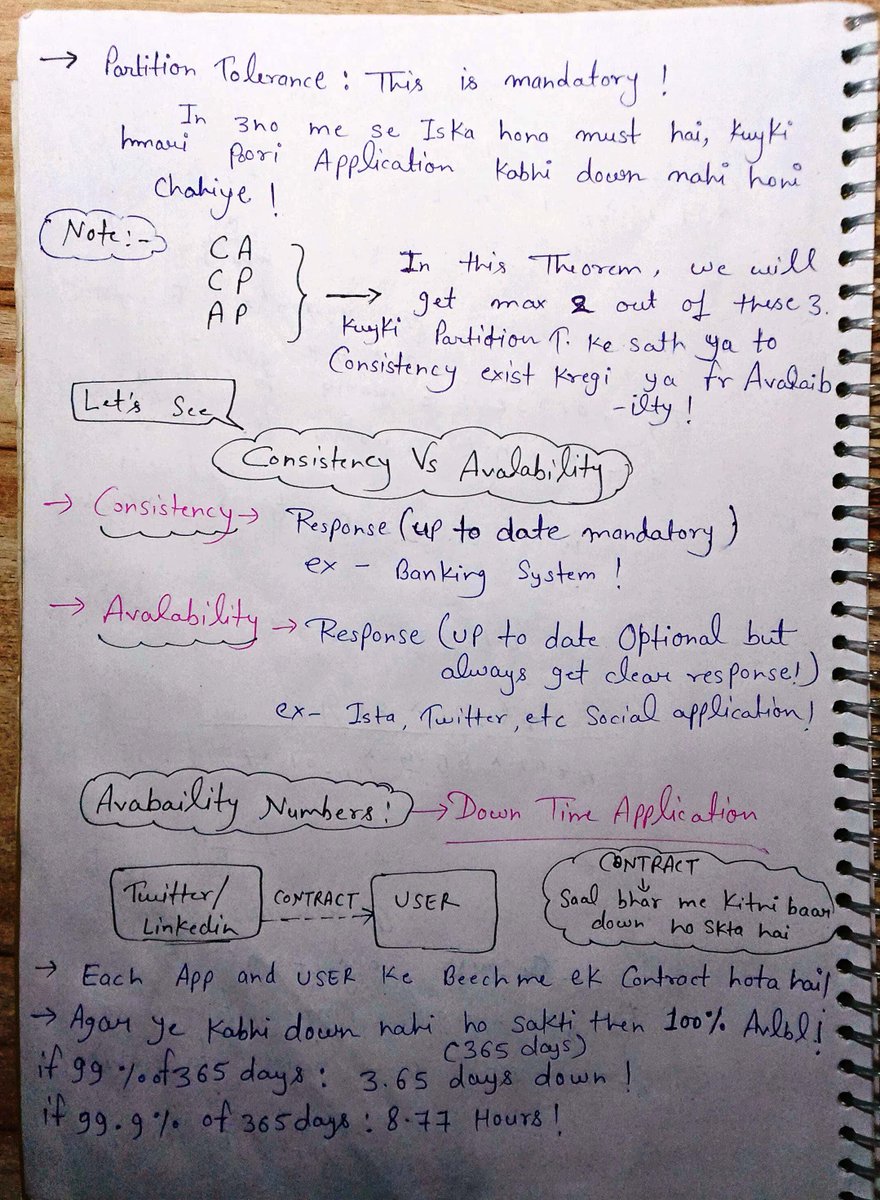
Day 3 of my #HLd with @adityatandon02 bhaiya🧡
📌Topics Cover Today:
➡️CAP Theorem
➡️Back of Envelope
➡️Monolith vs Microservice
➡️Saga (Orchestration/Choreo)
💡Real life apps = max 2 out of CAP
#SystemDesign #CAPTheorem #SystemDesign #DevJourney
2
69

10 Mar 2025
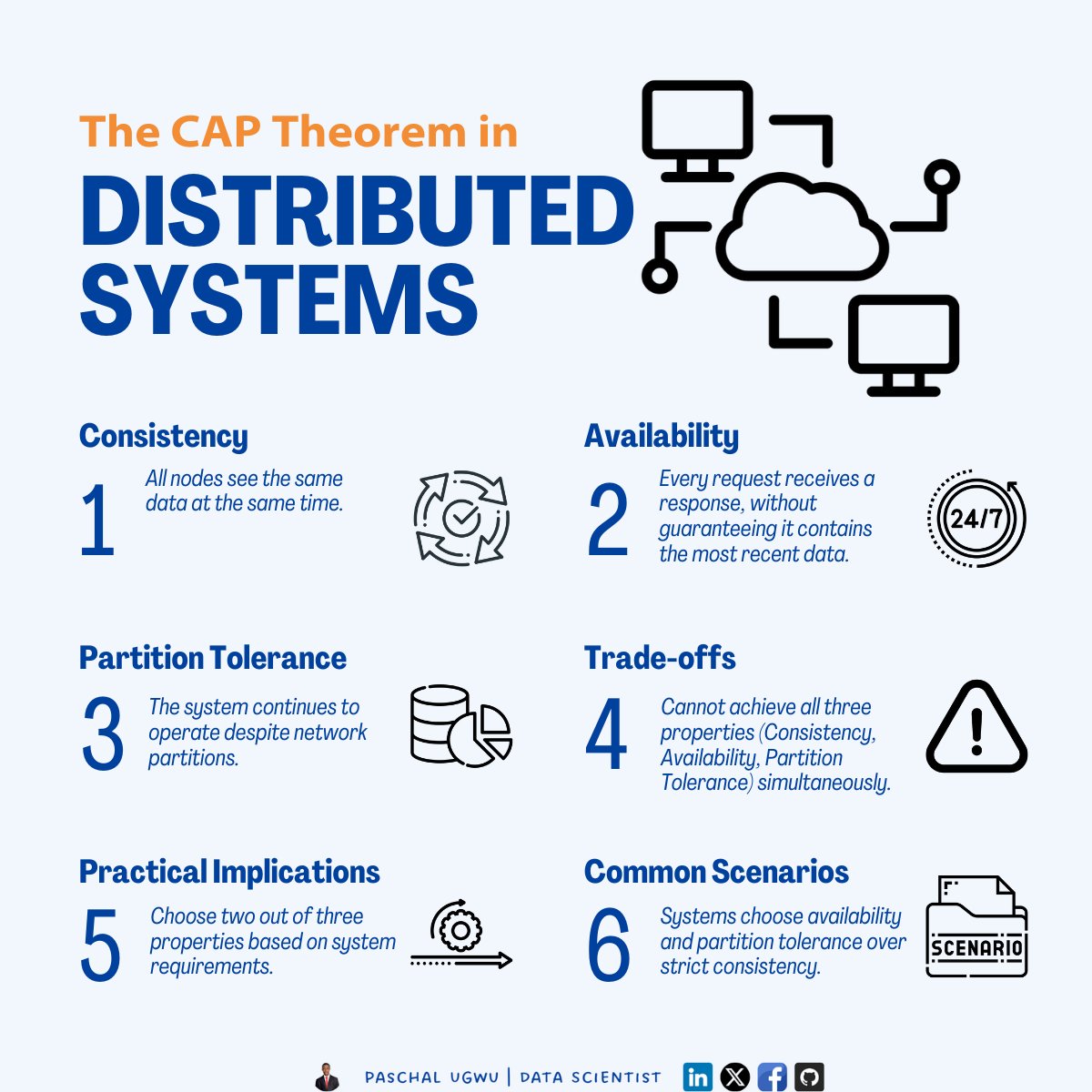
Understand the CAP Theorem to balance consistency, availability, and partition tolerance in your distributed system designs.
#DistributedSystems #CAPTheorem #TechInsights #Consistency #Availability #PartitionTolerance #SystemDesign #TechStrategy #DataConsistency
1
6

17 Jan 2025
🚀 Day 76 & 77 of #150dayslevelup:
1️⃣ Solved LQTD! 💡✅
2️⃣ Dived into CAP Theorem and learned its significance in distributed systems! 📚🔍
3️⃣ Installed Arch Linu 🖥️🐧
#LeetCode #CAPTheorem #ArchLinux #TechJourney
3
63

6 Jan 2025
In the realm of the CAP theorem, where trade-offs are inevitable, Partition Tolerance is non-negotiable:
Need One Truth? Prioritize Consistency with CP.
Need a One Second response? Prioritize Availability with AP.
The choice depends on what you value most!
#captheorem
1
114