
Jun 3
🚀 開発環境が更新されました。以下のPRがマージされました。#オプチャグラフ
#299: [STG] fix: スキーマ同期で不足している PRIMARY KEY を自動追加(タグ3テーブルが silent に非ユニークだった問題の恒久対策)
---
## 背景(実際に踏んだ不具合)
タグ定義テーブル(recommend / oc_tag / oc_tag2)はスキーマ上 `PRIMARY KEY(id)` を持つはずだが、
本番では **ja だけ PRIMARY KEY 付き、th と tw は PRIMARY KEY 無し(非ユニークな `id` 索引のみ)** という
不整合が起きていた。
原因は `sync_mysql_schema`(`SchemaParser` / `SchemaDiffer`)が **PRIMARY KEY を加算対象から完全に除外**して
いたこと(ドリフト警告すら出さない)。このためスキーマファイルで `PRIMARY KEY(id)` を定義しても、
**既に存在する本番テーブルには反映されず、silent に非ユニークのまま**残っていた(`CREATE TABLE IF NOT EXISTS`
は既存テーブルをスキップするため、新規環境でしか PK が入らない)。
## 対処(「加算のみ」の設計は維持)
- `SchemaParser`: PRIMARY KEY 定義を捨てず `ParsedTable::$primaryKey` に保持。
- `SchemaDiffer`: スキーマが PRIMARY KEY を定義し、実テーブルに PRIMARY が無い時だけ
`ALTER TABLE ... ADD PRIMARY KEY (...)` を生成。**既存PKの変更/削除はしない**(`DROP`/`MODIFY`/`CHANGE` は従来どおり非生成)。
- 重複値があると ADD は失敗するが、silent drift より明示エラーの方が安全(`--dry-run` で事前確認可能)。
- 旧来の非ユニーク索引が残っていても PK 追加は可能。冗長索引はドリフト警告で可視化(削除は手動)。
## テスト
- `SchemaDifferTest`: 不足PK追加 / 既存PKは再追加しない / PK非定義なら出さない / 破壊的キーワード非生成。
- `SchemaParserTest`: PRIMARY KEY 原文の捕捉 / 非PKテーブルは `primaryKey=null`。
- `app/Services/Schema/README.md` の挙動説明を更新。
- ※ 本番3DB(ja/th/tw)のタグ3テーブルは別途手動で `PRIMARY KEY(id)` 付与済み。本PRは**今後のドリフト再発防止**(コードでの恒久対策)。
## 検証
- `php -l` 全通過。Parser/Differ は純粋クラスのため、スキーマ実ファイル(tw)で
parse→diff のスタンドアロン検証で「不足PK→ADD PRIMARY KEY / 既存PK→冪等 / 新規→CREATEのみ / 非破壊」を確認。
1
124


May 25
Primary key engine cache management? Yes. #DolphinDB didn't forget it. Three engines, three proxies, one architecture.
#PrimaryKey #StorageEngine
1

Nah it's way worse.
If I change a type from int to PrimaryKey, for example, which is a type I invented that always has the Int in it and is just designed for me to keep track of what is what and not make mistakes, and then I ask it to explicitly cast where all the others are, it usually does the following:
1) Assess the problem
2) Go "OMG THAT'S BIG!" (which it isn't, ~60 files)
3) Take a step back again
4) Return to 1
Forever
124

Apr 29
Day77 Of #100DaysOfCode
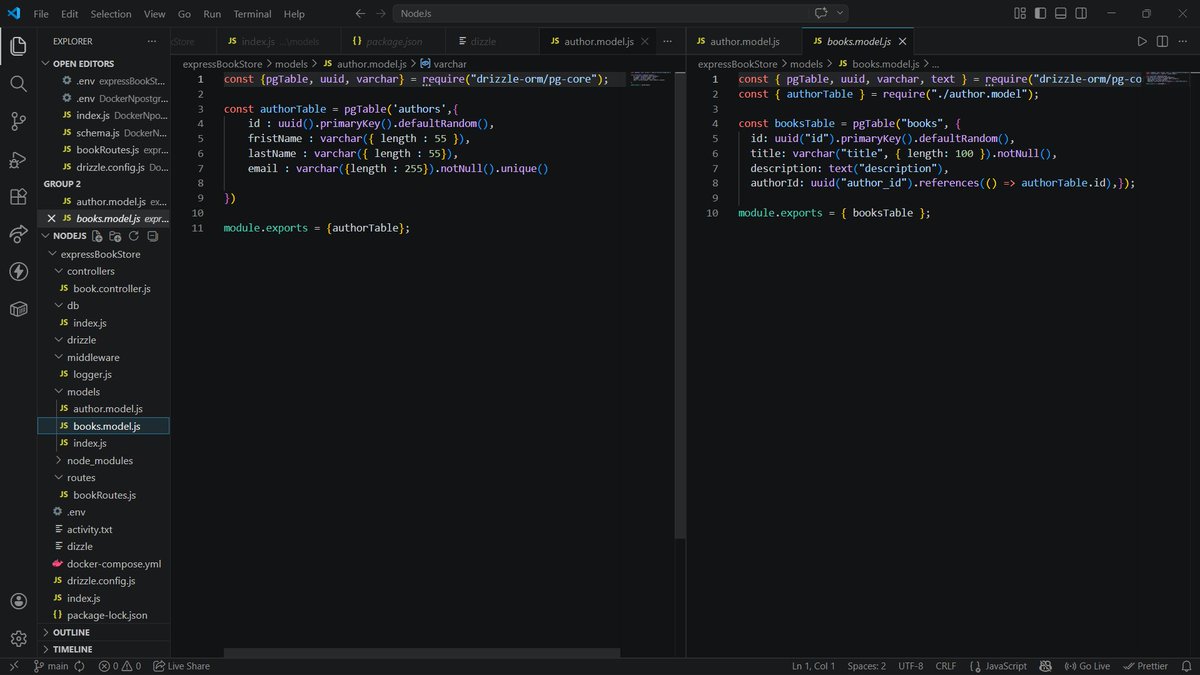
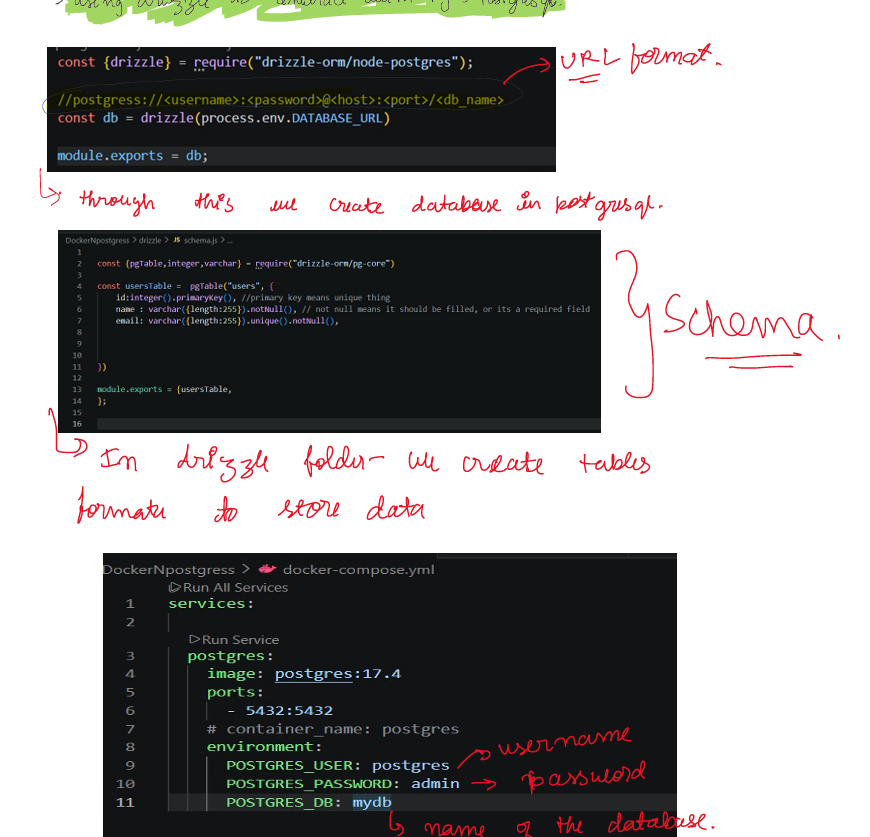
>Tested my CRUD bookstore in postman, created on drizzle studio
>Got to know about many drizzle commands i.e uuid,unique,primarykey,varchar,text, etc
#Docker #Postgresql #Nodejs #ExpressJs
2
9
134

For semantic search with pgvector, Drizzle is natural:
ts
export const embeddings = pgTable('embeddings', {
id: serial('id').primaryKey(),
embedding: vector('embedding', { dimensions: 1536 }).notNull(),
metadata: json('metadata')
})
Optimized SQL. Zero black magic.
1
13
Para búsqueda semántica con pgvector, Drizzle es natural:
ts
export const embeddings = pgTable('embeddings', {
id: serial('id').primaryKey(),
embedding: vector('embedding', { dimensions: 1536 }).notNull(),
metadata: json('metadata')
})
SQL optimizado. Zero magia negra.
1
13

Laravel 13 abraça os PHP Attributes como alternativa às class properties — e o resultado é código muito mais limpo.
Funciona em: Models, Controllers, Jobs, Commands, Listeners, Mailables, Notifications, Events, Form Requests, API Resources, Factories...
É opcional. Nada quebra. Mas depois que você experimenta, não volta mais. 👀
#Laravel #PHP #Laravel13 #CleanCode
```php
// Antes 😐
class User extends Model {
protected $table = 'users';
protected $primaryKey = 'user_id';
protected $fillable = ['name', 'email'];
protected $hidden = ['password'];
}
// Laravel 13 com Attributes 🎯
#[Table('users', key: 'user_id')]
#[Fillable('name', 'email')]
#[Hidden('password')]
class User extends Model {}
```
1
2
28

You certainly may. There isn’t one. 😊 it uses a root key, along with BKDS as described in brc.dev/42 - payments use brc.dev/29
This is not your typical HD wallet with BIP-32 style paths.
github.com/bsv-blockchain/bs…
Here you see the path from mnemonic to primaryKey, m/0’/0’ — everything thereafter is BKDS.
1
185

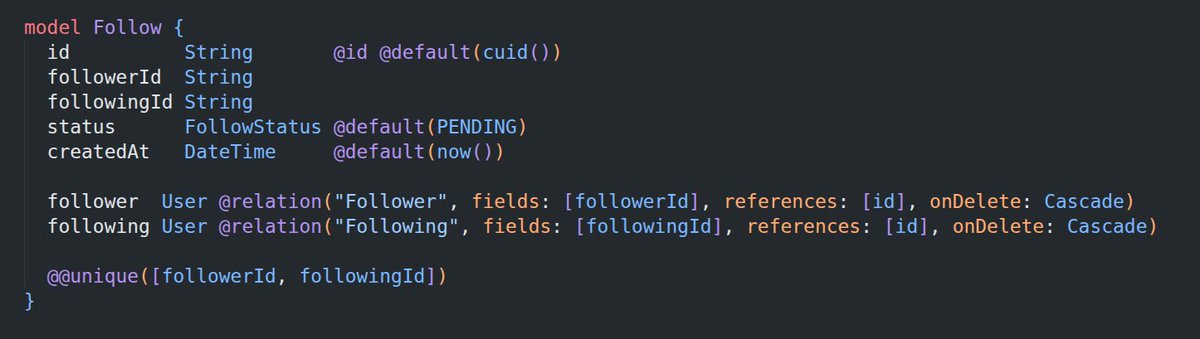
created #instagram-style profile visibility using a
Follow model with
followerId, followingId, and status (PENDING / ACCEPTED).
the (followerId, followingId) pair is primaryKey. #postgress
"strangers" will not be having any entry in model anyway.
UI implementation later.
6/n

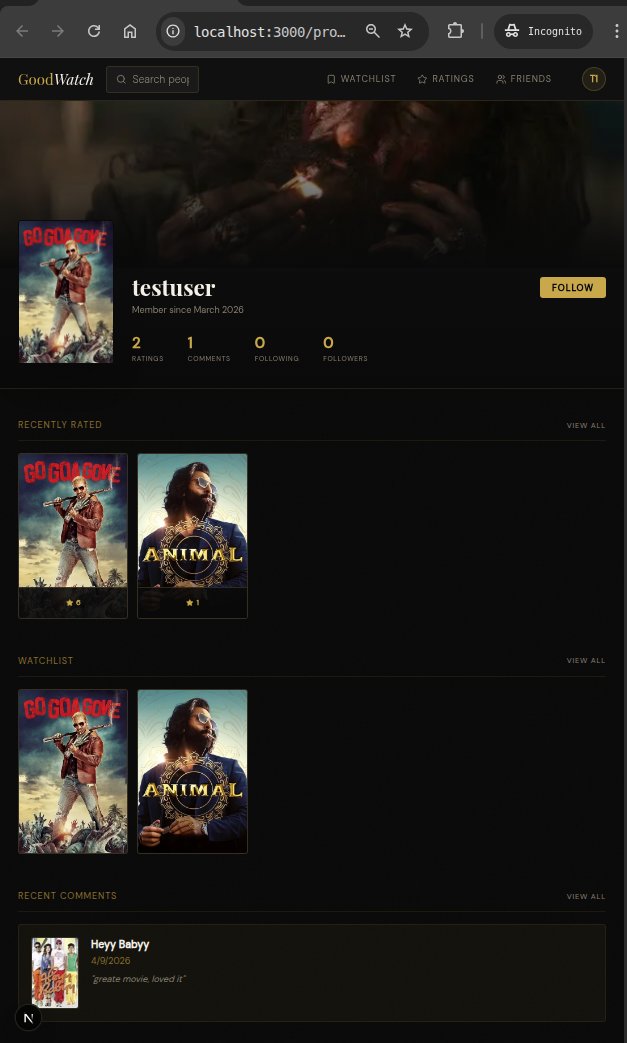
~profile page
will add follower-only visibility access next
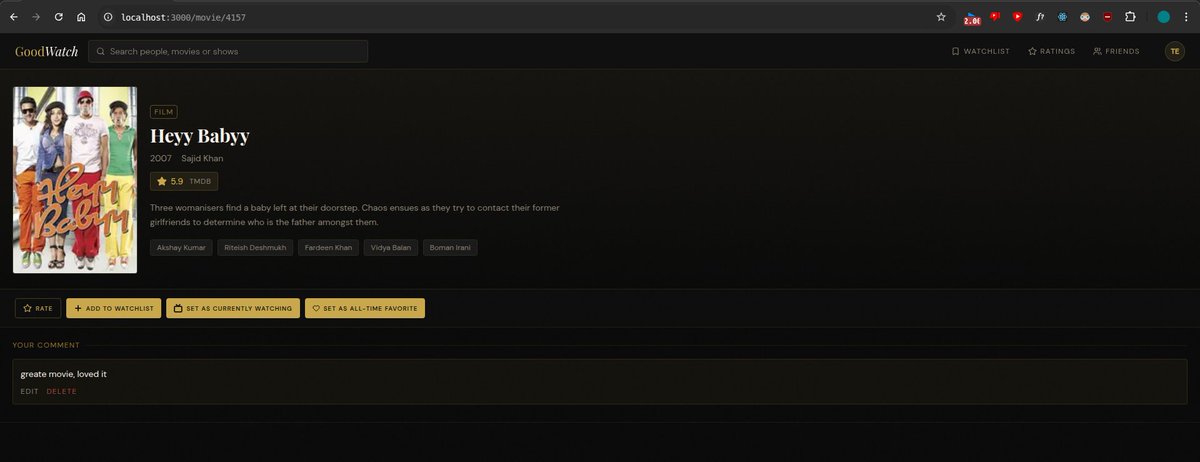
idea: profile picture will be currently watching
cover pic will be the all time favourite
~also modified the movie page to include the two buttons
-marking movie as all time fav and/or currently watching
#movie
5/n
64

Apr 6
🔑 How Relationships Are Built in Oracle SQL:
CREATE TABLE customers (
cust_id NUMBER PRIMARY KEY,
name VARCHAR2(50)
);
CREATE TABLE orders (
order_id NUMBER PRIMARY KEY,
cust_id NUMBER,
item VARCHAR2(50),
CONSTRAINT fk_cust FOREIGN KEY (cust_id)
REFERENCES customers(cust_id)
);
• PRIMARY KEY → marks the unique identifier
• FOREIGN KEY → creates the link between tables
• REFERENCES → points to which table and column the FK links to
⚠️ What Happens if You Break the Relationship?
If you try to insert an order with a cust_id that doesn't exist in CUSTOMERS → Oracle throws an error.
This is called a Referential Integrity Constraint - it protects your data from becoming inconsistent.
🏛️ Oracle-Specific Notes:
• Oracle enforces FK constraints strictly by default
• You can add ON DELETE CASCADE → if a customer is deleted, their orders delete too
• You can add ON DELETE SET NULL → if a customer is deleted, cust_id in orders becomes NULL
• Oracle's CONSTRAINT keyword lets you name your constraints for easier debugging
🧠 Quick Summary:
• Entity = a real-world thing stored as a table
• Relationship = how two tables are connected
• 1:1 → one row links to one row (rare)
• 1:M → one row links to many rows (most common)
• M:M → needs a junction table in between
• FK REFERENCES = how Oracle builds relationships
• Referential Integrity = Oracle protects data consistency automatically
#OracleSQL #EntityRelationship #ERDiagram #DatabaseDesign #PrimaryKey #ForeignKey #RDBMS #LearnSQL #Day4 #100DaysOfCode #TechTwitter
4
116
Apr 5
🛡️ RDBMS follows ACID properties - this is what makes it reliable:
↳ A - Atomicity → all operations complete, or none do
↳ C - Consistency → database always stays in a valid state
↳ I - Isolation → transactions don't interfere with each other
↳ D - Durability → once saved, data stays saved even after a crash
This is why banks use Oracle - they cannot afford to lose even one transaction.
🏛️ Oracle-Specific Facts:
↳ Oracle Database is an RDBMS - it stores data in tables
↳ We use SQL (Structured Query Language) to interact with it
↳ Oracle supports all ACID properties out of the box
↳ In Oracle, every table lives inside a schema (a user)
🧠 Quick Summary:
• RDBMS = database with tables connected via keys
• Primary Key = uniquely identifies a row
• Foreign Key = links two tables together
• Relationship = how tables talk to each other
• Oracle DB = enterprise-grade RDBMS
• ACID = the 4 properties that keep data safe and reliable
#OracleSQL #RDBMS #RelationalDatabase #SQL #PrimaryKey #ForeignKey #ACID #LearnSQL #Day3 #100DaysOfCode #TechTwitter #BuildInPublic
5
112

Apr 4
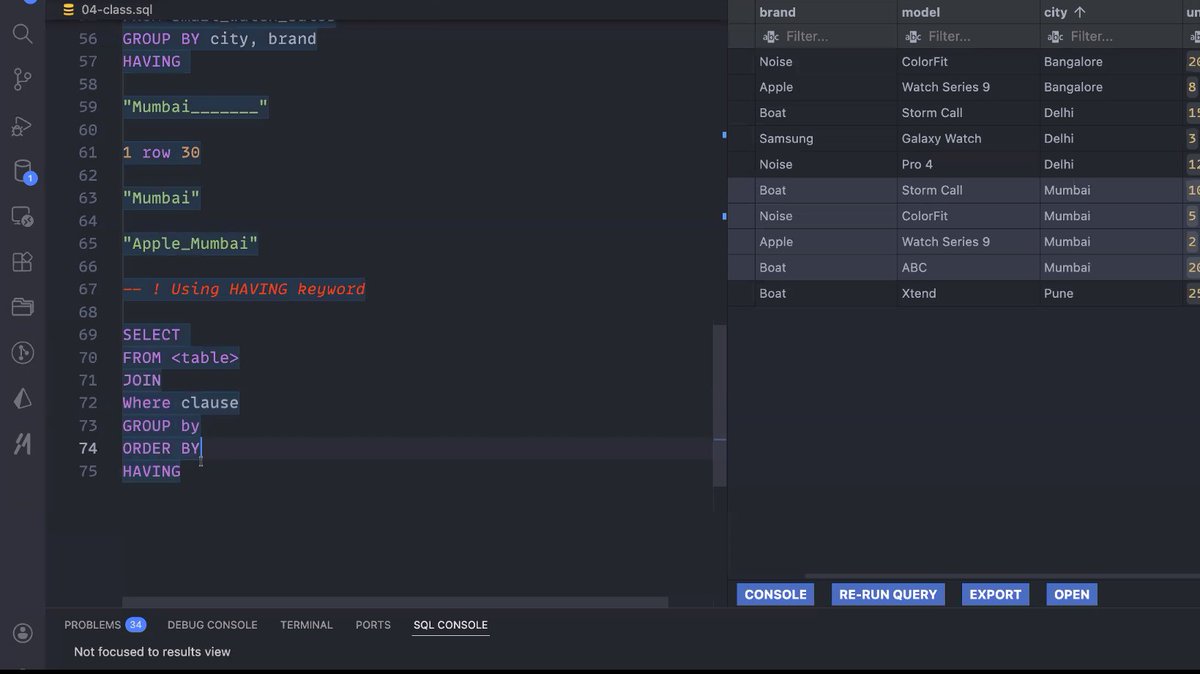
✅CLASS: 23
- Introduction to database(sql)
- SQL queries like CREATE TABLE, SELECT, ALTER TABLE, UPDATE TABLE
- datatypes like primarykey, serial, varchar, char, int, not null, unique
- Aggregation functions
Thanks @Hiteshdotcom @nirudhuuu and @piyushgarg_dev
#chaicode #chaisql
1
49
288

Apr 4
Skill Pseo
---
name: programmatic-seo-fullstack
description: Build a full-stack programmatic SEO website in the pnpm monorepo. Use when the user wants to create many SEO-optimized pages from templates (directories, product pages, category pages, guides, comparisons) with a beautiful React frontend AND server-rendered (SSR) pages that Google can actually crawl. Handles: SSR via Express, schema.org markup, sitemap.xml, robots.txt, OpenAPI spec, design subagent brief, DB seeding.
---
# Programmatic SEO — Full-Stack Skill
Build a beautiful Dutch or English website with:
- **React Vite** frontend (consumer-facing, interactive)
- **Express SSR** pages for SEO (server-rendered HTML that Google can crawl)
- **PostgreSQL** for product/content data
- **Schema.org** structured data on every SSR page
- **Sitemap.xml** auto-generated from DB
## Why Two Layers?
SPAs (React) are **invisible to Googlebot** — it sees an empty `<div id="root"></div>`. So we always build two separate layers:
1. **The SPA** — beautiful, interactive, served at `/` — for real users
2. **SSR routes** — complete HTML from Express — at `/seo/*` — for Google
The SSR pages link to the SPA and vice versa through the footer and navigation.
---
## Step-by-step Build Flow
### 1. Create artifact write OpenAPI spec
Create a `react-vite` artifact at `/`. Then design an OpenAPI spec in `lib/api-spec/openapi.yaml` that covers:
- `GET /products` — list with filters (thema, moeilijkheidsgraad, etc.)
- `GET /products/:slug` — single item detail
- `GET /categories` — list all categories
- `GET /categories/:slug/products` — items by category
- `GET /featured` — popular/highlighted items
- `GET /stats` — site-wide aggregates (item count, avg rating, etc.)
Run codegen: `pnpm --filter @workspace/api-spec run codegen`
### 2. Launch design subagent IMMEDIATELY after codegen
The design subagent builds the React frontend. Give it:
- A vivid **product identity** (who is this for, what does it feel like)
- A **vibe** in natural language (e.g. "warm and creative, like a Dutch art supply shop")
- List of pages routes with one-line purpose each
- The exact API hook names from grep: `grep "^export " lib/api-client-react/src/generated/*.ts | grep -E "function use|const use|QueryKey"`
- Tell it: all Dutch UI text, no emojis, framer-motion animations, generate product images with generate_image
### 3. Build backend while design subagent runs
#### DB Schema (Drizzle ORM)
```typescript
// lib/db/src/schema/products.ts
import { pgTable, text, serial, integer, numeric, boolean, timestamp } from "drizzle-orm/pg-core";
export const productsTable = pgTable("products", {
id: serial("id").primaryKey(),
slug: text("slug").notNull().unique(),
naam: text("naam").notNull(), // name
beschrijving: text("beschrijving").notNull(), // description
thema: text("thema").notNull(), // theme/category
moeilijkheidsgraad: text("moeilijkheidsgraad").notNull(), // difficulty
formaat: text("formaat").notNull(), // format/size
prijs: numeric("prijs", { precision: 10, scale: 2 }).notNull(), // price
populair: boolean("populair").notNull().default(false),
nieuw: boolean("nieuw").notNull().default(false),
beoordelingGemiddeld: numeric("beoordeling_gemiddeld", { precision: 3, scale: 1 }).notNull().default("4.5"),
aantalBeoordelingen: integer("aantal_beoordelingen").notNull().default(0),
inclusief: text("inclusief").array().notNull().default([]), // what's included
tips: text("tips").array().notNull().default([]),
createdAt: timestamp("created_at", { withTimezone: true }).notNull().defaultNow(),
});
```
After writing schema: `pnpm --filter @workspace/db run push`
#### API Routes
Keep routes thin — validate with Zod schemas from `@workspace/api-zod`, query with Drizzle, respond.
Implement all routes from the OpenAPI spec in `artifacts/api-server/src/routes/products.ts`, mount in `routes/index.ts`.
Seed 10-15 rows of realistic content. For multilingual sites seed Dutch text.
#### SSR SEO Routes
Create `artifacts/api-server/src/routes/seo.ts`. Mount it in `app.ts` at root `/` (NOT under `/api`):
```typescript
// app.ts
app.use("/api", router);
app.use("/", seoRouter); // SSR pages at root
```
Update `artifact.toml` paths for the API server to include SEO paths:
```toml
paths = ["/api", "/seo", "/sitemap.xml", "/robots.txt"]
```
### 4. SSR Page Architecture
#### Shared HTML shell (`src/lib/ssrShared.ts`)
Create this FIRST before any individual pages:
```typescript
export function ssrHtmlShell({ title, description, canonical, schemaJson, body }): string {
return `<!DOCTYPE html>
<html lang="nl">
<head>
<meta charset="UTF-8" />
<title>${title}</title>
<meta name="description" content="${description}" />
<meta name="robots" content="index, follow" />
<link rel="canonical" href="${canonical}" />
<meta property="og:title" content="${title}" />
<meta property="og:description" content="${description}" />
<meta property="og:type" content="website" />
<meta property="og:locale" content="nl_NL" />
${schemaJson ? `<script type="application/ld json">${JSON.stringify(schemaJson)}</script>` : ""}
<style>${sharedCss()}</style>
</head>
<body>
${header()}
${body}
${footer()}
</body>
</html>`;
}
```
The `header()` and `footer()` functions must **visually match the React app's header/footer**. Study the React component first, replicate it in plain HTML CSS. Mismatched headers destroy trust when users navigate between SPA and SSR pages.
#### Cache headers by content type
```typescript
// Static content (guides, glossary)
res.setHeader("Cache-Control", "public, max-age=86400");
// Category/product pages (change occasionally)
res.setHeader("Cache-Control", "public, max-age=3600");
// Live data (prices, stock)
res.setHeader("Cache-Control", "no-cache");
```
#### Product detail SSR page
URL: `/seo/schilderen-op-nummer/:slug` (or `/seo/product/:slug` in English)
Include:
- Breadcrumb nav (always INSIDE `.main`, not between hero and main — avoids negative-margin CSS bugs)
- H1 with target keyword: `"Schilderen op Nummer: ${product.naam}"`
- Product details, price, rating, what's included
- Schildertips / how-to section (unique per product)
- FAQ section with real answers (generates FAQPage schema)
- Related products from same category
- Schema: `Product` `AggregateRating` `Offer`
```typescript
const schema = {
"@context": "schema.org",
"@type": "Product",
name: `Schilderen op Nummer: ${product.naam}`,
offers: { "@type": "Offer", price: prijs, priceCurrency: "EUR", availability: "InStock" },
aggregateRating: { "@type": "AggregateRating", ratingValue: rating, reviewCount: count },
};
```
#### Category SSR page
URL: `/seo/categorie/:slug`
Include:
- Hero with category name description
- Product grid (links to individual SSR product pages)
- Editorial paragraph about the category
- Schema: `ItemList` with `itemListElement[]`
```typescript
const schema = {
"@context": "schema.org",
"@type": "ItemList",
name: `Schilderen op Nummer: ${category.naam}`,
itemListElement: products.map((p, i) => ({
"@type": "ListItem",
position: i 1,
name: p.naam,
url: `${BASE_URL}/seo/schilderen-op-nummer/${p.slug}`,
})),
};
```
#### How-to / guide SSR page
URL: `/seo/beginners-gids`
Include:
- Step-by-step guide written in Dutch
- Sticky sidebar with summary
- Schema: `HowTo` with `HowToStep[]`
```typescript
const schema = {
"@context": "schema.org",
"@type": "HowTo",
name: "Hoe begin je met schilderen op nummer?",
step: [
{ "@type": "HowToStep", name: "Kies je pakket", text: "..." },
// ...
],
};
```
#### Sitemap.xml robots.txt
```typescript
router.get("/sitemap.xml", async (_req, res) => {
const products = await db.select({ slug: productsTable.slug }).from(productsTable);
const categories = await db.select({ slug: categoriesTable.slug }).from(categoriesTable);
const urls = [
`<url><loc>${BASE}</loc><priority>1.0</priority></url>`,
...categories.map(c => `<url><loc>${BASE}/seo/categorie/${c.slug}</loc><priority>0.8</priority></url>`),
...products.map(p => `<url><loc>${BASE}/seo/schilderen-op-nummer/${p.slug}</loc><priority>0.7</priority></url>`),
];
res.setHeader("Content-Type", "application/xml; charset=utf-8");
res.send(`<?xml version="1.0" encoding="UTF-8"?><urlset xmlns="sitemaps.org/schemas/sitemap…">${urls.join("")}</urlset>`);
});
router.get("/robots.txt", (_req, res) => {
res.setHeader("Content-Type", "text/plain");
res.send(`User-agent: *\nAllow: /\nDisallow: /api/\nSitemap: ${BASE}/sitemap.xml`);
});
```
---
## Schema Markup by Page Type
| Page | Schema type | Key fields |
|---|---|---|
| Product detail | `Product` `AggregateRating` `Offer` | name, price, currency, ratingValue, reviewCount |
| Category listing | `ItemList` | itemListElement with position url |
| How-to guide | `HowTo` | step[] with HowToStep |
| FAQ section | `FAQPage` | mainEntity[] with Question acceptedAnswer |
| Glossary term | `DefinedTerm` | name, description, inDefinedTermSet |
---
## Internal Linking Architecture (Hub & Spoke)
- **Hub pages**: `/seo/categorieen`, `/seo/beginners-gids` — linked from footer
- **Spoke pages**: `/seo/categorie/:slug`, `/seo/schilderen-op-nummer/:slug`
- Every spoke links back to its hub
- Related spoke pages link to each other (same category)
- SSR footer links to hub pages so Google discovers them
- React SPA footer also links to SSR hubs so they're not orphaned
---
## Design Subagent Brief Template
Use this template for the async design subagent task:
```
You are building a beautiful Dutch [DOMAIN] website for [TARGET AUDIENCE].
**Product identity:** [1 vivid sentence about who this is for and what it feels like]
**Vibe:** [Natural language description — e.g. "warm and cozy like a Dutch art supply shop in the Jordaan"]
**Pages:**
- `/` — Homepage: hero, featured items, categories, stats
- `/producten` — Catalog with filters
- `/producten/:slug` — Detail page
- `/categorieen` — All categories
- `/categorieen/:slug` — Category with items
- `/[guide-slug]` — Static guide page
- `/over-ons` — About page
**Data types:** [List all fields in Dutch/English]
**Available hooks (import from @workspace/api-client-react):**
[Paste grep output here]
**Rules:**
- All UI text in Dutch
- No emojis
- Loading skeletons when isLoading
- Framer-motion for staggered card entrances and page transitions
- Generate product images with generate_image (4-6 unique images)
- Use ALL provided hooks
**Color:** Make a deliberate warm palette derived from the domain (e.g. burnt sienna, warm cream, deep teal)
You are capable of extraordinary creative work. Don't hold back.
```
---
## Checklist Before Presenting
- [ ] API server starts and all `/api/*` routes return 200
- [ ] `curl localhost:80/seo/schilderen-op-nummer/[slug]` returns complete HTML with `<title>` and schema.org JSON-LD
- [ ] `curl localhost:80/sitemap.xml` returns valid XML with all product and category URLs
- [ ] `curl localhost:80/robots.txt` returns correct content
- [ ] React frontend loads at `/` with real data from API
- [ ] artifact.toml for API server includes `/seo`, `/sitemap.xml`, `/robots.txt` in paths array
---
## Common Pitfalls
1. **Breadcrumbs between hero and main** — always put breadcrumb INSIDE `.main` container, not between sections. Negative `margin-top` on `.main` will cover a breadcrumb placed between them.
2. **Logo height** — if the logo has whitespace, use `overflow:hidden` precise `height`/`margin-top` to clip it, matching how React renders it.
3. **SSR mounted at `/api`** — SSR routes must be mounted at root `/`, not under `/api`. Only JSON API routes go under `/api`.
4. **artifact.toml paths** — the proxy won't forward `/seo`, `/sitemap.xml`, `/robots.txt` to the API server unless they're listed in `paths`.
5. **array columns** — use `.array()` method: `text("tips").array()`, NOT `array(text("tips"))`.
6. **Don't machine-translate** — for multilingual pages, only translate when you have genuine translations. Machine-translated boilerplate = thin content penalty.
---
## BASE_URL Resolution
```typescript
const BASE_URL = process.env.REPLIT_DOMAINS
? `https://${process.env.REPLIT_DOMAINS.split(",")[0]}`
: "yourdomain.nl";
```
Use this in every `canonical` URL, sitemap entry, and schema.org `url` field.
1
204

ThenByは親(以前の OrderBy/ThenBy)を保持しつつ、sorterを作成 (EnumerableSorter)して、親がいたらその親のsorterの前に連結することでOrderBy = PrimaryKey、ThenBy = SecondaryKey担保してるのも賢い。単純だけどいいね。
1
86

Mar 23
とはいえUUIDの衝突くらいでそれがPrimaryKeyだよって程度なら大抵は適当に再採番してリトライするだけで解決なので対応コストもたいしてかからないんだけどな。。。
66

Mar 12
Something I misunderstood about ORMs while working with Drizzle.
You can define:
id: text().primaryKey().$defaultFn(() => nanoid())
But this default only runs in the application.
In psql, Postgres doesn't know nanoid(), so you need to add id to data manually
16

made it, here is it
---
name: whop-app
description: >
How to build, deploy, and publish Whop apps using Next.js (App Router or Pages Router),
with database options including Drizzle ORM Supabase or Convex, deployed on Vercel.
Use this skill whenever the user mentions Whop, Whop apps, Whop developer API, Whop
payments, in-app purchases, Whop webhooks, Whop websockets, Whop App Store, or wants
to build anything on the Whop platform. Also trigger for questions about charging users,
paying out users, verifying Whop access levels, experience IDs, or creator vs user
permissions. Always consult this skill before writing any Whop-related code — even for
small questions or single functions.
---
# Whop App Development Skill
## Overview
Whop is a creator platform with a developer API and App Store. Apps are Next.js projects
embedded inside Whop communities (called "experiences"). Each app installation gets a
unique `experienceId`. The platform provides:
- **Auth**: Token-based user verification per experience
- **Payments**: Charge users and pay out users/companies via the Whop API
- **WebSockets**: Real-time messaging scoped to an experience
- **Webhooks**: Server-to-server events (e.g. payment succeeded)
- **App Store**: Publish apps for creators to install on their communities
---
## 1. Project Setup
### Bootstrap
```bash
pnpx create-whop-app@latest my-app
cd my-app
pnpm dev # runs on localhost:3000
```
### Environment Variables
Copy from the [Whop Developer Dashboard](whop.com/dashboard/developer) → your app → API Keys.
Create `.env.development.local`:
```env
WHOP_API_KEY=...
WHOP_APP_ID=...
NEXT_PUBLIC_WHOP_APP_ID=...
```
### Linking to Vercel (for env sync)
```bash
vercel link # link to existing Vercel project
vercel env pull .env.development.local # pull env vars locally
```
---
## 2. App Structure
### App Router (recommended)
```
app/
experiences/
[experienceId]/
page.tsx ← main app view (server component)
layout.tsx ← wraps with WhopWebsocketProvider
create/
page.tsx ← sub-pages scoped to experience
```
The `experienceId` comes from `params` in any route under `[experienceId]`.
### Pages Router
```
pages/
experiences/
[experienceId]/
index.tsx ← main app view
create.tsx ← sub-pages
api/
webhooks.ts ← webhook handler
```
In Pages Router, get `experienceId` from `useRouter().query.experienceId` on the client,
or from `context.params.experienceId` in `getServerSideProps`.
Auth in Pages Router uses API routes instead of server actions — call `verifyUserToken`
inside `getServerSideProps` or an API route handler, passing `req.headers`.
---
## 3. Auth & User Verification
### Pattern: `verifyUser` helper
Create `lib/authentication.ts`:
```typescript
import { cache } from "react";
import { headers } from "next/headers";
import { verifyUserToken } from "@whop-apps/sdk";
import { WhopAPI } from "@whop-apps/sdk";
export const verifyUser = cache(
async ({
experienceId,
requireAdmin,
}: {
experienceId: string;
requireAdmin?: boolean;
}) => {
const hdrs = await headers();
const { userId } = await verifyUserToken({ headers: hdrs });
const { accessLevel } = await WhopAPI.me().GET("/me/access_passes/{experienceId}", {
params: { path: { experienceId } },
});
if (requireAdmin && accessLevel !== "admin") {
throw new Error("Admin required");
}
if (!requireAdmin && accessLevel === "no_access") {
throw new Error("No access");
}
return { userId, accessLevel };
}
);
```
- Use `cache()` so it's only evaluated once per request even if called multiple times
- `requireAdmin: true` → only admins pass; good for creator-only actions
- `requireAdmin` omitted → any user with access passes
### In server actions
```typescript
"use server";
export async function myAction(formData: FormData) {
const { userId, accessLevel } = await verifyUser({ experienceId, requireAdmin: true });
// proceed...
}
```
---
## 4. Database
Choose one approach based on your needs:
- **Drizzle Supabase** → SQL, familiar ORM, good for relational data and complex queries
- **Convex** → real-time reactive queries, no schema migrations, great for live-updating UIs
---
### Option A: Drizzle ORM Supabase
#### Install
```bash
pnpm add drizzle-orm postgres @paralleldrive/cuid2
pnpm add -D drizzle-kit
```
#### `drizzle.config.ts`
```typescript
import { defineConfig } from "drizzle-kit";
export default defineConfig({
schema: "./lib/db/schema.ts",
out: "./drizzle",
driver: "pg",
dbCredentials: { connectionString: process.env.POSTGRES_URL! },
});
```
#### Schema pattern (`lib/db/schema.ts`)
```typescript
import { pgTable, text, integer, timestamp, uniqueIndex } from "drizzle-orm/pg-core";
import { createId } from "@paralleldrive/cuid2";
const timestamps = {
createdAt: timestamp("created_at").defaultNow().notNull(),
updatedAt: timestamp("updated_at").defaultNow().notNull(),
};
export const items = pgTable("items", {
id: text("id").primaryKey().$defaultFn(() => createId()),
experienceId: text("experience_id").notNull(), // always scope to experience
createdByUserId: text("created_by_user_id").notNull(),
// ... your fields
...timestamps,
});
```
#### DB client (`lib/db/index.ts`)
```typescript
import { drizzle } from "drizzle-orm/postgres-js";
import postgres from "postgres";
import * as schema from "./schema";
const client = postgres(process.env.POSTGRES_URL!);
export const db = drizzle(client, { schema });
```
#### Setup Supabase via Vercel
1. Vercel → Settings → Integrations → Marketplace → Supabase
2. Create project, connect to your Vercel project (dev preview prod)
3. Run `vercel env pull` to get `POSTGRES_URL` locally
4. Add `"db:push": "drizzle-kit push"` to `package.json`
5. Run `pnpm db:push` to apply schema to DB
---
### Option B: Convex
Convex is a real-time backend — queries automatically re-run on the client when data changes, which pairs naturally with Whop's websocket model.
#### Install & init
```bash
pnpm add convex
pnpx convex dev # creates convex/ folder, links to Convex dashboard
```
#### Schema (`convex/schema.ts`)
```typescript
import { defineSchema, defineTable } from "convex/server";
import { v } from "convex/values";
export default defineSchema({
items: defineTable({
experienceId: v.string(), // always scope to experience
createdByUserId: v.string(),
text: v.string(),
completedAt: v.optional(v.number()),
}).index("by_experience", ["experienceId"]),
});
```
#### Queries & Mutations (`convex/items.ts`)
```typescript
import { query, mutation } from "./_generated/server";
import { v } from "convex/values";
export const listByExperience = query({
args: { experienceId: v.string() },
handler: async (ctx, { experienceId }) => {
return ctx.db
.query("items")
.withIndex("by_experience", (q) => q.eq("experienceId", experienceId))
.collect();
},
});
export const create = mutation({
args: { experienceId: v.string(), text: v.string(), userId: v.string() },
handler: async (ctx, args) => {
return ctx.db.insert("items", { ...args, createdByUserId: args.userId });
},
});
```
#### Using in Next.js App Router
```typescript
// app/layout.tsx — wrap with ConvexProvider
"use client";
import { ConvexProvider, ConvexReactClient } from "convex/react";
const convex = new ConvexReactClient(process.env.NEXT_PUBLIC_CONVEX_URL!);
export default function RootLayout({ children }) {
return <ConvexProvider client={convex}>{children}</ConvexProvider>;
}
// In a client component:
import { useQuery, useMutation } from "convex/react";
import { api } from "@/convex/_generated/api";
const items = useQuery(api.items.listByExperience, { experienceId });
// items auto-updates in real-time — no websocket wiring needed
```
#### Add Convex URL to env
```env
NEXT_PUBLIC_CONVEX_URL=your-project.convex.cloud
```
#### Convex Whop Webhooks
In your Convex HTTP actions, you can receive webhook events:
```typescript
// convex/http.ts
import { httpRouter } from "convex/server";
import { httpAction } from "./_generated/server";
const http = httpRouter();
http.route({
path: "/webhooks/whop",
method: "POST",
handler: httpAction(async (ctx, req) => {
const body = await req.text();
// validate with Whop SDK, then call ctx.runMutation(...)
return new Response("OK", { status: 200 });
}),
});
export default http;
```
---
## 5. In-App Purchases (Charging Users)
### Flow overview
1. **Server**: Call `WhopAPI.app().POST("/app/charge_user")` → returns `inAppPurchase` object
2. **Client**: Pass `inAppPurchase` to `inAppPurchase()` from `@whop-apps/sdk` → opens Whop checkout modal
3. **Webhook**: Handle `payment.succeeded` server-to-server to record the payment
### Server action: create charge
```typescript
"use server";
import { WhopAPI } from "@whop-apps/sdk";
export async function submitVote({ answerId, gameId, experienceId }: {...}) {
const { userId } = await verifyUser({ experienceId });
const charge = await WhopAPI.app().POST("/app/charge_user", {
body: {
amount: game.answerCost,
currency: "usd",
userId,
metadata: { answerId, gameId }, // passed to webhook
},
});
return charge; // return to client
}
```
### Client: open checkout modal
```typescript
"use client";
import { inAppPurchase } from "@whop-apps/sdk/client";
const chargeObj = await submitVote({ answerId, gameId, experienceId });
await inAppPurchase(chargeObj); // opens modal, resolves on success
```
### Paying out users
```typescript
await WhopAPI.app().POST("/app/pay_user", {
body: {
amount: payoutAmount,
currency: "usd",
userId: winnerId,
ledgerAccountId: companyLedgerAccountId,
transferFee: ledgerAccount.transferFee,
idempotencyKey: `${userId}-${gameId}`, // prevents double-pay
note: "Game winnings",
},
});
```
### Paying out a company
```typescript
// Get companyId from experienceId
const exp = await WhopAPI.app().GET("/app/experiences/{experienceId}", {
params: { path: { experienceId } },
});
const companyId = exp.company.id;
await WhopAPI.app().POST("/app/pay_company", {
body: {
amount: creatorCut,
currency: "usd",
companyId,
idempotencyKey: `company-${gameId}`,
},
});
```
**Always use `idempotencyKey`** — prevents accidental double-payments if the action runs twice.
---
## 6. Webhooks
### Setup in dashboard
1. Developer Dashboard → your app → Webhooks
2. Add endpoint: `your-app.vercel.app/api/webh…`
3. Select events: `payment.succeeded` (and others as needed)
4. API version: **v5**
5. Copy the webhook secret → add to Vercel env as `WHOP_WEBHOOK_SECRET`
### Handler
**App Router** (`app/api/webhooks/route.ts`):
```typescript
import { validateWebhook } from "@whop-apps/sdk";
import { waitUntil } from "@vercel/functions";
export async function POST(req: Request) {
const body = await req.text();
const event = await validateWebhook(body, req.headers, process.env.WHOP_WEBHOOK_SECRET!);
// throws if invalid — only whop.com can pass this check
if (event.type === "payment.succeeded") {
const { finalAmount, amountAfterFees, currency, userId, metadata } = event.data;
const { answerId, gameId } = metadata as { answerId: string; gameId: string };
if (!answerId || !gameId || !userId || !amountAfterFees || currency !== "usd") {
return new Response("Invalid", { status: 400 });
}
waitUntil(async () => {
await db.insert(votes).values({ gameId, answerId, userId, amount: finalAmount, amountAfterFees });
await sendUpdate(gameId, experienceId);
});
}
return new Response("OK", { status: 200 });
}
```
**Pages Router** (`pages/api/webhooks.ts`):
```typescript
import type { NextApiRequest, NextApiResponse } from "next";
import { validateWebhook } from "@whop-apps/sdk";
export default async function handler(req: NextApiRequest, res: NextApiResponse) {
if (req.method !== "POST") return res.status(405).end();
const body = await getRawBody(req); // use 'raw-body' package
const event = await validateWebhook(body.toString(), req.headers, process.env.WHOP_WEBHOOK_SECRET!);
if (event.type === "payment.succeeded") {
// handle same as above, but no waitUntil — just await inline
await handlePayment(event.data);
}
res.status(200).end();
}
export const config = { api: { bodyParser: false } }; // required for raw body
```
- `validateWebhook` ensures only Whop can send events
- `waitUntil` runs async work after the 200 response → prevents webhook retries
- Filter events by checking `metadata` fields from your charge call
---
## 7. WebSockets (Real-time)
> **Note**: If using Convex, you get real-time reactivity for free via `useQuery` — you may not need Whop WebSockets for data sync. Use Whop WebSockets when you need to push state to all connected viewers beyond what your DB query covers (e.g. game phase transitions, push notifications).
### Layout: join the experience channel (App Router)
```typescript
// app/experiences/[experienceId]/layout.tsx
import { WhopWebsocketProvider } from "@whop-apps/sdk/client";
export default function Layout({ children, params }) {
return (
<WhopWebsocketProvider experienceId={params.experienceId}>
{children}
</WhopWebsocketProvider>
);
}
```
For **Pages Router**, wrap your `_app.tsx` or individual page components with `WhopWebsocketProvider`, passing `experienceId` from router query.
### Server: send a message to all viewers
```typescript
import { WhopAPI } from "@whop-apps/sdk";
async function sendUpdate(gameId: string, experienceId: string) {
const game = await loadGame(gameId);
if (!game) return;
await WhopAPI.app().POST("/app/experiences/{experienceId}/send_websocket_message", {
params: { path: { experienceId } },
body: { message: JSON.stringify(game) },
});
}
```
Server-sent messages are **trusted** (sent with your API key).
### Client: receive messages
```typescript
"use client";
import { useOnWebsocketMessage } from "@whop-apps/sdk/client";
useOnWebsocketMessage((message) => {
if (!message.isTrusted) return; // ignore client-broadcast messages
const updatedGame = JSON.parse(message.data) as GameWithVotes;
setGame((prev) => ({ ...updatedGame, userVoteAnswerId: prev.userVoteAnswerId }));
// merge in user-specific state that server broadcast can't include
});
```
### Client: broadcast (un-trusted, fast)
```typescript
import { useBroadcastWebsocketMessage } from "@whop-apps/sdk/client";
const broadcast = useBroadcastWebsocketMessage();
broadcast({ type: "cursor", x: 100, y: 200 }); // visible to all, not verified
```
Use trusted (server) messages for game state. Use broadcast for ephemeral UI like cursors.
---
## 8. Permissions
Set up in Developer Dashboard → your app → Permissions tab.
- Request only permissions your app needs (each endpoint documents its required permissions)
- Mark permissions as **required** or **optional** (creators can toggle optional ones off)
- After adding permissions, visit `whop.com/apps/app_xxx/instal…` to re-approve on your own company
- You can request up to 100 permissions
---
## 9. Deploying to Vercel
```bash
# 1. Push code to GitHub
git add . && git commit -m "init" && git push
# 2. Create Vercel project, import GitHub repo
# 3. Add environment variables in Vercel dashboard (same as .env.development.local)
# 4. Deploy
# 5. Set production domain in Whop dashboard
# Developer Dashboard → your app → Base URL → paste Vercel URL (https://...)
```
After setting the base URL, switch from "localhost" to "production" in the Whop community settings icon.
---
## 10. Publishing to the App Store
1. Developer Dashboard → your app → App Details
2. Fill in: **name**, **description**, **icon**, **category**
3. Enable creator DM automation (optional — sends DM when creator installs)
4. Hit **Publish** → app enters review → appears on App Store
---
## Key SDK Imports Reference
```typescript
// Server
import { WhopAPI, validateWebhook, verifyUserToken } from "@whop-apps/sdk";
// Client
import { inAppPurchase, useOnWebsocketMessage, useBroadcastWebsocketMessage, WhopWebsocketProvider } from "@whop-apps/sdk/client";
// UI components (Frosted UI, built on Radix)
import { Button, Text } from "@whop-apps/react/components";
// Full component docs: storybook.whop.com
```
---
## Common Patterns & Gotchas
- **Admin vs User separation**: Admins progress state; users pay/vote. Enforce with `requireAdmin` in `verifyUser`.
- **Idempotency keys**: Always set on `pay_user` and `pay_company` to prevent double payments.
- **Merge websocket state**: Server broadcasts can't include per-user data. Merge on client: `{ ...serverUpdate, userVoteAnswerId: prev.userVoteAnswerId }`.
- **`waitUntil` in webhooks** (App Router): Run DB writes after returning 200 to avoid webhook retries. Pages Router: just `await` inline.
- **Pages Router webhook body**: Must disable `bodyParser` and use `raw-body` to read the raw request body for `validateWebhook`.
- **Experience ID scoping**: Always scope DB queries to `experienceId` — same app can be installed multiple times in different communities.
- **`cache()` on verifyUser**: Prevents duplicate auth calls within the same request (App Router only).
- **Minimum payout**: $1 USD minimum. Check `amount >= 100` (cents) before calling `pay_user`.
- **Fees**: Use `amountAfterFees` from the webhook (not `finalAmount`) for accurate accounting and payouts.
- **Convex Whop WS**: With Convex, prefer `useQuery` for data sync; use Whop WebSockets only for non-data events like push notifications or game phase transitions.
- **Convex HTTP actions**: Deploy to `your-project.convex.site` — use this as your webhook endpoint URL in the Whop dashboard.
98


Feb 17
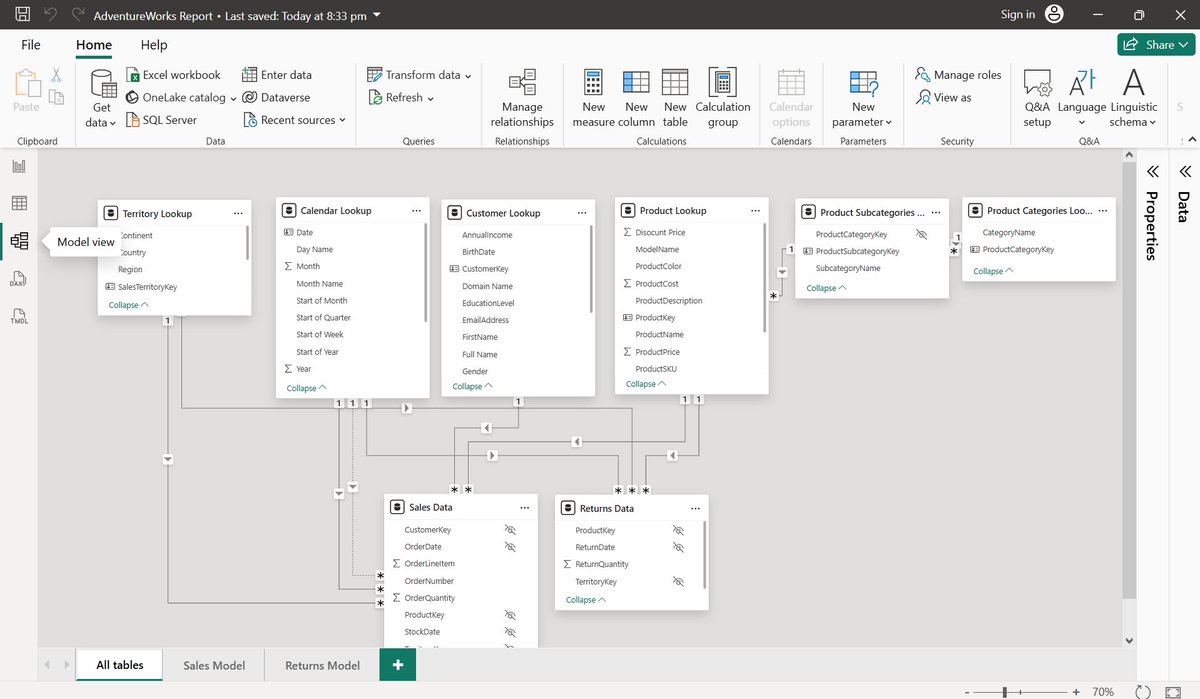
Winded up with the Data Model Section:
Data Model: -
1) Connecting tables via relationships, based on a common field (PrimaryKey).
2) The data model will be more efficient for the STAR Schema than the Snowflake Schema.
3) All relationships in the data model should follow a One-To-Many cardinality.
4)We can connect the two fact tables using fields from any shared dimension table.
5) Filter Context & Flow should be passed to one way(downstream) following the arrow's direction.
6)Avoid Bi-Directional filters, which cause ambiguity.
Feb 16

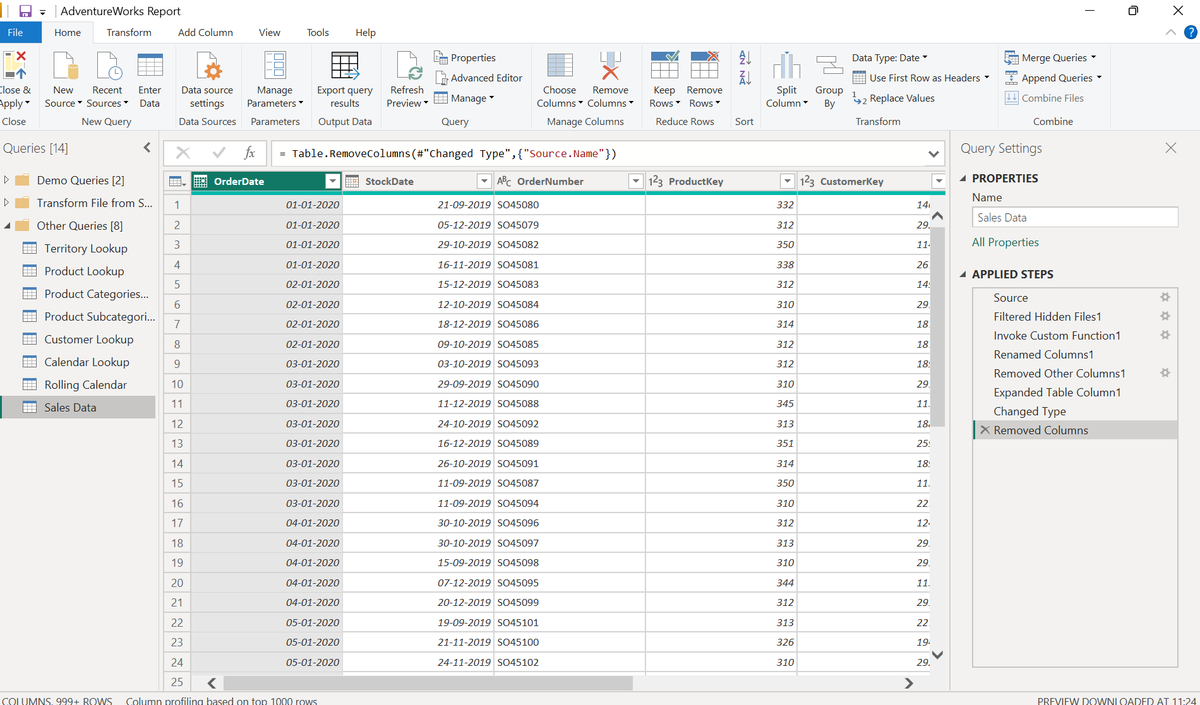
Winded up with the Loading & Transforming the data Section (Power Query).
Key Points:
1) Import & Direct Query: Import is more efficient than Direct Query unless huge amounts of data are present.
2) Loading all the files from the folder is more efficient than loading multiple files multiple times.
3) Data Profiling: Column Quality, Column Profile, Column Distribution, explore the quality of the data.
4) Creating your own Calendar table is a very wise option.
5) Transform:- Modifying or Overriding the column that you're selected.
6) Add Column: Creating a brand new column within a table.
7)Always try to avoid merging and appending queries.
8) Get Organized before connecting & loading the data.
9)Disable report refresh for any static data sources.
Feel free to add more points and exchange the knowledge.
1
134