
May 8
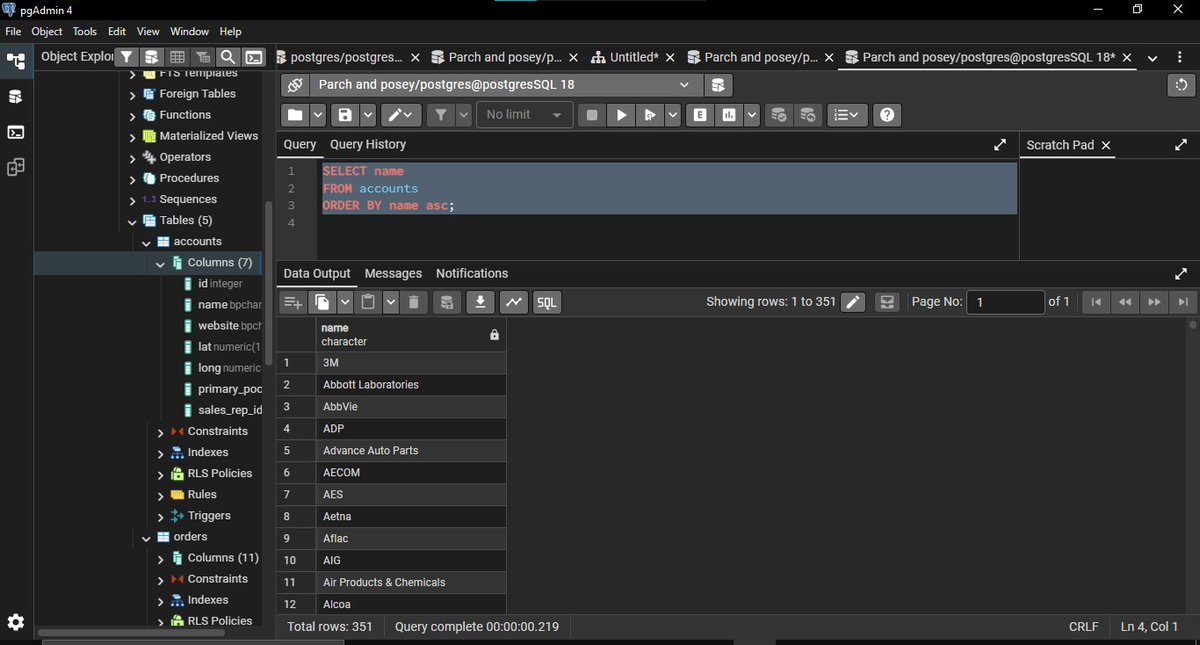
10th day of the #HTTDatachallange knowing the basics is one thing putting it to actual use and answering those questions is another, i retrieved the "name" column from the "Account" table to give a detailed result.
#SQLBasics
#SQLSorting
2
4
45
May 7
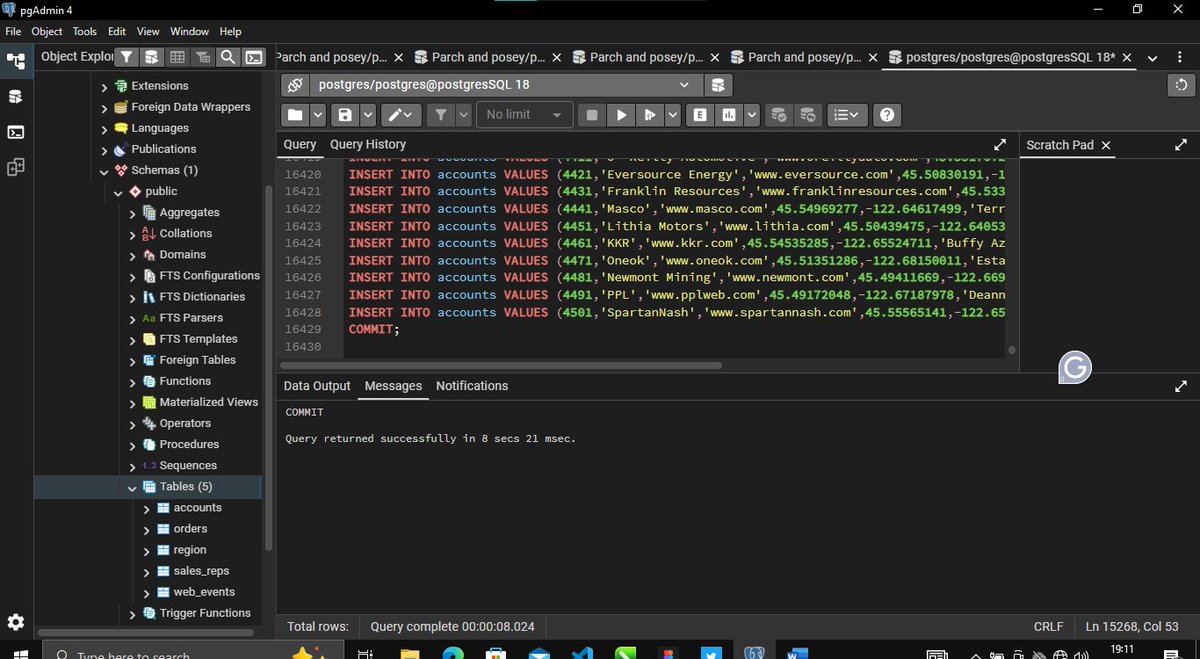
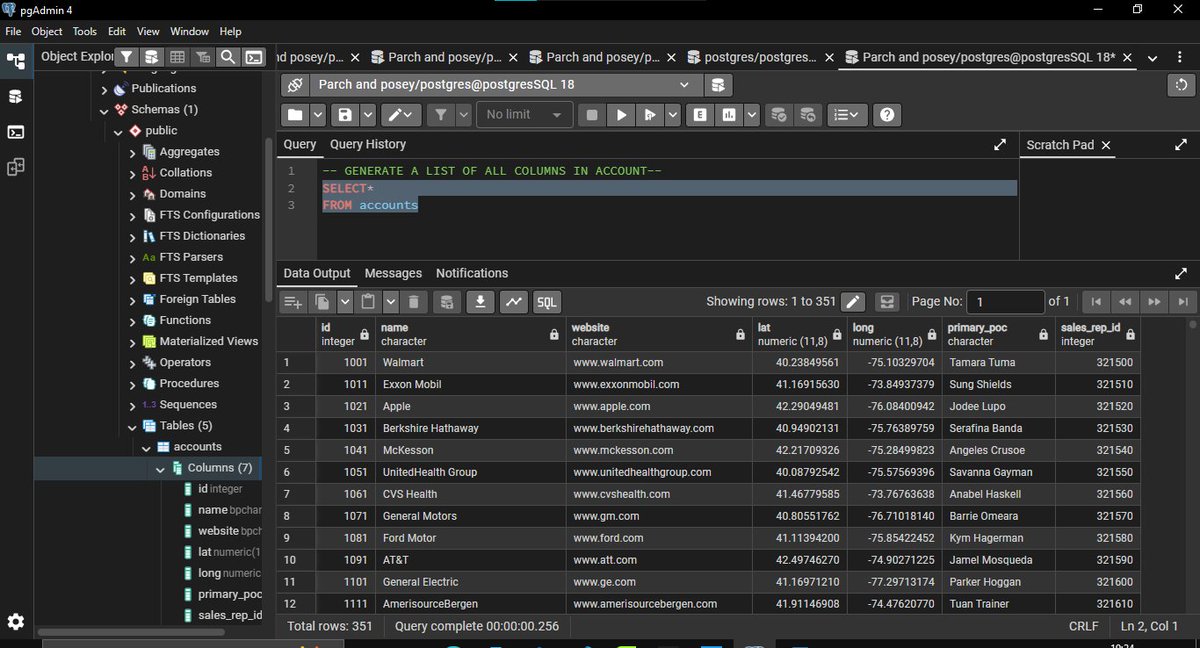
9th day of the #HTTDatachallange started off with SQL basics, i ran my first Query on a real data base to create my Tables and Retrieve all Colums in (Account) Table. SQL helps turn the raw dataset into meaningful insights and also answer the business questions.
#SQLBasics
4
6
57

May 7
I’m early today😂🤭
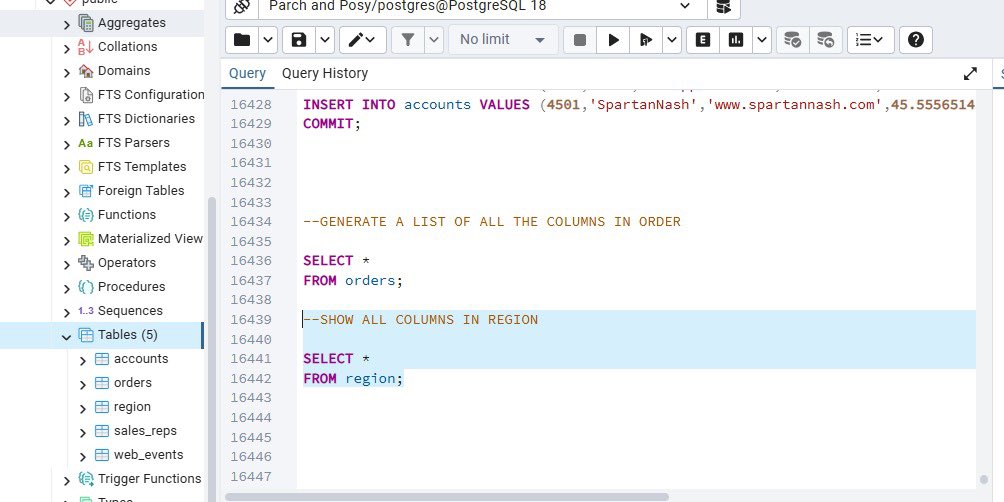
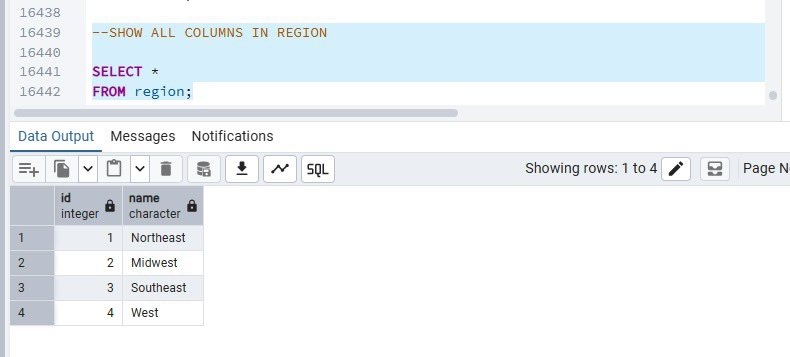
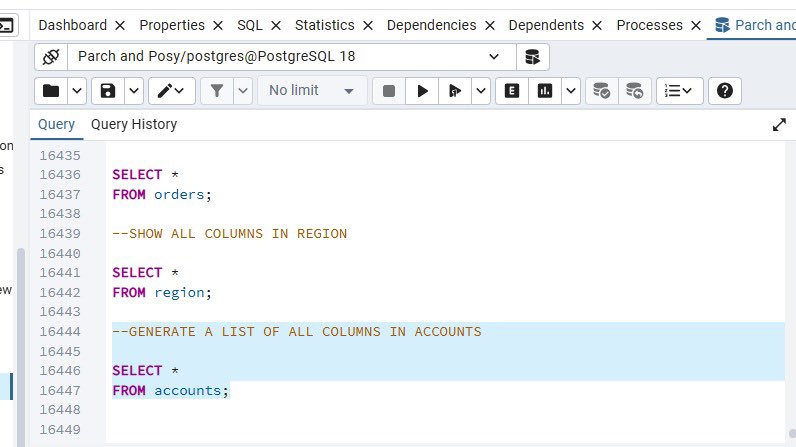
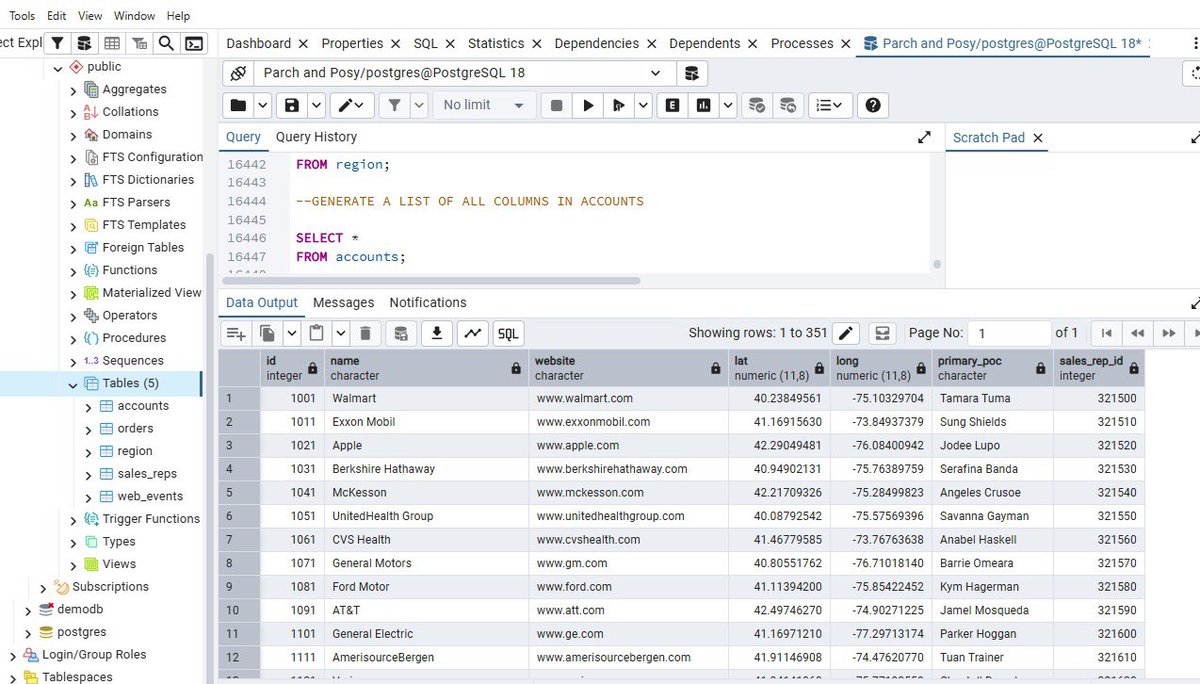
Day 9 of the @hertechtrail #HTTDataChallenge task is to retrieve all column from any specific table
I used the commands
SELECT *
FROM region;
Result = 4 rows and 2 columns
SELECT *
FROM accounts;
Result = 351 rows and 7 columns
#SQLQuery #SQLBasics
1
4
22

Apr 13
SQL هي لغة التحليل الحقيقية للبيانات الكبيرة! 🔥
ما تحتاج تعقيد في البداية.
ابدأ بهذي الأوامر الأساسية فقط، وبتقدر تبني أي تقرير بسيط بسرعة:
- SELECT → اختيار الأعمدة اللي تبيها
- FROM → من أي جدول
- WHERE → فلترة البيانات حسب الشروط
- ORDER BY → ترتيب النتايج (تصاعدي أو تنازلي)
هذي الأربعة لوحدها تكفيك تبدأ وتشتغل كـ Analyst حقيقي.
#SQL #تحليل_البيانات #DataAnalyst #SQLBasics
11
4,286

Apr 5
☕𝗖𝗵𝗮𝗶 𝗔𝘂𝗿 𝗦𝗤𝗟 - Yesterday's #Cohort Class Recap!
We unpacked some serious DB & SQL fundamentals. Quick thread so you can revise or catch up 🔥
Let’s break it down one by one 👇
🧵/n
#ChaiAurSQL #SQLBasics
1
17
91

21 Nov 2025
DAY 6: DOCUMENTING MY SQL PROGRESS: Window Functions.
Another day at the office, Chads. Today is proof that I need to improve with window functions. Throughout this daily documentation, I have decided to use CHATGPT sparingly. As a result, I am left to think deeply about the solutions to particular tasks and instructions. Without further ado, let's dive in...
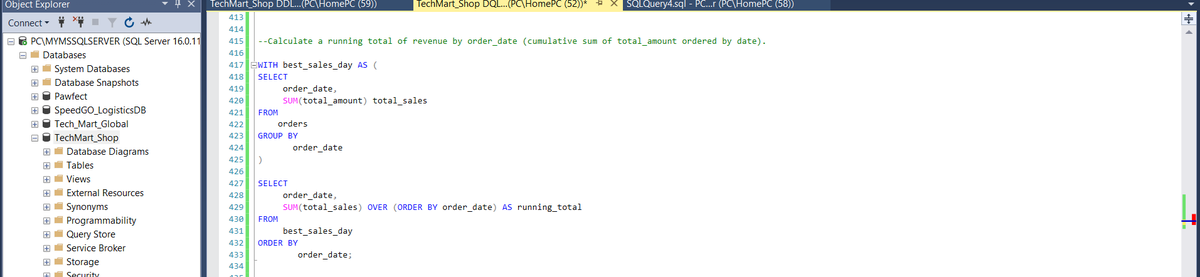
--FRAME 1--
Query 1: The purpose of this query is to calculate the total revenue per date. This is tantamount to saying how much was sold per day.
I wrote one CTE to first compute the total sales on each day. Then I wrote a query to group these totals (total_sales) by dates. Pretty straight forward to explain, but this took too long to figure out. For the longest time, I was actually calculating the sum of orders and grouping by the total amount of orders. Glad I figured it out eventually. I also did not know I could substitute the ''RANK()" syntax for the particular computation we seek to partition and order In this case, that is the SUM(total_sales). Lesson learnt! Onward.
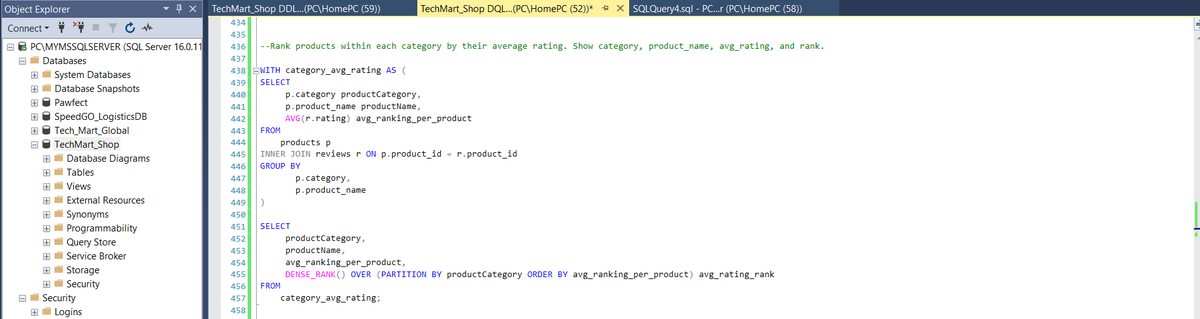
--FRAME 2--
Query 2: The purpose of this query was to rank each product by its average rating, compared to the average rating of other products in its category.
This required a JOIN of the products and reviews table. Then I calculated the avg rating of each product all in the CTE. I proceeded to use the 'DENSE_RANK' function in the outer query. This allowed me to group products in the same category together, and rank their avg_rating compared to other products in the category.
I have noticed that supposedly queries could prove difficult, while supposedly difficult ones have the propensity to come easy. This is perhaps due to top-down processing on my part.
I should round up window functions tomorrow.
Kindly give feedback, corrections and suggestions. I really need and appreciate it.
See you tomorrow, Chads!! 🤲🏾🤲🏾
#DataScience #Analytics #SQLServer #sqlbasics #sqlwithTimi #oracledatabase
20 Nov 2025

DAY 5: DOCUMENTING MY SQL PROGRESS : CTEs
Another day at the office, Chads.
Today, I focused on doing one more Subquery and then CTEs. Here we go!
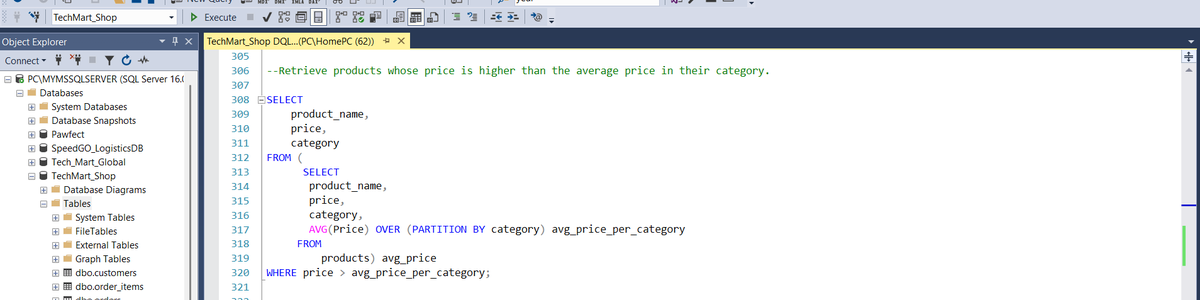
--FRAME 1--
Query 1: This query retrieves products that have a price that is higher than the average price of products in their category.
A challenge I encountered with this query was computing the Average price of products in each category. I initially used an aggregate function and a window function in the same SELECT statement. This is an illegal thing to do in SQL.
This challenged the way I understood subqueries. A subquery is supposed to compute a value or multiple values that can be used by the outer query. Therefore, I sorted grouping with the 'avg_price_per_category' window function. This value is then compared to the price and category of the product in the outer query. Once the price in the subquery is greater than the average price of products in its own category, then that product is returned.
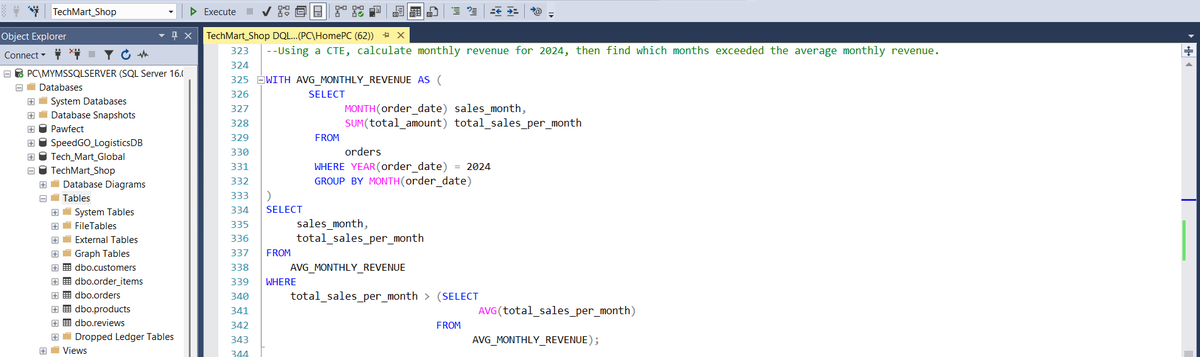
--FRAME 2--
Query 2: Now onto CTEs. This particular CTE computes the average monthly revenue in the year 2024. This was pretty straight forward but I did not know where to add the final filter for monthly revenue that exceeds the average monthly revenue.
I was also writing code that returned multiple rows of results. This cannot work since the ">" operand that I had in the 'WHERE' clause of the retrieving 'SELECT' statement would only product results for scalar inputs.
So I had to use a sort of subquery in the retrieving 'SELECT' statement to compute the average monthly revenue. The revenue per month could then be compared to this average to determine which months exceeded the average monthly revenue.
--FRAME 3--
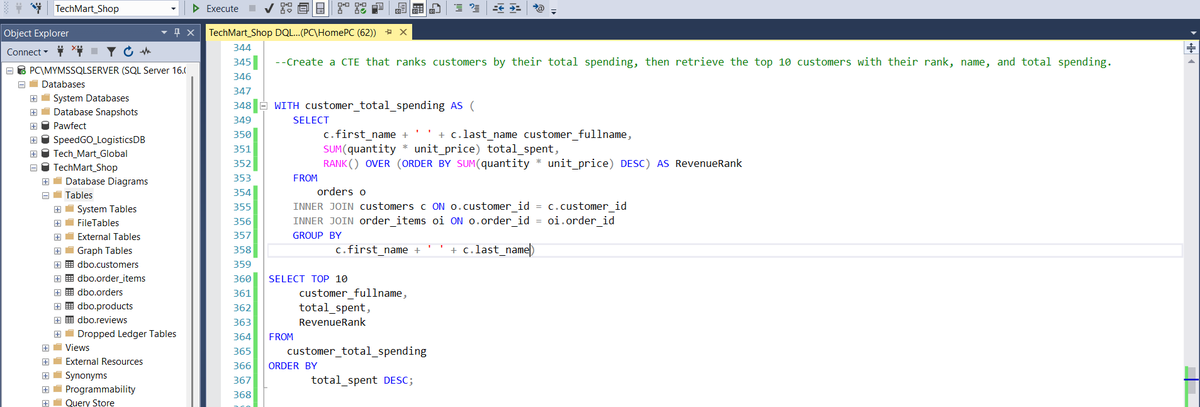
Query 3: This query retrieves the top 10 customers by total spending. Very useful information for marketing and analytics purposes. This was easier than I thought.
All I had to do was build the CTE. I got the customer name, total_spent by the customer, and their rank based on this spending. I had to use the JOIN to connect the orders, customers, and order_items tables. You can see the connecting columns that mandated the use of these JOINS.
--FRAME 4--
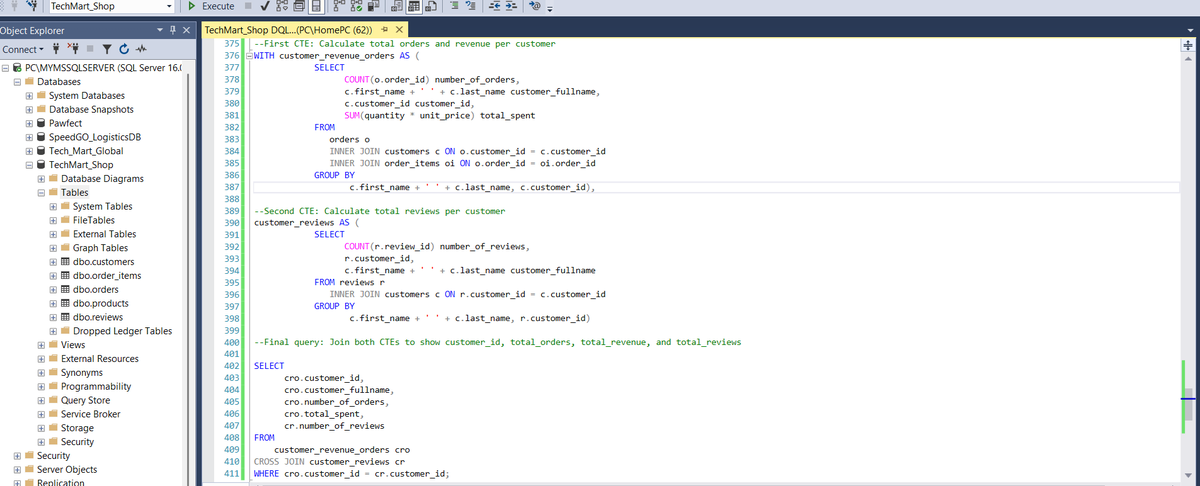
Query 4: This was also very smooth. First CTE was to get the total revenue brought in by a customer as well as the number of orders they placed. JOINS were crucial for linking Foreign keys that made sense for data object connection.
Second CTE was to know the number of reviews that each customer submitted. Very similar to the first CTE. When writing these CTEs, it is crucial to avoid the mistake of not using aliases correctly. Especially when JOINS are involved.
By the Final query, I was just putting all I had retrieved from the first and second CTEs together.
That's it fam!! We are making good progress here! Tomorrow we handle Window function.
Please say hi if these explanations are not clear. or you think I am makin a mistake or even if there is a better way to do things.
As always, corrections, suggestions and feedback is greatly appreciated.
See you tomorrow, Lads!!
#datafam #DataScience #dataengineering #SQL #CodingJourney #sqlbeginner
3
3
7
451

5 Nov 2025
🪟 Q: 1321. Restaurant Growth 🪟 @LeetCode
Ig the Best LC Problem to really try & figure out how SQL Window Functions work!!
( especially the Window Frame clause...rows/range part 👀)
#sqlbasics #sqlbeginner #leetcodeproblems #LeetCode
leetcode.com/problems/restau…
3
73
4 Nov 2025
One of the Best Pieces of Content on 'SQL Window Function' for Noobs !!
W @_Produde_ 🌟 !
It doesn’t dive deep into the window frame clause, but it’ll help you see how window functions work for each row...
#SQL #sqlknowledge #sqlbasics #sqlbeginner
medium.com/learning-sql/sql-…
3
86

3 Nov 2025
Day 1 of the IDC 21 Days of SQL Challenge organized by @indiandataclub @dpdzero
#SQLWithIDC
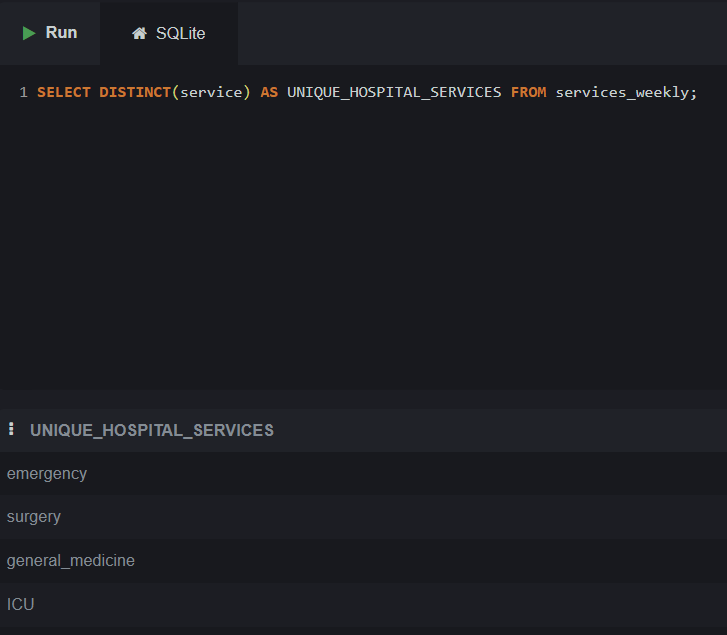
Brushed up the SQL - SELECT , filtering , distinct
#SQL #sqlbasics
2
48

25 Oct 2025
2
2
31

16 Oct 2025
MEMORY_ALLOCATION_EXT is one such wait type that frequently confounds database managers. Check all the details to avoid MEMORY_ALLOCATION_EXT:
madesimplemssql.com/memory-a…
#sql #sqlserver #sqlknowledge #sqlbasics #patlama #data #database #madesimplemssql @MadeSimpleMSSQL @QuerySurge
3
3
59

4 Sep 2025
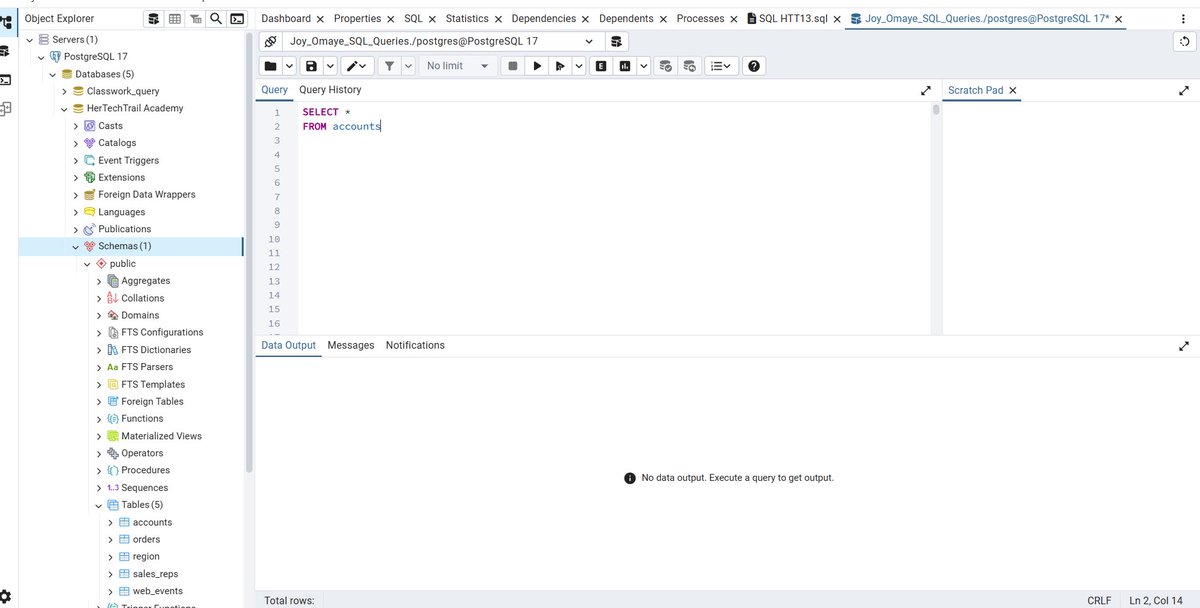
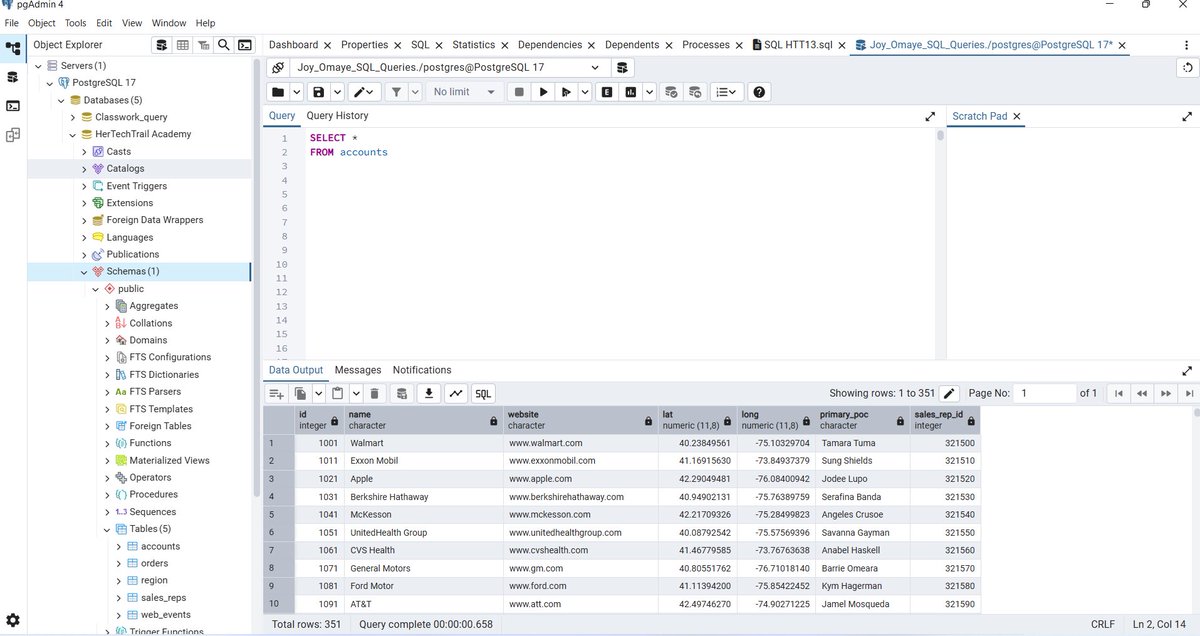
It’s Day 9 of our challenge and we have 6 more days to gooooo 🥳🎉💃
Today’s challenge is about: SQL Basic Query
First of all, what is SQL???
SQL is a Structured Query Language.
Thank you @phaibooboo, @it_is_reel, @preciey_oma, @gbonna42449096 🎉
#HTTDataChallenge
#SQLBasics
2
64

22 Jul 2025
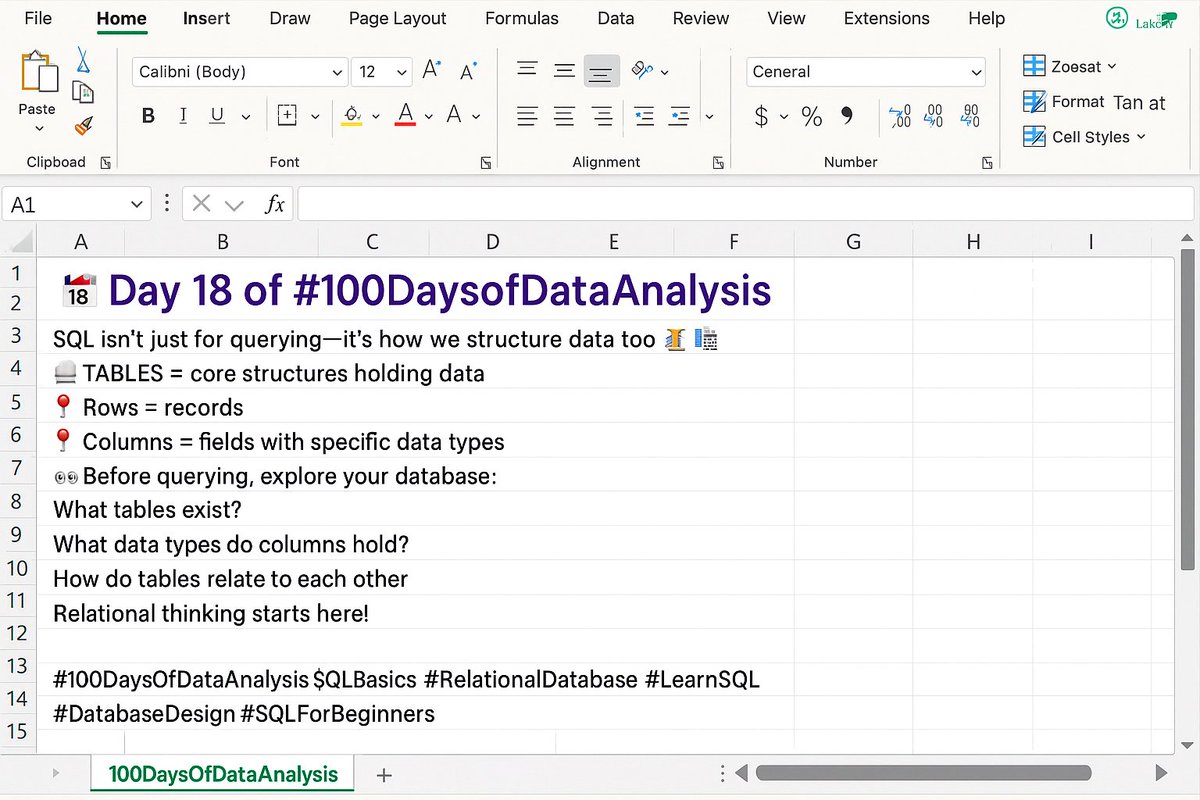
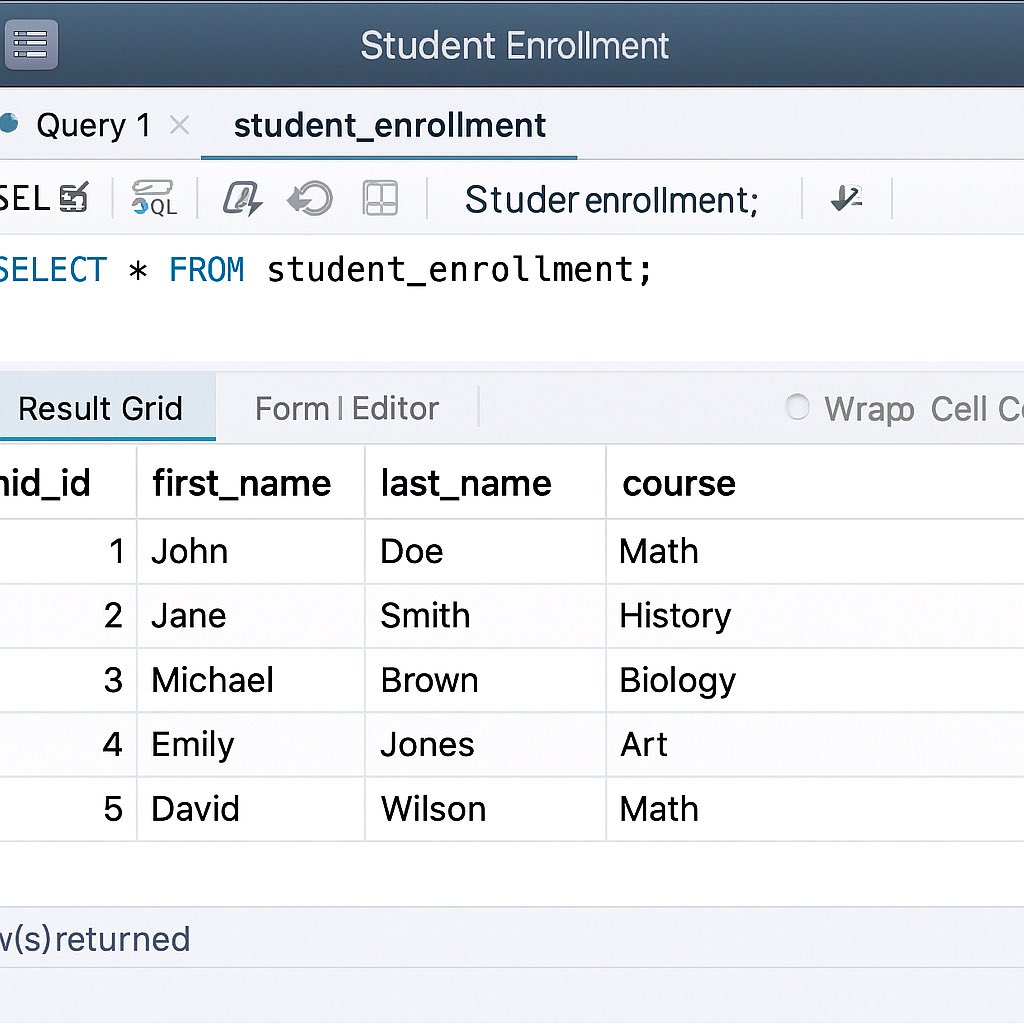
📅 Day 18 of #100DaysOfDataAnalysis
SQL isn’t just code, it’s how we think about data 🧠📊
🧱 Slide 1: The structure (tables, rows, columns)
🖥️ Slide 2: The real thing in MySQL
Start with structure. Query with clarity. 💡
#LearnSQL #SQLBasics #RelationalDatabase #DataDesign
1
1
53

11 Mar 2025
MYSQL and NODE-JS || HTML Tutorial ||
HTML Beginner || MELS Coding |
youtube.com/watch?v=1jjM77UM…
#JavaScript #MELS #HTML #Database #SqlTutorial #SqlBasics #SqlForBeginners #MySQL #Server #MELSSTEM #MELSCoding #MachineLearning #AI #EssentialSkills #STEAM #DeepLearning #nodejs
2
51

23 Feb 2025
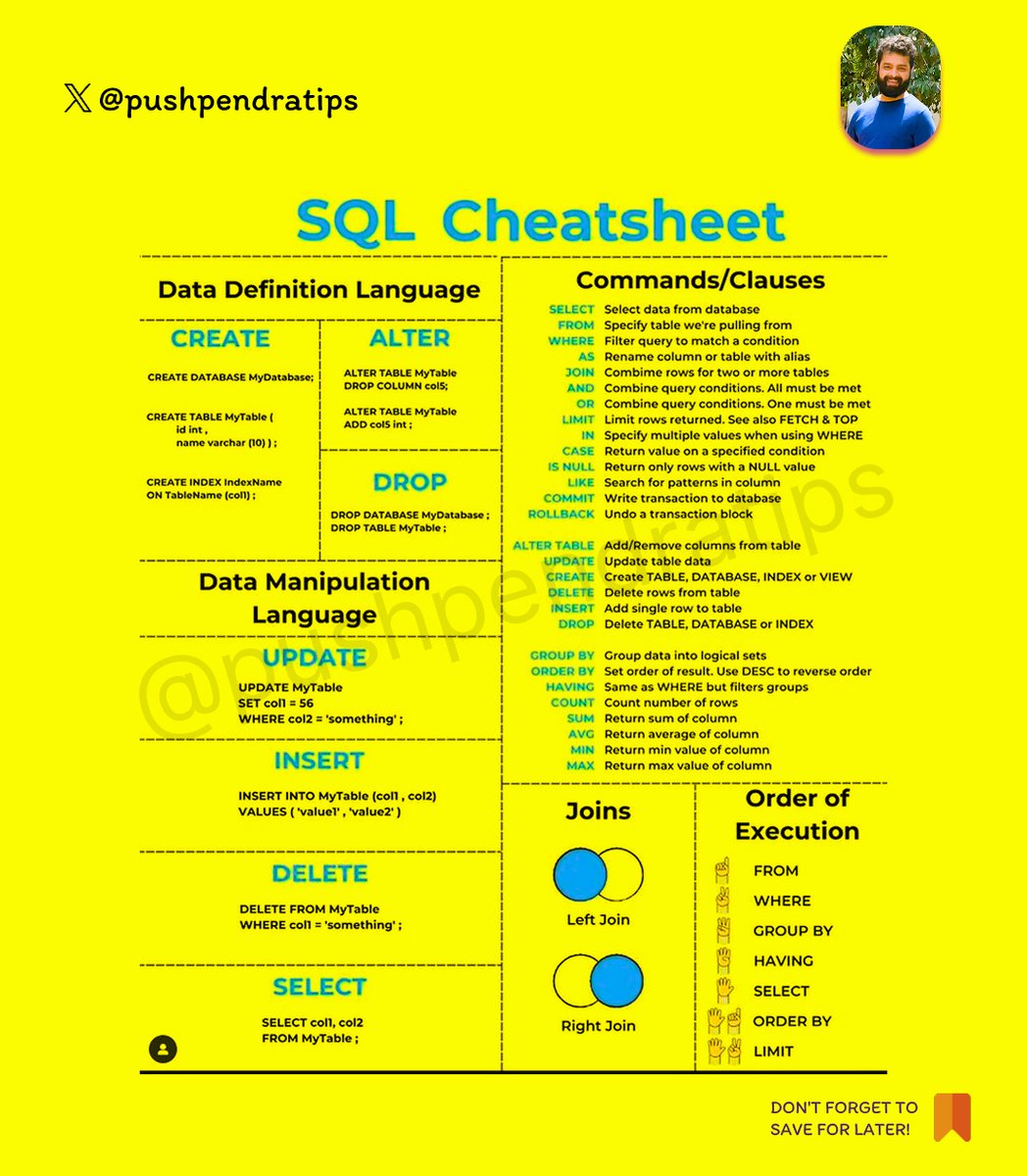
📜 SQL Cheat Sheet
🔍 Fetching Data (SELECT)
SELECT * FROM table_name;
SELECT column1, column2 FROM table_name;
SELECT DISTINCT column FROM table_name;
_____________________________________________________
🎯 Filtering Data (WHERE)
SELECT * FROM users WHERE age > 25;
SELECT * FROM orders WHERE status = 'delivered';
_____________________________________________________
🧩 Multiple Conditions (AND, OR, NOT)
SELECT * FROM users WHERE age > 25 AND city = 'Delhi';
SELECT * FROM products WHERE price < 500 OR stock > 50;
SELECT * FROM employees WHERE NOT department = 'HR';
_____________________________________________________
🔢 Sorting Results (ORDER BY)
SELECT * FROM employees ORDER BY salary DESC;
SELECT * FROM products ORDER BY price ASC, name DESC;
_____________________________________________________
🎛 Limiting & Skipping (LIMIT, OFFSET)
SELECT * FROM products LIMIT 5;
SELECT * FROM orders LIMIT 10 OFFSET 5;
_________________________________________________________
🏗 Grouping Data (GROUP BY, HAVING)
SELECT department, COUNT(*) FROM employees GROUP BY department;
SELECT category, AVG(price) FROM products GROUP BY category HAVING AVG(price) > 100;
_________________________________________________________
🏆 Aggregations (COUNT, SUM, AVG, MIN, MAX)
SELECT COUNT(*) FROM users;
SELECT SUM(price) FROM orders;
SELECT AVG(salary) FROM employees;
SELECT MIN(age), MAX(age) FROM users;
_____________________________________________________
🔄 Joining Tables (JOIN)
👫 Inner Join
SELECT users.name, orders.amount
FROM users
INNER JOIN orders ON users.id = orders.user_id;
_____________________________________________________
📌 Left Join
SELECT users.name, orders.amount
FROM users
LEFT JOIN orders ON users.id = orders.user_id;
_________________________________________________________
📌 Right Join
SELECT users.name, orders.amount
FROM users
RIGHT JOIN orders ON users.id = orders.user_id;
_____________________________________________________
🔗 Full Join
SELECT users.name, orders.amount
FROM users
FULL JOIN orders ON users.id = orders.user_id;
_____________________________________________________
🏗 Creating & Modifying Tables
🆕 Creating a Table
CREATE TABLE users (
id INT PRIMARY KEY,
name VARCHAR(100),
age INT,
city VARCHAR(50)
);
_____________________________________________________
🔧 Altering a Table
ALTER TABLE users ADD COLUMN email VARCHAR(100);
ALTER TABLE users DROP COLUMN city;
_____________________________________________________
📝 Modifying Data
➕ Inserting Data
INSERT INTO users (id, name, age) VALUES (1, 'Amit', 30);
_____________________________________________________
🛠 Updating Data
UPDATE users SET age = 31 WHERE id = 1;
_____________________________________________________
❌ Deleting Data
DELETE FROM users WHERE id = 1;
DELETE FROM users; -- Delete all rows
_____________________________________________________
🏛 Indexes & Keys
🔑 Primary Key
CREATE TABLE users (
id INT PRIMARY KEY,
name VARCHAR(100)
);
_____________________________________________________
🔑 Foreign Key
CREATE TABLE orders (
id INT PRIMARY KEY,
user_id INT,
FOREIGN KEY (user_id) REFERENCES users(id)
);
_____________________________________________________
🚀 Creating Index
CREATE INDEX idx_name ON users(name);
_____________________________________________________
📜 Subqueries & Unions
🔄 Subquery
SELECT name FROM users WHERE id IN (SELECT user_id FROM orders);
_____________________________________________________
🔗 Union (Combine Results)
SELECT name FROM customers UNION SELECT name FROM suppliers;
SELECT name FROM customers UNION ALL SELECT name FROM suppliers; -- Includes duplicates
_____________________________________________________
🔥 Transactions
BEGIN TRANSACTION;
UPDATE accounts SET balance = balance - 500 WHERE id = 1;
UPDATE accounts SET balance = balance 500 WHERE id = 2;
COMMIT; -- Save changes
ROLLBACK; -- Undo changes
#SQL #SQLTutorial #LearnSQL #SQLQueries #SQLCheatSheet #Database #DataScience #Programming #Tech #Code
#SQLForBeginners #SQLBasics #SQLTraining #LearnToCode #CodingForBeginners #AdvancedSQL #SQLPerformance #SQLOptimization #SQLBestPractices
#SQLDatabase #MySQL #PostgreSQL #SQLServer #OracleSQL #NoSQL #DataAnalytics #SQLForDataScience #BusinessIntelligence #BigData #DataVisualization
28
19
66
8,752

29 Jan 2025
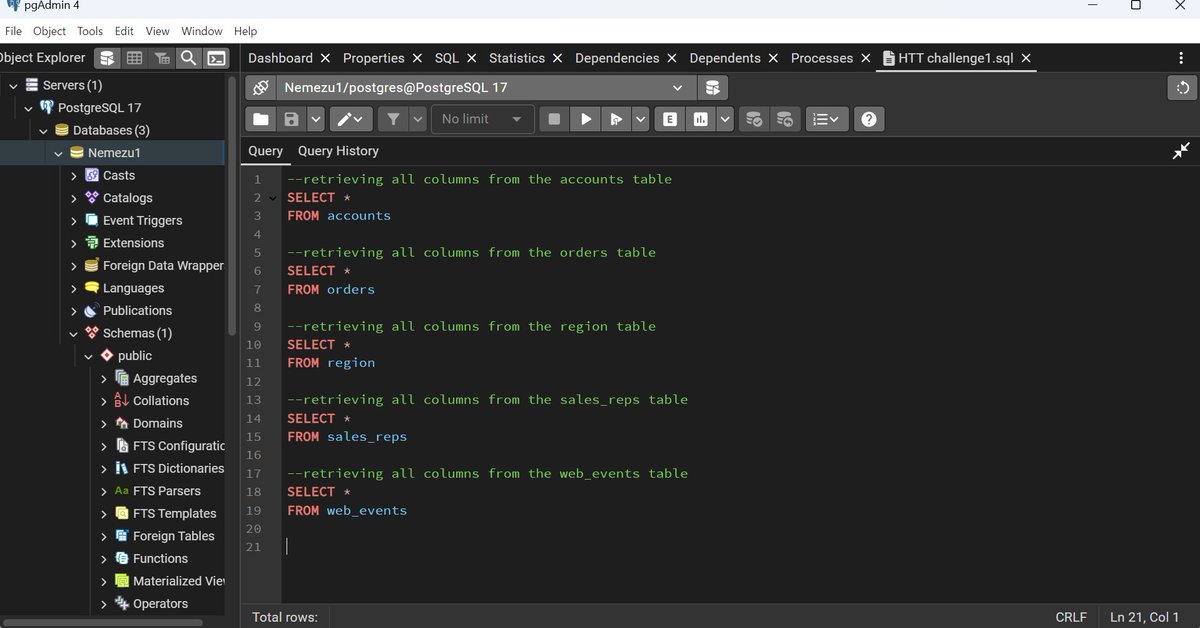
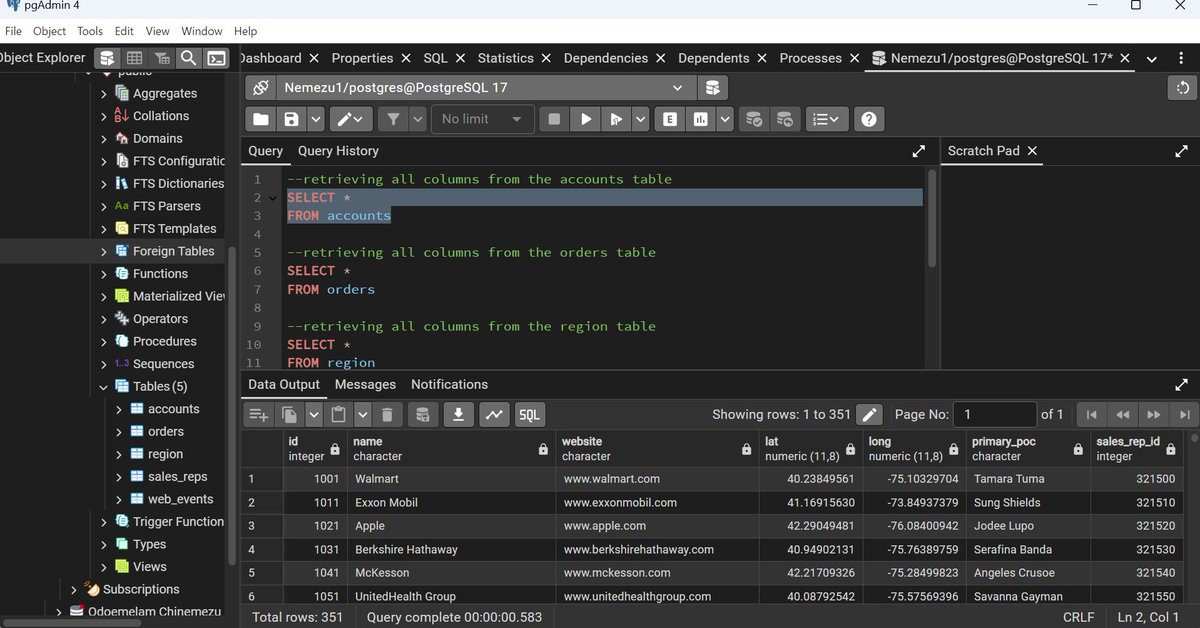
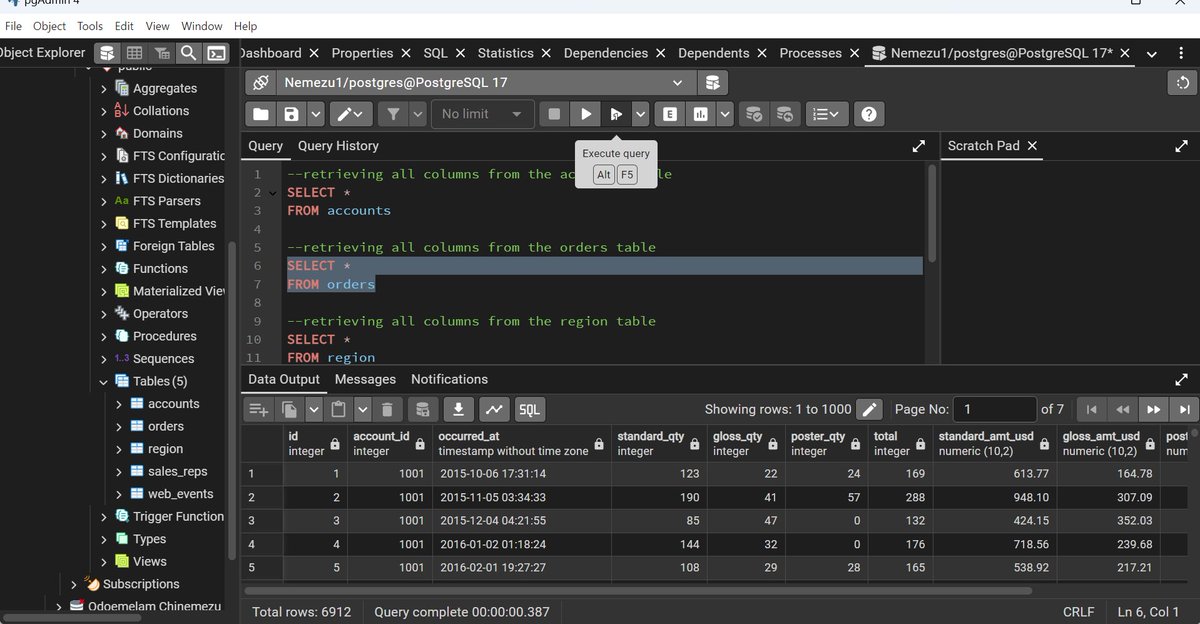
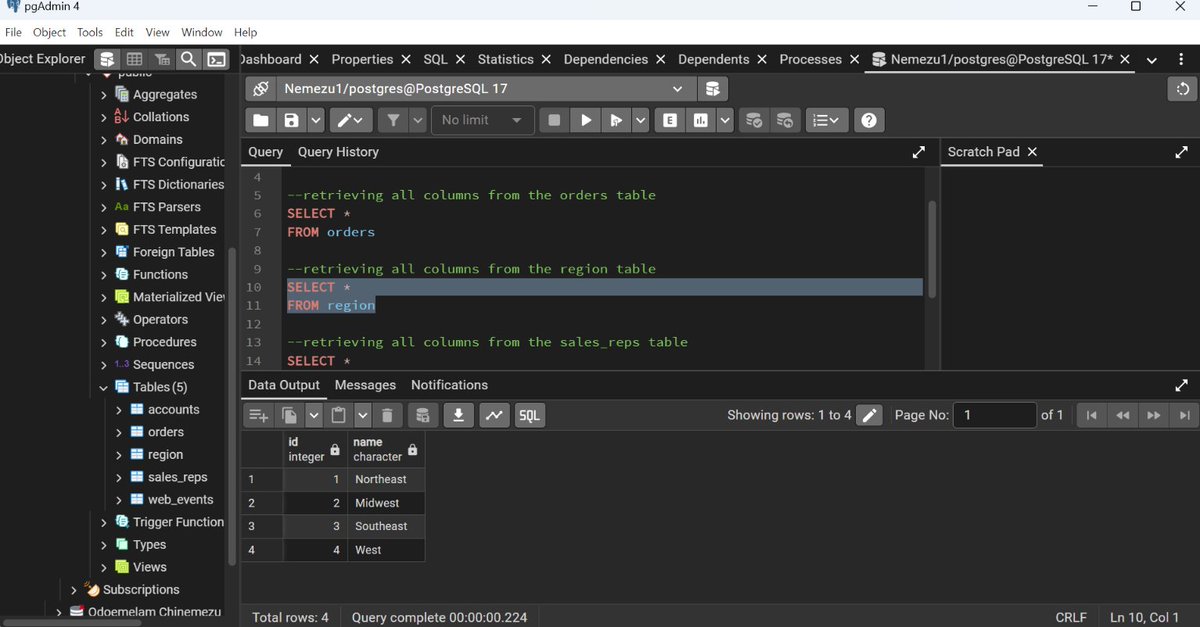
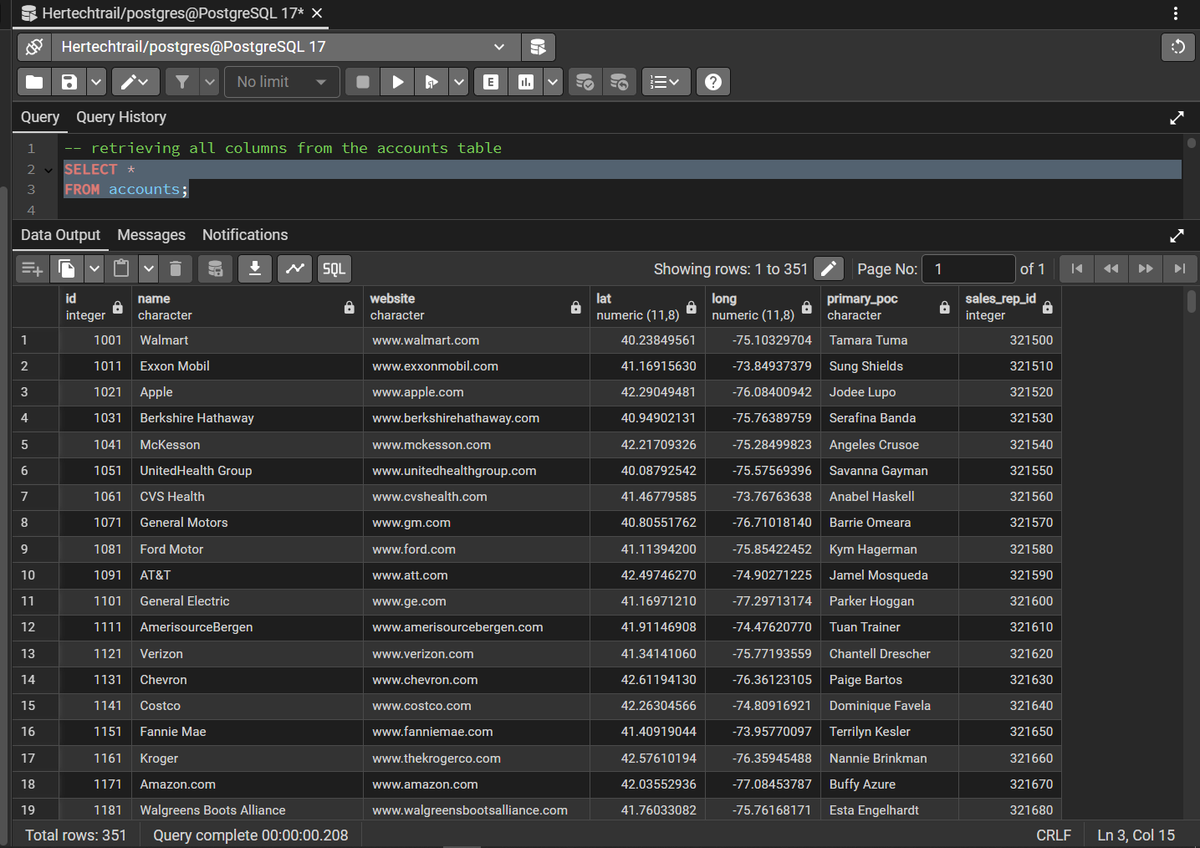
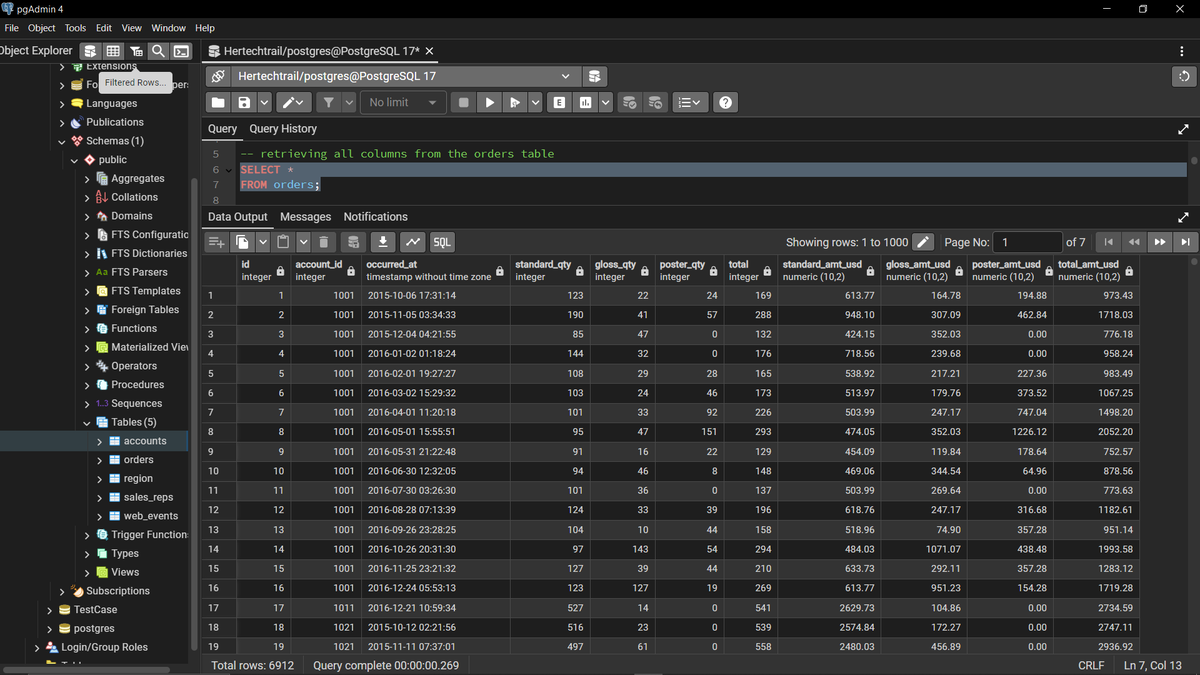
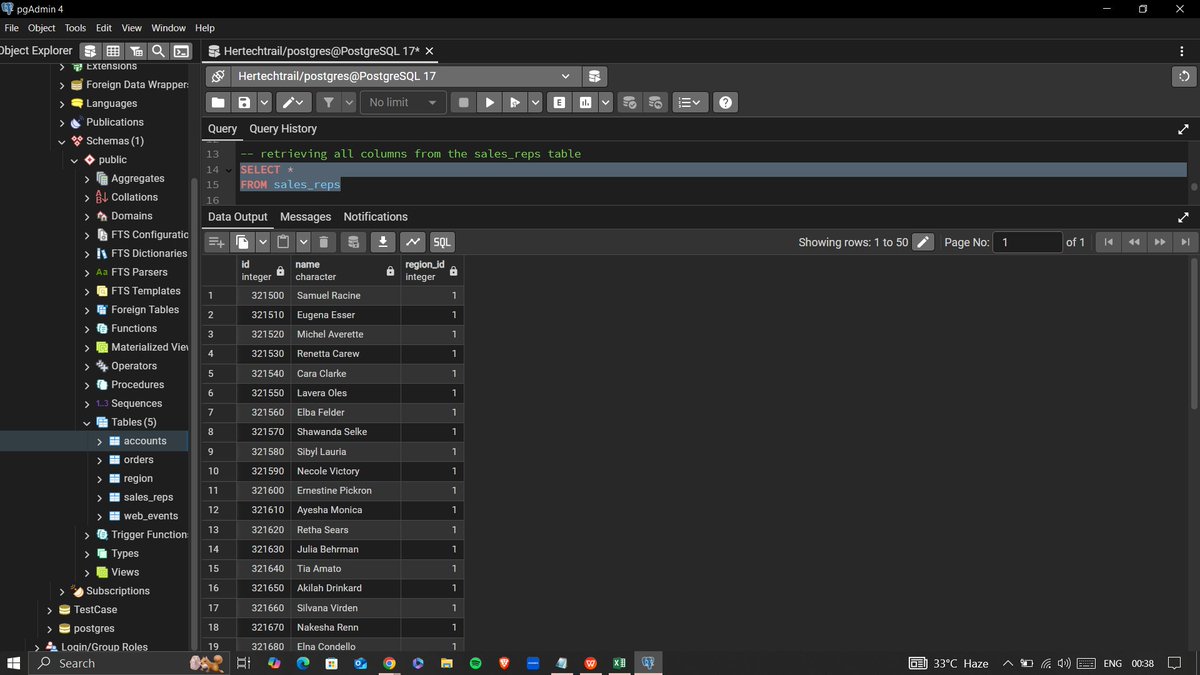
I was tasked with writing an SQL query to retrieve all columns from any of the tables
Below is a snippet of my work
#hertechtrailacademy #SQLBasics #SQLQuery
@hertechtrail @phaibooboo @it_is_reel @preciey_oma @ogbonna42449096 @som_nnamani @mychailblaise @AtiJoshua
3
27

21 Jan 2025
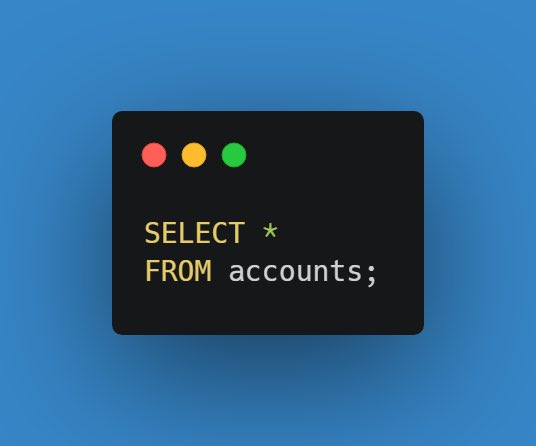
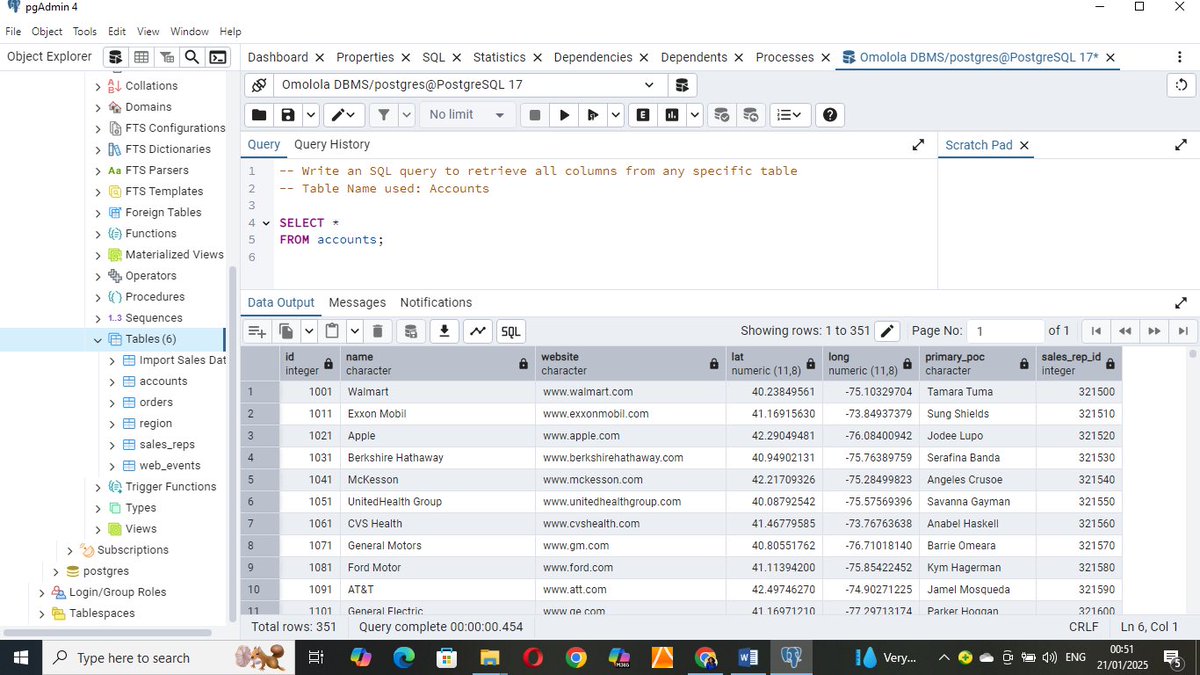
Today I will be using a simple SQL query to retrieve all columns in a table called accounts which is stored in the database.
SQL query used:
SELECT *
FROM accounts;
#hertechtrailacademy #HTTDataChallenge
#SQLBasics #SQLQuery @tech_bella @it_is_reel
1
3
45

21 Jan 2025
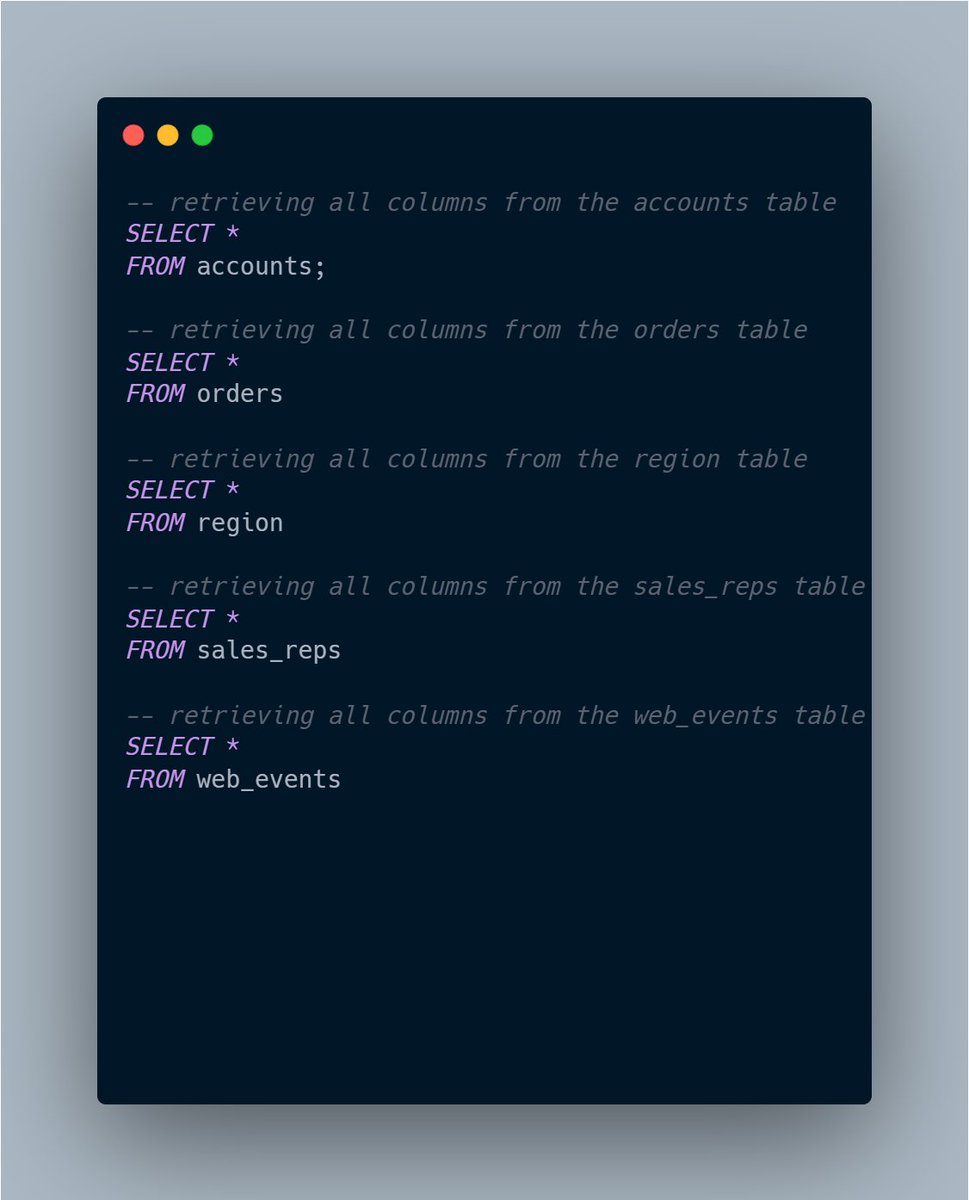
I was tasked with writing an SQL query to retrieve all columns from any of the tables.
Below is a snippet of my query and the results👇
#SQLBasics #SQLQuery
@hertechtrail @phaibooboo
Stay tuned for Day 10 as I dive deeper into exploring this dataset and writing more queries!🚀
2
5
93

26 Nov 2024
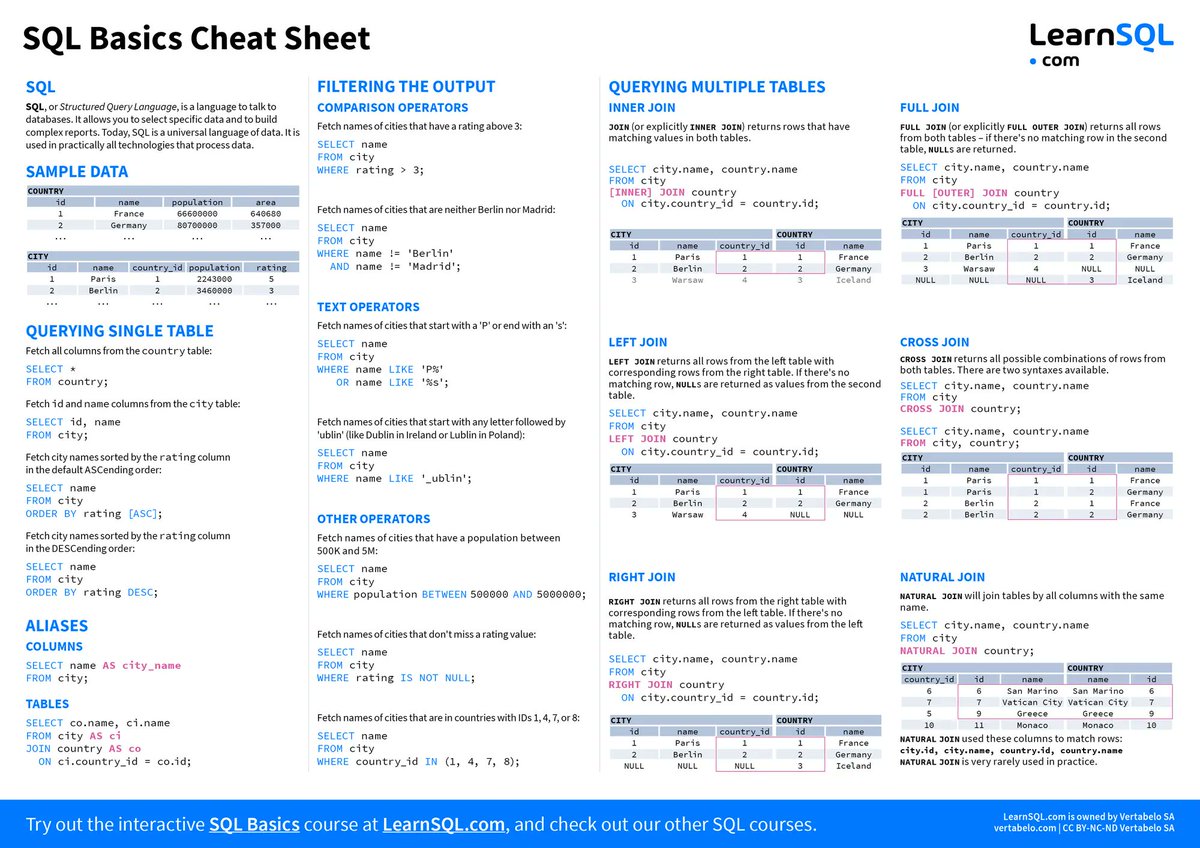
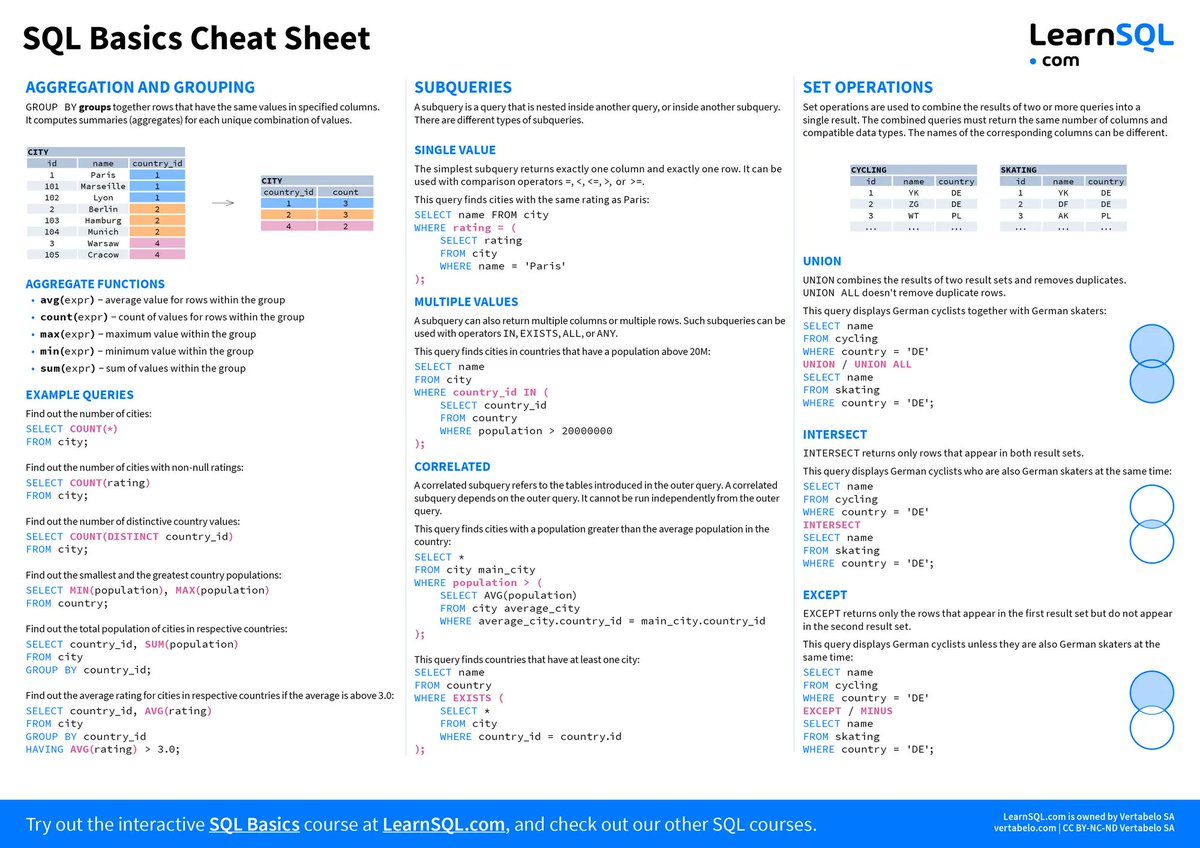
SQL Basics: The Complete Resource List ➡️ bit.ly/3Ay1e0K
Learn Basic SQL statements like SELECT, INSERT, UPDATE, and DELETE for free with an extensive list of resources by LearnSQL.com ➡️ bit.ly/3Ay1e0K
#sql #learnSQL #SQLbasics
2
41
4 Nov 2024
Set Tables in MySQL and Manage Directories in Linux (Set 1/3) || Data base || HTML || Linux ||
youtube.com/watch?v=iKe1rh-9…
#Jquery #JavaScript #MELS #STEM #HTML #Query #Database #SqlTutorial #SqlBasics #SqlForBeginners #MySQL #Server #MELSSTEM #MELSCoding #MachineLearning #AI
1
45