
18 Nov 2024
A few days ago, I made a post about why EDA is important in data analytics and I feel I should tell you some more benefits of EDA.
EDA stands for Exploratory Data Analysis and you perform basic and high-level analysis in EDA to have a better understanding of the data.
𝗜𝘁 𝗵𝗮𝘀 𝘃𝗮𝗿𝗶𝗼𝘂𝘀 𝗯𝗲𝗻𝗲𝗳𝗶𝘁𝘀 𝘀𝘂𝗰𝗵 𝗮𝘀:
• So, I also posted how to select relevant variables according to your business problems when your datasets are massive. EDA helps in that too.
• EDA also allows you to shop for KPIs or metrics when you are familiarizing yourself with the data.
• It can also allow you to flag some anomalies in the data because sometimes crucial data points can be missing. If you spend enough time in EDA, you can notice it and thus solve it.
So, always perform EDA as a data analyst. Never skip it.
Enjoy. Follow for more!
#ExploratoryDataAnalysis #DataAnalytics #DataScience #DataAnalyst #DataExploration #EDABenefits #Analytics #DataAnalysis #BusinessIntelligence #DataDrivenDecisionMaking #DataAnalyticsUSA #USDataAnalyst #DataScienceUSA #USAnalyticsJobs #DataDrivenUSA #DataAnalyticsUK #UKDataAnalyst #DataScienceUK #AnalyticsCareersUK #BusinessIntelligenceUK #DataAnalyticsEurope #EUDataAnalyst #DataScienceEurope #EuropeanAnalytics #DataJobsEurope #DataAnalyticsSG #SingaporeDataAnalyst #SGDataScience #AnalyticsJobsSG #SingaporeAnalytics #DataAnalytics #GlobalDataAnalyst #DataScienceCommunity #DataDriven #AnalyticsCareersWorldwide
2
28
14 Nov 2024
𝗔𝘀 𝗮 𝗱𝗮𝘁𝗮 𝗮𝗻𝗮𝗹𝘆𝘀𝘁, 𝗮𝗹𝘄𝗮𝘆𝘀 𝘀𝗽𝗲𝗻𝗱 𝗲𝗻𝗼𝘂𝗴𝗵 𝘁𝗶𝗺𝗲 𝗽𝗲𝗿𝗳𝗼𝗿𝗺𝗶𝗻𝗴 𝗘𝗗𝗔 𝗮𝘀 👇
Follow for more!
#DataAnalyst #DataAnalytics #ExploratoryDataAnalysis #EDATips #DataScience #BusinessIntelligence #AnalyticsInsights #DataTrends #USDataAnalytics #UKDataAnalytics #EuropeDataCommunity #DataScienceUK #DataScienceUSA #GlobalAnalytics #DataAnalystLife #DataDriven #AnalyticsJobs #EDABestPractices #DataQuality #AnalyticsProfessionals #UKHiring #USEmployment #DataJobsEurope #DataCareersWorldwide #TechCareers #AnalyticsCommunity #DataAnalysisUSA #HiringDataAnalysts #DataScienceCommunity
1
2
30
1 Nov 2024
I yesterday created a post where I explained how you can share your Power BI dashboard as a link to your clients/stakeholders when you are working as a data analyst.
Let's discuss something interesting about it in this thread!
#PowerBI #DataAnalyst #DataAnalytics #BusinessIntelligence #PowerBIDashboard #BIService #DataVisualization #Analytics #DataDriven #AnalyticsCommunity #TechTips #BIInsights #CareerGrowth #USDataAnalyst #UKDataAnalyst #EuropeDataAnalyst #GlobalDataCommunity #HiringNow #AnalyticsJobs #RemoteWork #Recruitment #DataCareer #DashboardDesign #LinkedIn #USDataAnalyst #DataAnalystsUSA #USAJobs #AnalyticsUSA #DataScienceUSA #TechInAmerica #MadeInUSA #UKDataAnalyst #UKTechJobs #DataScienceUK #AnalyticsUK #TechInUK #DigitalUK #EuropeDataAnalyst #AnalyticsEurope #EuropeTech #DataScienceEurope #DigitalEurope #InnovationEurope #GlobalDataAnalyst #WorldwideAnalytics #GlobalTech #DataScienceWorld #AnalyticsEverywhere #TechCareersWorldwide #GlobalOpportunities
1
3
80
31 Oct 2024
Data Analysts perform a lot of tasks with SQL such as data cleaning, data pre-processing, data transformation, EDA, and a lot more, improving database performance using partitioning, indexing, and more.
Let's discuss SQL execution in this thread!
#SQL #DataAnalytics #DataAnalyst #SQLTips #DataScience #DataAnalysis #DatabaseManagement #SQLQueries #TechCareers #AnalyticsJobs #DataJobs #SQLForData #SQLCommunity #DataAnalystJobs #HiringDataAnalysts #AnalyticsUK #AnalyticsUSA #DataEurope #GlobalDataCareers #SQLForBeginners #DataScienceUK #DataScienceUS #TechCareersEurope #DataCareers #SQLExecution #DataScienceEurope #SQLInsights #AnalyticsWorld #USDataAnalytics #UKDataAnalytics #EuropeDataAnalytics #GlobalDataInsights #DataScienceUK #DataScienceUSA #DataScienceEurope #AnalyticsGermany #DataAnalyticsFrance #DataJobsSpain #DataAnalystNetherlands #GlobalAnalyticsJobs #AnalyticsItaly #EUDataAnalyst #WorldwideDataCommunity #DataAnalyticsSweden #DataJobsEurope #GlobalTechCareers #AnalyticsIreland #UKAnalyticsJobs #EuropeanDataCommunity
1
4
39
31 Oct 2024
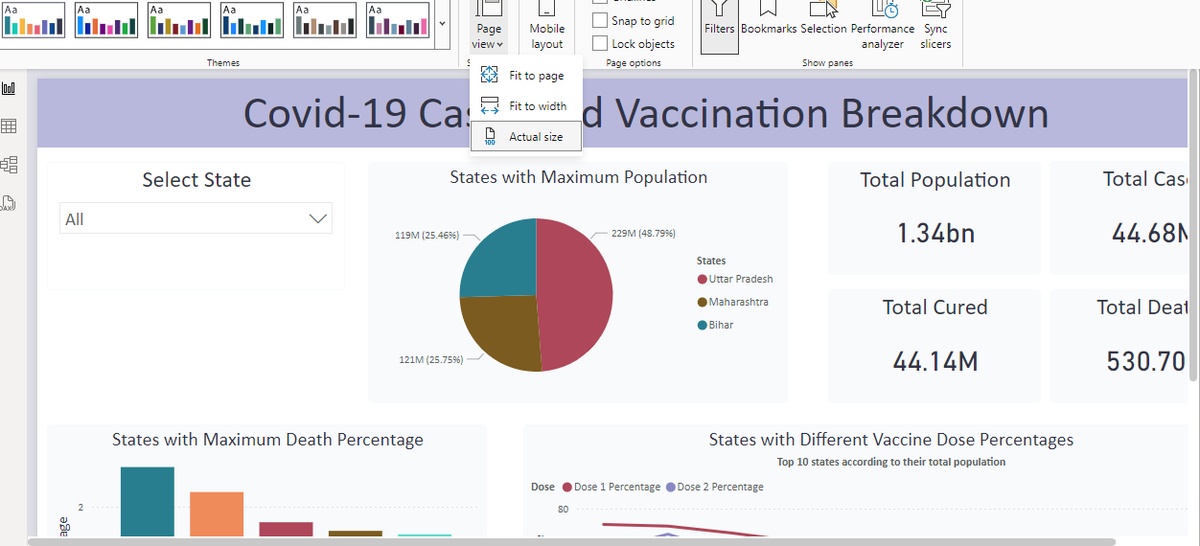
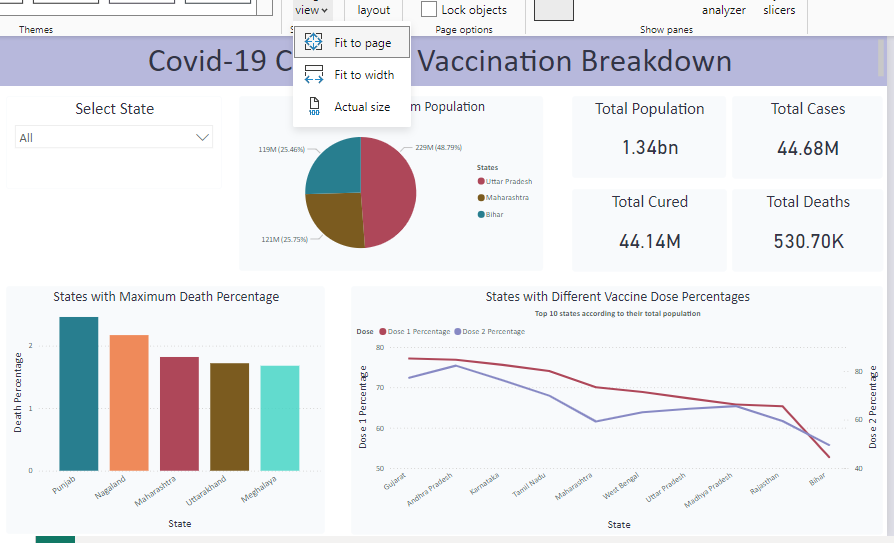
A lot of times, when we create dashboards as a data analyst, we do find a small problem and that is each dashboard page has a different layout in a different system.
Let me explain why that happens and how you can solve it in this thread.
#DataAnalytics #DataAnalyst #DashboardDesign #DataVisualization #PowerBI #ExcelTips #DataInsights #AnalyticsCareers #DataJobs #AnalyticsCommunity #DataStrategy #DashboardTips #ReportingSolutions #AnalyticsUK #AnalyticsUSA #DataEurope #TechJobsUK #TechJobsUSA #DataCareers #GlobalAnalytics #DataAnalysisWorldwide #PowerBICommunity #ExcelCommunity #DataAnalyticsUK #DataAnalyticsUSA #EuropeanDataJobs #DataJobsUS #DataJobsUK #AnalyticsEurope #DataScienceUK #DataScienceUS #TechCareersUK #TechCareersEurope #AnalyticsGermany #DataScienceGermany #DataAnalystFrance #AnalyticsSpain #DataJobsWorldwide #EuropeanDataScience #GlobalDataCareers #AnalyticsItaly #DataAnalyticsNetherlands #DataAnalystEurope #DataCommunity
1
2
60
27 Oct 2024
Learning and Improving is the only constant in data analytics. When you understand this initially in your career, you will go really far.
Let's discuss that in this thread!
#DataAnalyst #DataAnalytics #DataAnalysis #BusinessAnalyst #BusinessAnalytics #BusinessAnalysis #DataAnalyticsJourney #ContinuousLearning #DataDriven #AnalyticsInsights #DataSkills #DataAnalystLife #AnalyticsCareer #DashboardDesign #DataStrategy #MarketingAnalytics #DataDrivenDecisions #DataInsights #AnalyticsExcellence #AnalyticsCommunity #USAData #USAnalytics #AmericanBusiness #USJobs #USATech #DataInTheUSA #AnalyticsInAmerica #USAInsights #AmericanBusinessAnalytics #DataDrivenUSA #UKData #AnalyticsUK #DataScienceUK #UKBusiness #UKTech #DataInTheUK #AnalyticsInBritain #BritishBusiness #InsightsUK #UKJobMarket #EuropeData #EUAnalytics #DataInEurope #EuropeTech #EuropeanBusiness #AnalyticsInEurope #DataScienceEurope #EuropeInsights #EUDataAnalyst #EuroTech
1
3
86
20 Oct 2024
I have mentioned multiple times that, as a data analyst, you need to generate actionable insights to help solve business problems.
But a lot of the time, those actionable insights are not that easy to generate.
Let's discuss that in this thread.
#DataAnalysis #DataAnalytics #DataAnalyst #BusinessAnalysis #BusinessAnalytics #BusinessAnalyst #DataInsights #BusinessProblemSolving #ActionableInsights #DataDrivenDecisions #DeepDataAnalysis #DataPatterns #HistoricalDataAnalysis #AdvancedAnalytics #DataStrategy #VariableSelection #BusinessIntelligence #AnalyticsInAction #DataAnalystTips #SolveWithData #InsightfulAnalysis #USDataAnalytics #UKBusinessData #EuropeDataAnalysis #USEconomyInsights #UKDataProfessionals #EuropeBusinessAnalytics #DataAnalysisUS #DataScienceUK #AnalyticsInEurope #GlobalBusiness #TechInEurope #UKAnalytics #USEconomy #AnalyticsEurope #DigitalTransformation
#USDataExperts #UKDataCareers #EuropeDataProfessionals #USBusinessIntelligence #UKTechInsights #EuropeTechAnalysis
#USMarketAnalysis #UKMarketInsights #EuropeEconomicTrends #USAIandData #UKBigData #EuropeanDataScience
3
4
88
10 Oct 2024
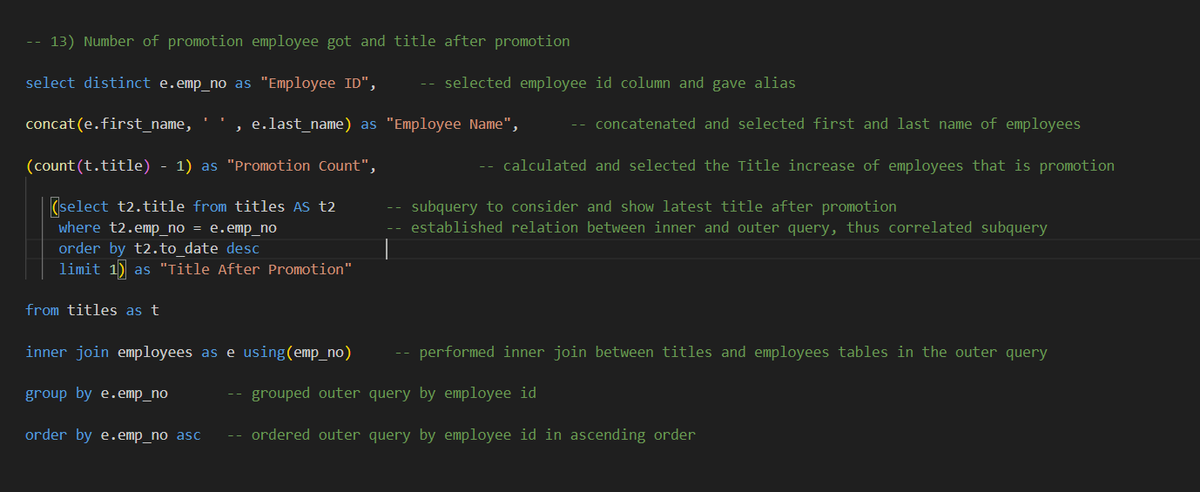
As a data analyst, ensuring optimal performance of SQL queries is a must and generally, whenever a SQL query is slow, subquery is the reason for that.
Also, how you implement subqueries is also important.
If you are using it to access small amount of data then it is fine but if you need to extract larger amount, then it can slow down the performance.
Also, if you use correlated subqueries, then your SQL query will be very slow if it is not implemented with caution.
Let's understand correlated subqueries in easy language:
𝗖𝗼𝗿𝗿𝗲𝗹𝗮𝘁𝗲𝗱 𝘀𝘂𝗯𝗾𝘂𝗲𝗿𝗶𝗲𝘀: When your inner query is connected with outer query and needs result/data from the outer query to perform operations, then it is known as correlated subqueries.
Generally, when you try to extract mutliple rows using correlated subqueries, it becomes really slow, thus SQL query slows down.
The solution for this is really simple, Use CTEs
#DataAnalytics #SQLPerformance #CTE #Subqueries #SQLQueries #CorrelatedSubqueries #DataOptimization #SQLBestPractices #DatabaseOptimization #QueryOptimization #DataAnalyst #DataEfficiency #DataQuerying #SQLTips #DataPerformance #SQLSkills #DataJobsUS #DataJobsUK #DataJobsEurope #TechSkills #DatabaseManagement #DataCareers #DataCommunity #DataInsights #SQLExperts #AnalyticsTools #DataDriven #UKTech #UKDataJobs #USTechJobs #USDataAnalyst #EuropeTech #EuropeDataJobs #UKAnalytics #USAnalytics #DataJobsEurope #TechCareersUK #DataCareersUK #DataCareersUS #TechCareersUS #TechCareersEurope #DataAnalystEurope #DataScienceUK #DataScienceUS #EuropeAnalytics #TechOpportunitiesUK #TechOpportunitiesUS #AnalyticsCareersEurope
3
54
5 Oct 2024
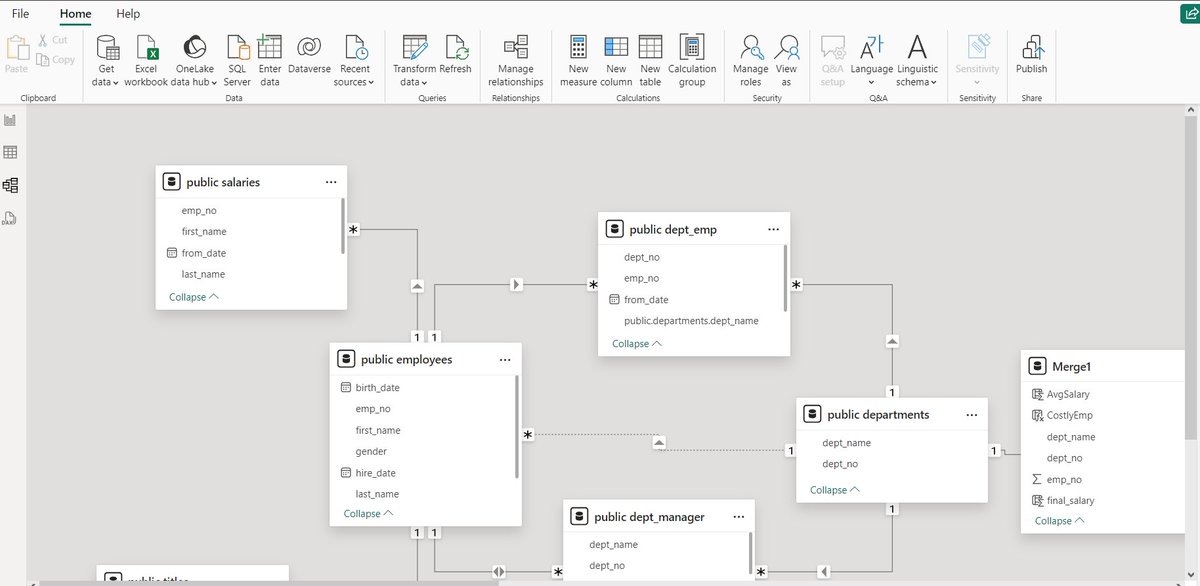
Understanding relationship between different tables in 𝗣𝗼𝘄𝗲𝗿 𝗕𝗜 is crucial for a 𝗱𝗮𝘁𝗮 𝗮𝗻𝗮𝗹𝘆𝘀𝘁𝘀 to understand and create the 𝗱𝗮𝘁𝗮 𝗺𝗼𝗱𝗲l as well as for creating 𝗮𝗰𝘁𝗶𝗼𝗻𝗮𝗯𝗹𝗲 𝗶𝗻𝘀𝗶𝗴𝗵𝘁𝘀 without any errors.
So, in our 𝗣𝗼𝘄𝗲𝗿 𝗕𝗜 series, let's focus on 𝗠𝗼𝗱𝗲𝗹 𝗩𝗶𝗲𝘄 of 𝗣𝗼𝘄𝗲𝗿 𝗕𝗜 𝗗𝗲𝘀𝗸𝘁𝗼𝗽 and understand the same. Let's understand this via thread.
#PowerBI #ModelView #TableRelationships #DataModeling #BusinessIntelligence #CrowFootNotation #SQLtoPowerBI #CrossFilter #PowerBIDesktop #DataAnalysis #DataModel #DashboardDevelopment #DataAnalyst #DataInsights #OneToMany #BItools #AnalyticsSkills #ActionableInsights #PowerBItutorial #USData #UKData #EuropeData #USTech #UKTech #EuropeTech #DataScienceUSA #DataScienceUK #DataScienceEurope #NorthAmericaData #EUData #DataEngineering #TableModeling
1
1
34
3 Oct 2024
Continuing our 𝗣𝗼𝘄𝗲𝗿 𝗕𝗜 series, let's discuss how you can work around operations or functions that are not easily available in 𝗣𝗼𝘄𝗲𝗿 𝗕𝗜.
Let's consider an example for this, consider you want to use 𝗟𝗔𝗚(), 𝗟𝗘𝗔𝗗() window function in Power BI but actually you don't have any direct 𝗗𝗔𝗫 𝗳𝗼𝗿𝗺𝘂𝗹𝗮 to implement this.
You can use multiple 𝗗𝗔𝗫 𝗳𝗼𝗿𝗺𝘂𝗹𝗮𝘀 to get your way around but I personally thing that it is not efficient specially when you are connected to a database and you can write SQL queries in your database.
Also, this solution is effective only when you have access to the database and can write query to it.
𝗦o, 𝘄𝗵𝗮𝘁 𝘆𝗼𝘂 𝗰𝗮𝗻 𝗱𝗼 𝗶𝘀:
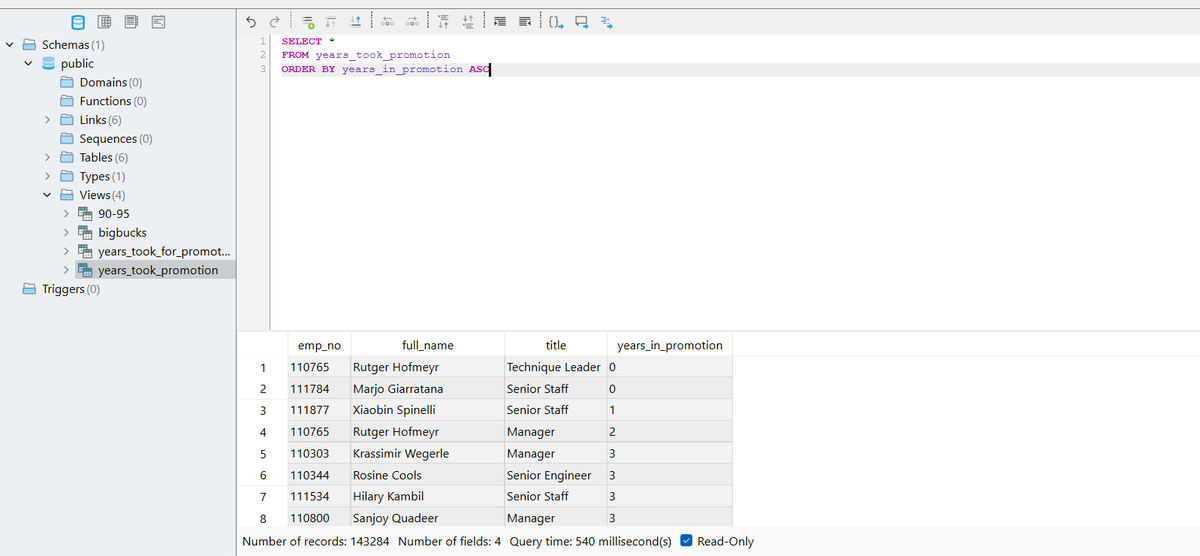
• Create a materialized view in SQL using LAG(), LEAD() or whatever function you don't have in Power BI.
• Now, load the data using direct query and you will find the view that you created there like table.
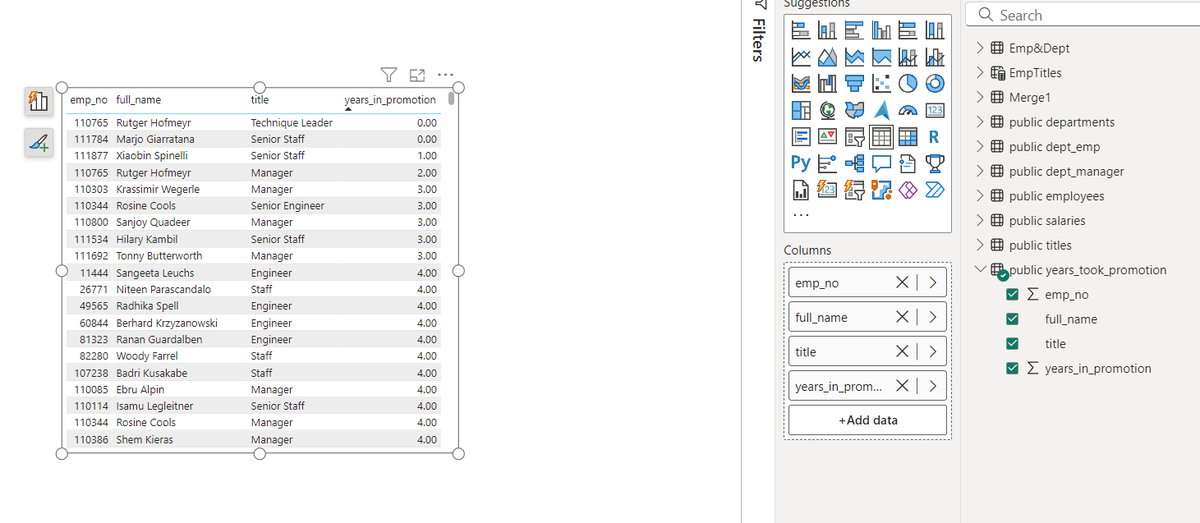
• Then you can use that view as table and visualize the data that you want.
I attached some screenshots where I created view in SQL and then loaded the data into Power BI and visualized it using a table.
#PowerBI #SQL #DAX #WindowFunctions #LAGFunction #LEADFunction #MaterializedView #DatabaseIntegration #DirectQuery #PowerBIWorkaround #DataAnalytics #BusinessIntelligence #DataVisualization #TechSolutions #DataModeling #PowerBIExpert #AdvancedAnalytics #DataEfficiency #TechUS #TechUK #TechEurope #USBusiness #UKBusiness #EuropeTech #DigitalTransformation #BIInnovation #SQLQueries #DataAnalyst #PowerBIDesktop #DatabaseManagement #BigData #BusinessDecisions #DataScienceUK #DataScienceUS #EuropeanTech #DataDrivenUK #DigitalEconomyEU #DataInsightsEurope #DataAnalysisUS #TechCommunityUS #TechInnovationUK #DataScienceEurope
1
29
24 Sep 2024
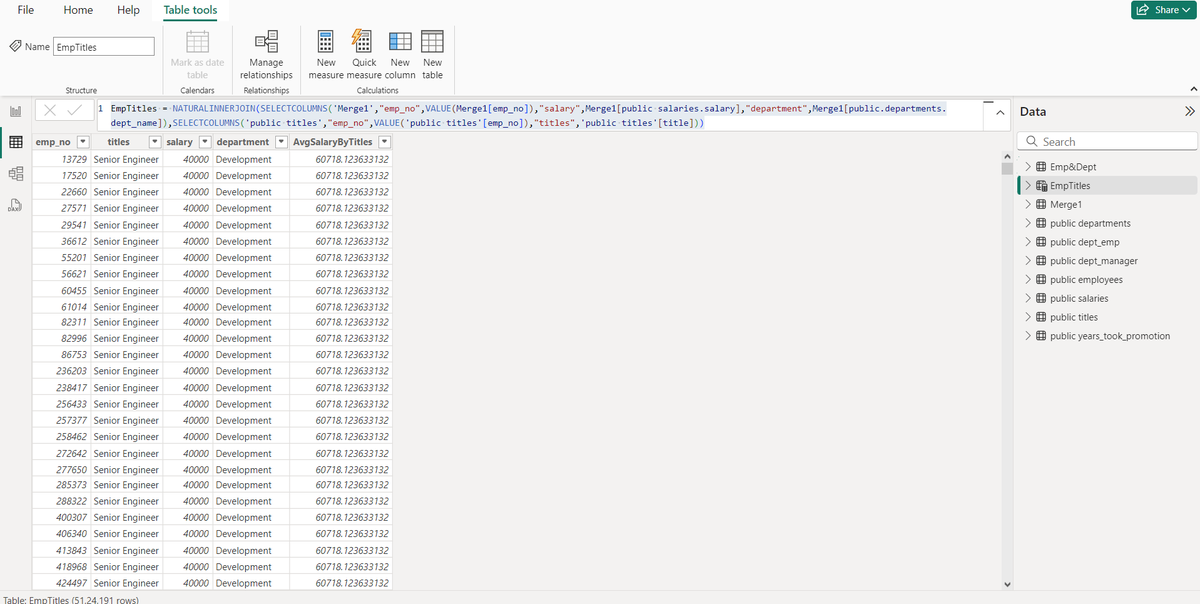
Today, in our Power BI series, Let's discuss how you can perform join operation using DAX function in Power BI.
As a data analyst, you should be proficient in DAX formulas as they are really powerful and allow you to analyze data in a detailed manner.
So, to perform join in Power BI, the DAX function is:
1) NATURALINNERJOIN(<left table>,<right table>): It allows you to perform inner join between the two tables.
2) NATURALLEFTOUTERJOIN(<left table>,<right table>): It performs a left outer join between the two tables.
Some things to keep in mind:
-- Now note that, you should have a column which is common in both the table.
-- The name of columns should be same in both the tables.
Also, if you are facing some issues to perform this join operation even after doing everything right, the possible issue can be from the fact that Power BI is having issues in joining according to the column that is common.
It can be because of the fact that Power BI only wants unique values as the key and can throw an error if the rows of the key are not unique.
Also, many times, you also don't get all the columns that you want after the join and I have faced these issues multiple times, so to solve this:
-- Use "SELECTCOLUMNS" to select appropriate columns that you want in your result. Also, include "common column (key)" in this and ensure name is same for key.
-- Also, the key that is creating the problem in joining, use "VALUE" function so that only distinct values are provided to the function.
-- Now perform the join.
Example:
EmpTitles=NATURALINNERJOIN(SELECTCOLUMNS('Merge1',"emp_no",VALUE(Merge1[emp_no]),"salary",Merge1[publicsalaries.salary],"department",Merge1[public.departments.dept_name]),SELECTCOLUMNS('public titles',"emp_no",VALUE('public titles'[emp_no]),"titles",'public titles'[title]))
Here:
EmpTitles ---> result table
Merge1 ---> Table 1
public titles ---> Table 2
#PowerBI #DAX #JoinOperations #NATURALINNERJOIN #NATURALLEFTOUTERJOIN #DataAnalytics #DataAnalyst #DataTransformation #DAXFunctions #PowerBItips #BusinessIntelligence #BItools #AnalyticsSkills #DataModeling #TableJoins #DataAnalysis #USData #UKData #EuropeData #USTech #UKTech #EuropeTech #DataScienceUSA #DataScienceUK #DataScienceEurope #EUData #DataEngineering #NorthAmericaData #UKBusiness #EuropeanTech
1
50
21 Sep 2024
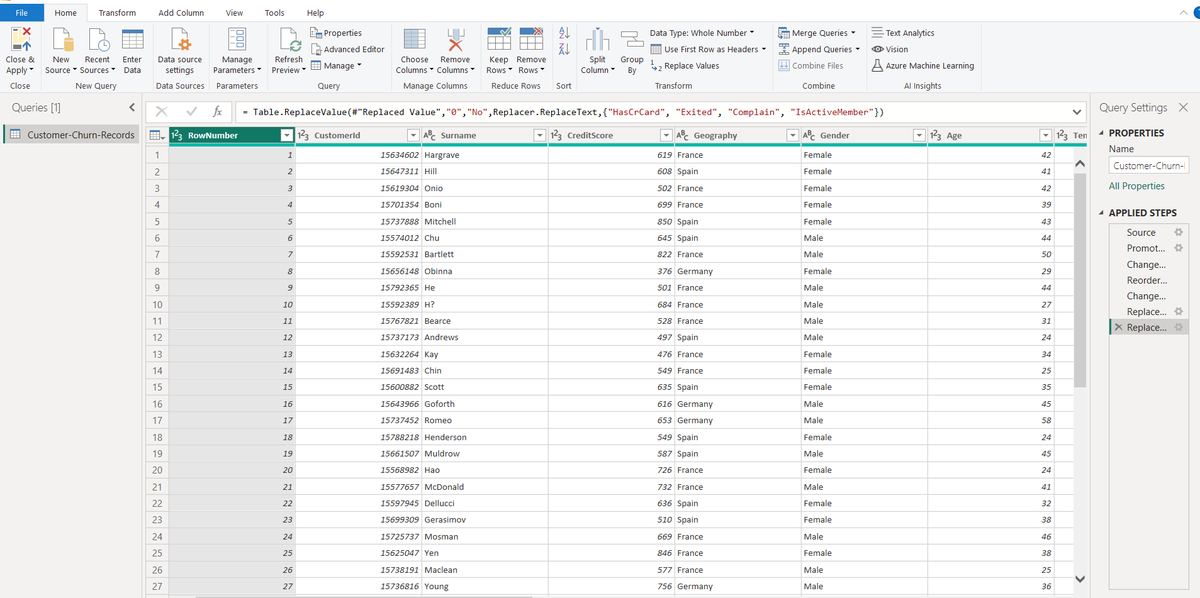
Let's discuss about features and options that Power Query provides in it's Home Tab in the ribbon and continue our series in Power BI.
It will be helpful for someone who wants to learn Power BI to land a data analyst role or a data analyst who is working in a company and their company recently migrated to Power BI for dashboard generation and more.
Also, I will mention only those options/features from Home Tab of Power Query that are most commonly used by data analyst. Feel free to try other features as well and mention the options that I may miss or you use as a data analyst from Power Query.
So, Let's discuss them one by one:
-- Choose Columns: It allows you to select only those columns that you want to see in Power BI, it doesn't delete remaining columns, it just hides them.
-- Remove Columns: It allows you to remove columns from the table.
-- Keep Rows: It allows you to keep only those rows that you want.
-- Remove Rows: It allows you to remove rows and has various options such as "Remove Top Rows", "Remove Bottom Rows", "Remove Alternate Rows" and more.
-- Split Columns: It allows you to split columns according to various criteria such as "by delimiter", "by character count", "by position" and more.
-- Group by: It allows you to group the rows in the given table according to the selected column.
-- Use first rows as header: As the name explains, it allows you to use first row of table as header.
-- Replace Values: It allows you to replace values. You simply need to select the value that you want to replace and the new value that you want to replace with.
-- Append Queries: It simply allows you to concatenate rows of multiple tables. It has another option "Append Queries as New" and it creates a new query after concatenation.
-- Merge Queries: It allows you to perform join operation between multiple tables and also has an option of "Merge Queries as New" where new query will be formed after join. I posted a detailed explanation of Merge in Power BI which can be checked.
-- Close and Apply: It allows you to confirm and apply the changes if you want and when you apply, then the updated data is provided to the model. You can also select "Close" if you don't want to feed these changes to the model.
So, These are the various features/options available in Home Tab of Power BI that you will use often as a data analyst.
#PowerBI #PowerQuery #DataAnalytics #DataAnalyst #BusinessIntelligence #DataPreparation #PowerBIHomeTab #DataCleaning #DashboardDevelopment #DataTransformation #BIWorkflows #TechSolutions #DataEfficiency #DigitalTransformation #BIInnovation #TechUS #TechUK #TechEurope #USBusiness #UKBusiness #EuropeTech #DataScienceUS #DataScienceUK #EuropeanTech #BigDataEurope #DataModeling
1
202

🚀Level up your data skills in the UK🇬🇧 ! Open doors, boost your career, and make an impact!🎓👨💻
Call: 7708758508 (or) 9488972333
Visit: dolphineducationconsultancy.…
#studyabroad #datascienceuk #ukeducation #studyinuk #ukuniversities #datascientist #dataanalysis #machinelearning

2
3
33

4 Apr 2023
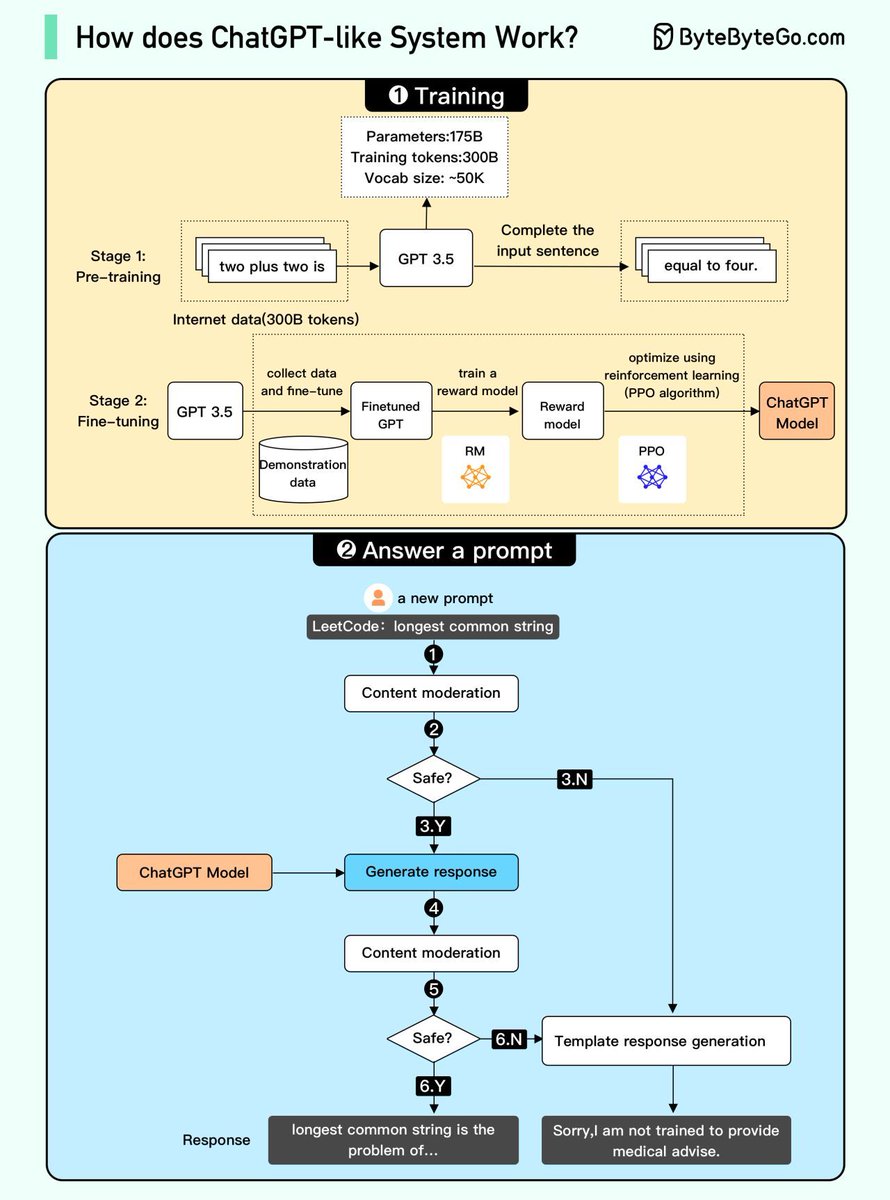
Unlocking the mystery behind ChatGPT in 7 Tweets 🤖📚 #ChatGPT #AI #questionanswering
Thread 🧵⬇️
#ChatGPT #OpenAI #languageModel #AI #machinelearning #training #finetuning #questionanswering #safetymechanism #NLP #prompt #textgeneration #codanics #datascienceuk
1
1
3
151

14 Sep 2022
Thank you @knime - enjoyed the #DataScienceUK meetup last night, and even managed to complete the cheat sheet quest :-) credly.com/badges/bb8d4869-0…
2

23 Jul 2020
Looking for the best AI/ML jobs in the UK? Check out ai-jobs.uk #AI #MachineLearning #AIjobs #DeepLearning #computervision #bigdata #ukjobs #mljobs #datascienceuk #uktechjobs #Techjobs

1
2

19 Oct 2018
BBC News - Amazon creates 1,000 UK Jobs in Data Science, Machine Learning and R&D. #datascienceuk #whyuk bbc.co.uk/news/business-4590…
1
1