
31 Oct 2024
Data Analysts perform a lot of tasks with SQL such as data cleaning, data pre-processing, data transformation, EDA, and a lot more, improving database performance using partitioning, indexing, and more.
Let's discuss SQL execution in this thread!
#SQL #DataAnalytics #DataAnalyst #SQLTips #DataScience #DataAnalysis #DatabaseManagement #SQLQueries #TechCareers #AnalyticsJobs #DataJobs #SQLForData #SQLCommunity #DataAnalystJobs #HiringDataAnalysts #AnalyticsUK #AnalyticsUSA #DataEurope #GlobalDataCareers #SQLForBeginners #DataScienceUK #DataScienceUS #TechCareersEurope #DataCareers #SQLExecution #DataScienceEurope #SQLInsights #AnalyticsWorld #USDataAnalytics #UKDataAnalytics #EuropeDataAnalytics #GlobalDataInsights #DataScienceUK #DataScienceUSA #DataScienceEurope #AnalyticsGermany #DataAnalyticsFrance #DataJobsSpain #DataAnalystNetherlands #GlobalAnalyticsJobs #AnalyticsItaly #EUDataAnalyst #WorldwideDataCommunity #DataAnalyticsSweden #DataJobsEurope #GlobalTechCareers #AnalyticsIreland #UKAnalyticsJobs #EuropeanDataCommunity
1
4
39
31 Oct 2024
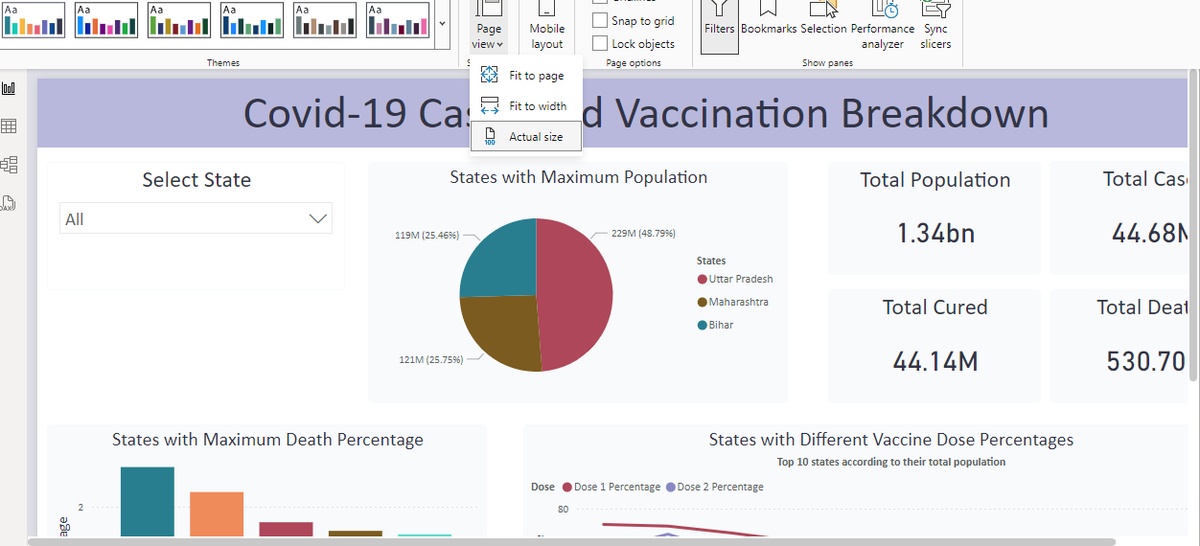
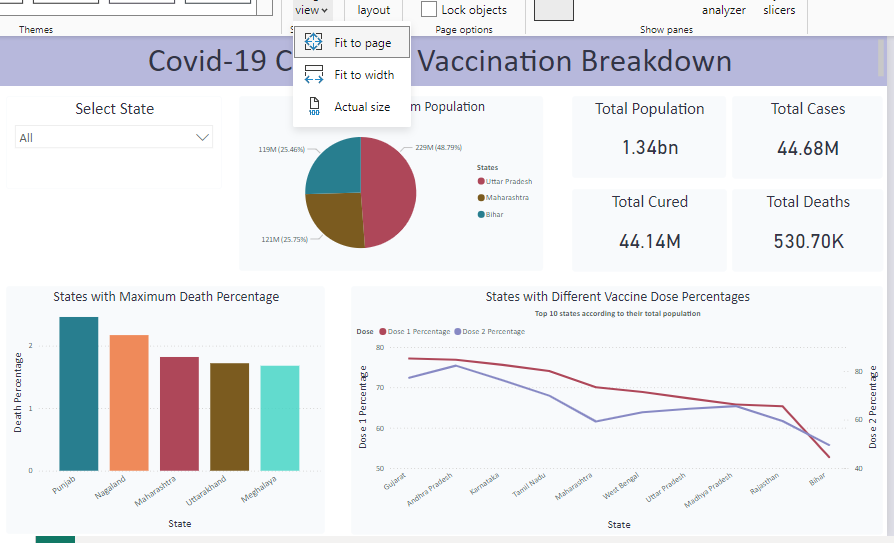
A lot of times, when we create dashboards as a data analyst, we do find a small problem and that is each dashboard page has a different layout in a different system.
Let me explain why that happens and how you can solve it in this thread.
#DataAnalytics #DataAnalyst #DashboardDesign #DataVisualization #PowerBI #ExcelTips #DataInsights #AnalyticsCareers #DataJobs #AnalyticsCommunity #DataStrategy #DashboardTips #ReportingSolutions #AnalyticsUK #AnalyticsUSA #DataEurope #TechJobsUK #TechJobsUSA #DataCareers #GlobalAnalytics #DataAnalysisWorldwide #PowerBICommunity #ExcelCommunity #DataAnalyticsUK #DataAnalyticsUSA #EuropeanDataJobs #DataJobsUS #DataJobsUK #AnalyticsEurope #DataScienceUK #DataScienceUS #TechCareersUK #TechCareersEurope #AnalyticsGermany #DataScienceGermany #DataAnalystFrance #AnalyticsSpain #DataJobsWorldwide #EuropeanDataScience #GlobalDataCareers #AnalyticsItaly #DataAnalyticsNetherlands #DataAnalystEurope #DataCommunity
1
2
60
10 Oct 2024
As a data analyst, ensuring optimal performance of SQL queries is a must and generally, whenever a SQL query is slow, subquery is the reason for that.
Also, how you implement subqueries is also important.
If you are using it to access small amount of data then it is fine but if you need to extract larger amount, then it can slow down the performance.
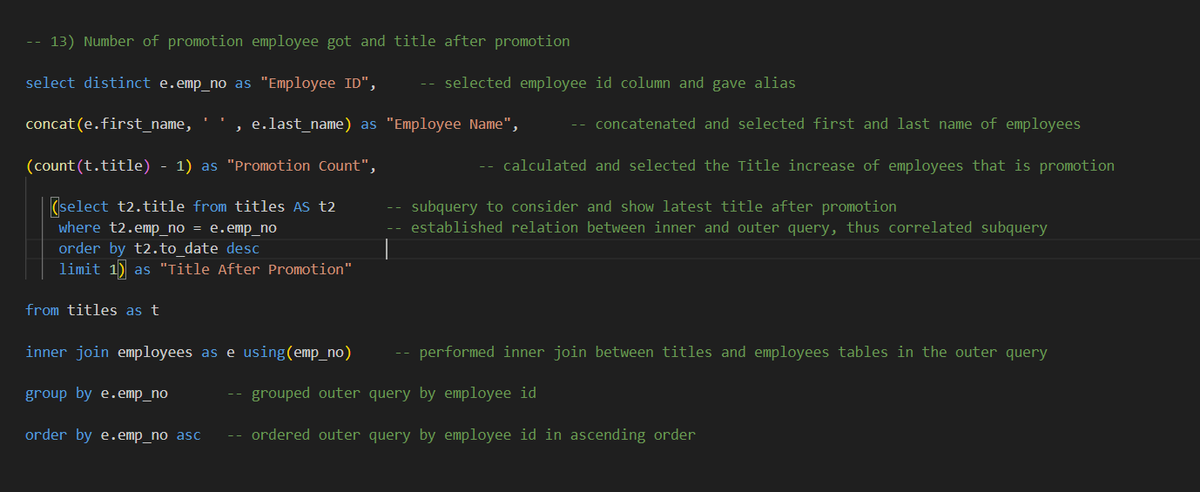
Also, if you use correlated subqueries, then your SQL query will be very slow if it is not implemented with caution.
Let's understand correlated subqueries in easy language:
𝗖𝗼𝗿𝗿𝗲𝗹𝗮𝘁𝗲𝗱 𝘀𝘂𝗯𝗾𝘂𝗲𝗿𝗶𝗲𝘀: When your inner query is connected with outer query and needs result/data from the outer query to perform operations, then it is known as correlated subqueries.
Generally, when you try to extract mutliple rows using correlated subqueries, it becomes really slow, thus SQL query slows down.
The solution for this is really simple, Use CTEs
#DataAnalytics #SQLPerformance #CTE #Subqueries #SQLQueries #CorrelatedSubqueries #DataOptimization #SQLBestPractices #DatabaseOptimization #QueryOptimization #DataAnalyst #DataEfficiency #DataQuerying #SQLTips #DataPerformance #SQLSkills #DataJobsUS #DataJobsUK #DataJobsEurope #TechSkills #DatabaseManagement #DataCareers #DataCommunity #DataInsights #SQLExperts #AnalyticsTools #DataDriven #UKTech #UKDataJobs #USTechJobs #USDataAnalyst #EuropeTech #EuropeDataJobs #UKAnalytics #USAnalytics #DataJobsEurope #TechCareersUK #DataCareersUK #DataCareersUS #TechCareersUS #TechCareersEurope #DataAnalystEurope #DataScienceUK #DataScienceUS #EuropeAnalytics #TechOpportunitiesUK #TechOpportunitiesUS #AnalyticsCareersEurope
3
54
3 Oct 2024
Continuing our 𝗣𝗼𝘄𝗲𝗿 𝗕𝗜 series, let's discuss how you can work around operations or functions that are not easily available in 𝗣𝗼𝘄𝗲𝗿 𝗕𝗜.
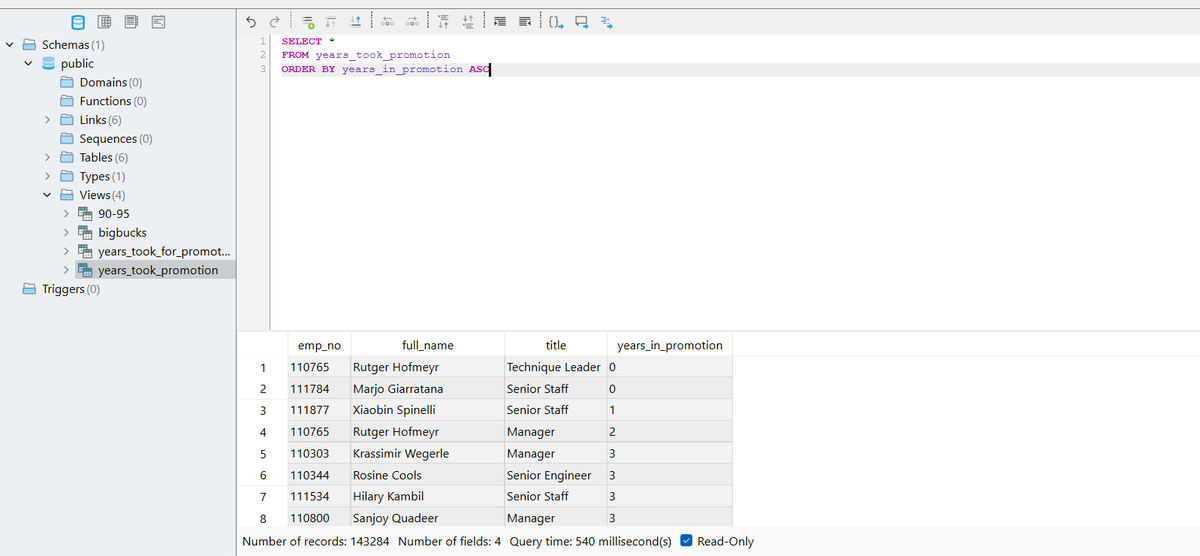
Let's consider an example for this, consider you want to use 𝗟𝗔𝗚(), 𝗟𝗘𝗔𝗗() window function in Power BI but actually you don't have any direct 𝗗𝗔𝗫 𝗳𝗼𝗿𝗺𝘂𝗹𝗮 to implement this.
You can use multiple 𝗗𝗔𝗫 𝗳𝗼𝗿𝗺𝘂𝗹𝗮𝘀 to get your way around but I personally thing that it is not efficient specially when you are connected to a database and you can write SQL queries in your database.
Also, this solution is effective only when you have access to the database and can write query to it.
𝗦o, 𝘄𝗵𝗮𝘁 𝘆𝗼𝘂 𝗰𝗮𝗻 𝗱𝗼 𝗶𝘀:
• Create a materialized view in SQL using LAG(), LEAD() or whatever function you don't have in Power BI.
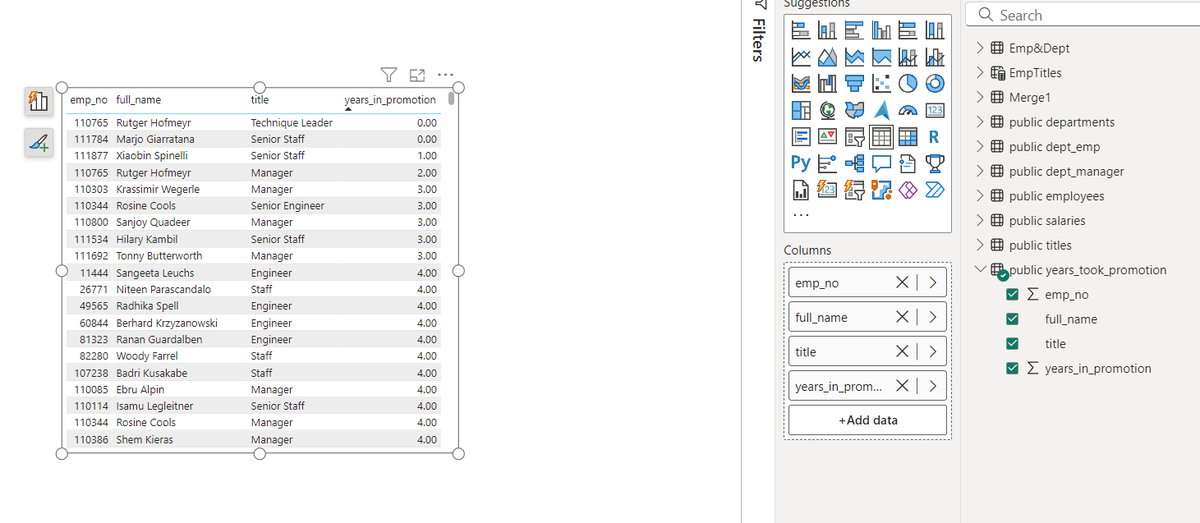
• Now, load the data using direct query and you will find the view that you created there like table.
• Then you can use that view as table and visualize the data that you want.
I attached some screenshots where I created view in SQL and then loaded the data into Power BI and visualized it using a table.
#PowerBI #SQL #DAX #WindowFunctions #LAGFunction #LEADFunction #MaterializedView #DatabaseIntegration #DirectQuery #PowerBIWorkaround #DataAnalytics #BusinessIntelligence #DataVisualization #TechSolutions #DataModeling #PowerBIExpert #AdvancedAnalytics #DataEfficiency #TechUS #TechUK #TechEurope #USBusiness #UKBusiness #EuropeTech #DigitalTransformation #BIInnovation #SQLQueries #DataAnalyst #PowerBIDesktop #DatabaseManagement #BigData #BusinessDecisions #DataScienceUK #DataScienceUS #EuropeanTech #DataDrivenUK #DigitalEconomyEU #DataInsightsEurope #DataAnalysisUS #TechCommunityUS #TechInnovationUK #DataScienceEurope
1
29
21 Sep 2024
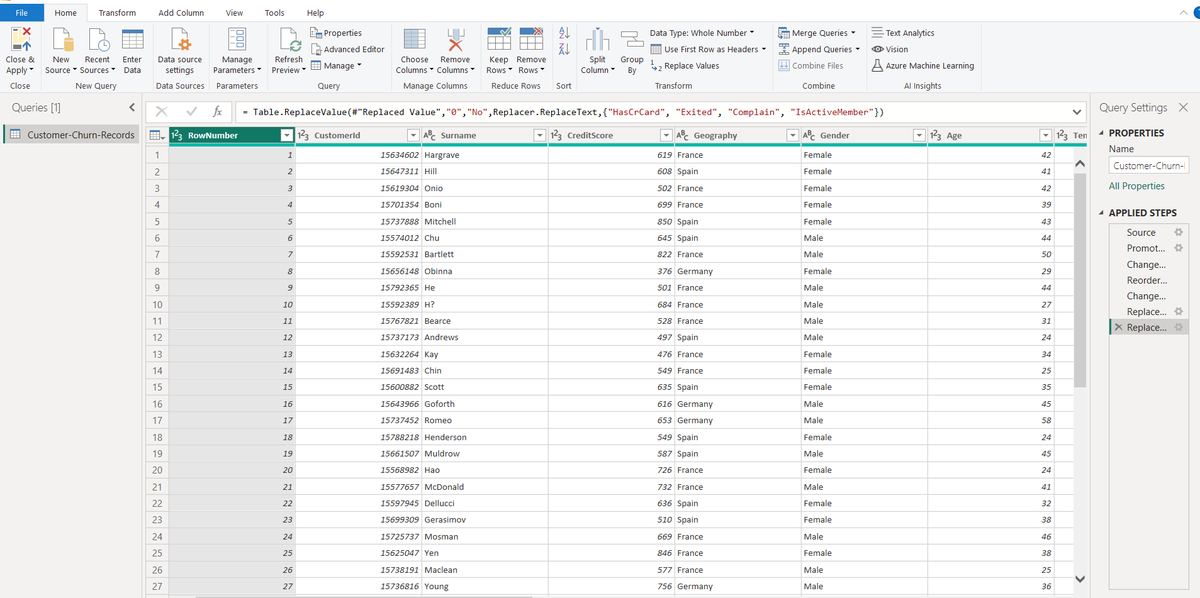
Let's discuss about features and options that Power Query provides in it's Home Tab in the ribbon and continue our series in Power BI.
It will be helpful for someone who wants to learn Power BI to land a data analyst role or a data analyst who is working in a company and their company recently migrated to Power BI for dashboard generation and more.
Also, I will mention only those options/features from Home Tab of Power Query that are most commonly used by data analyst. Feel free to try other features as well and mention the options that I may miss or you use as a data analyst from Power Query.
So, Let's discuss them one by one:
-- Choose Columns: It allows you to select only those columns that you want to see in Power BI, it doesn't delete remaining columns, it just hides them.
-- Remove Columns: It allows you to remove columns from the table.
-- Keep Rows: It allows you to keep only those rows that you want.
-- Remove Rows: It allows you to remove rows and has various options such as "Remove Top Rows", "Remove Bottom Rows", "Remove Alternate Rows" and more.
-- Split Columns: It allows you to split columns according to various criteria such as "by delimiter", "by character count", "by position" and more.
-- Group by: It allows you to group the rows in the given table according to the selected column.
-- Use first rows as header: As the name explains, it allows you to use first row of table as header.
-- Replace Values: It allows you to replace values. You simply need to select the value that you want to replace and the new value that you want to replace with.
-- Append Queries: It simply allows you to concatenate rows of multiple tables. It has another option "Append Queries as New" and it creates a new query after concatenation.
-- Merge Queries: It allows you to perform join operation between multiple tables and also has an option of "Merge Queries as New" where new query will be formed after join. I posted a detailed explanation of Merge in Power BI which can be checked.
-- Close and Apply: It allows you to confirm and apply the changes if you want and when you apply, then the updated data is provided to the model. You can also select "Close" if you don't want to feed these changes to the model.
So, These are the various features/options available in Home Tab of Power BI that you will use often as a data analyst.
#PowerBI #PowerQuery #DataAnalytics #DataAnalyst #BusinessIntelligence #DataPreparation #PowerBIHomeTab #DataCleaning #DashboardDevelopment #DataTransformation #BIWorkflows #TechSolutions #DataEfficiency #DigitalTransformation #BIInnovation #TechUS #TechUK #TechEurope #USBusiness #UKBusiness #EuropeTech #DataScienceUS #DataScienceUK #EuropeanTech #BigDataEurope #DataModeling
1
202

9 Aug 2022
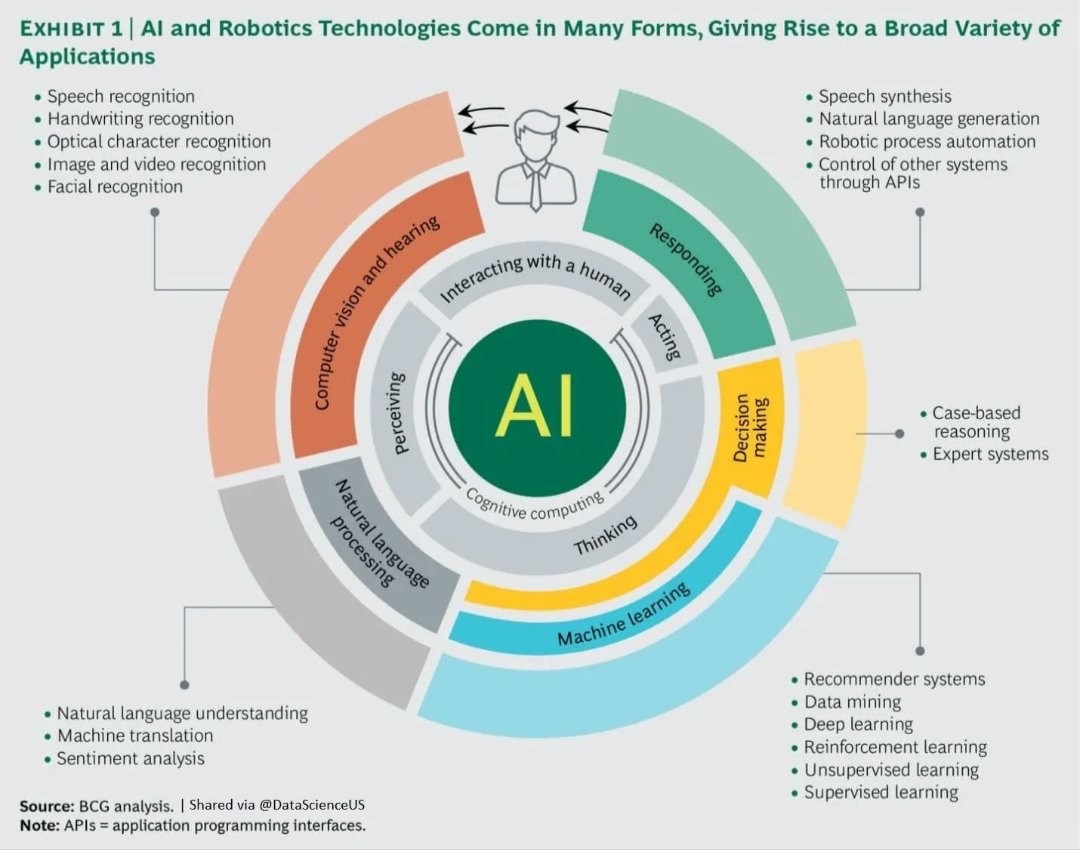
#AI & #Robotics:A Game Changers for Industries
By dataScienceUS
via @ingliguori
#API #ArtificialIntelligence #ML #cobot #MachineLearning #DataScientists #innovation #CodeNewbies #Tech #deeplearning #nocode #Python #Coding #javascript #rstats #programming #SQL #MLOps #DataScience
17
14

14 Sep 2019
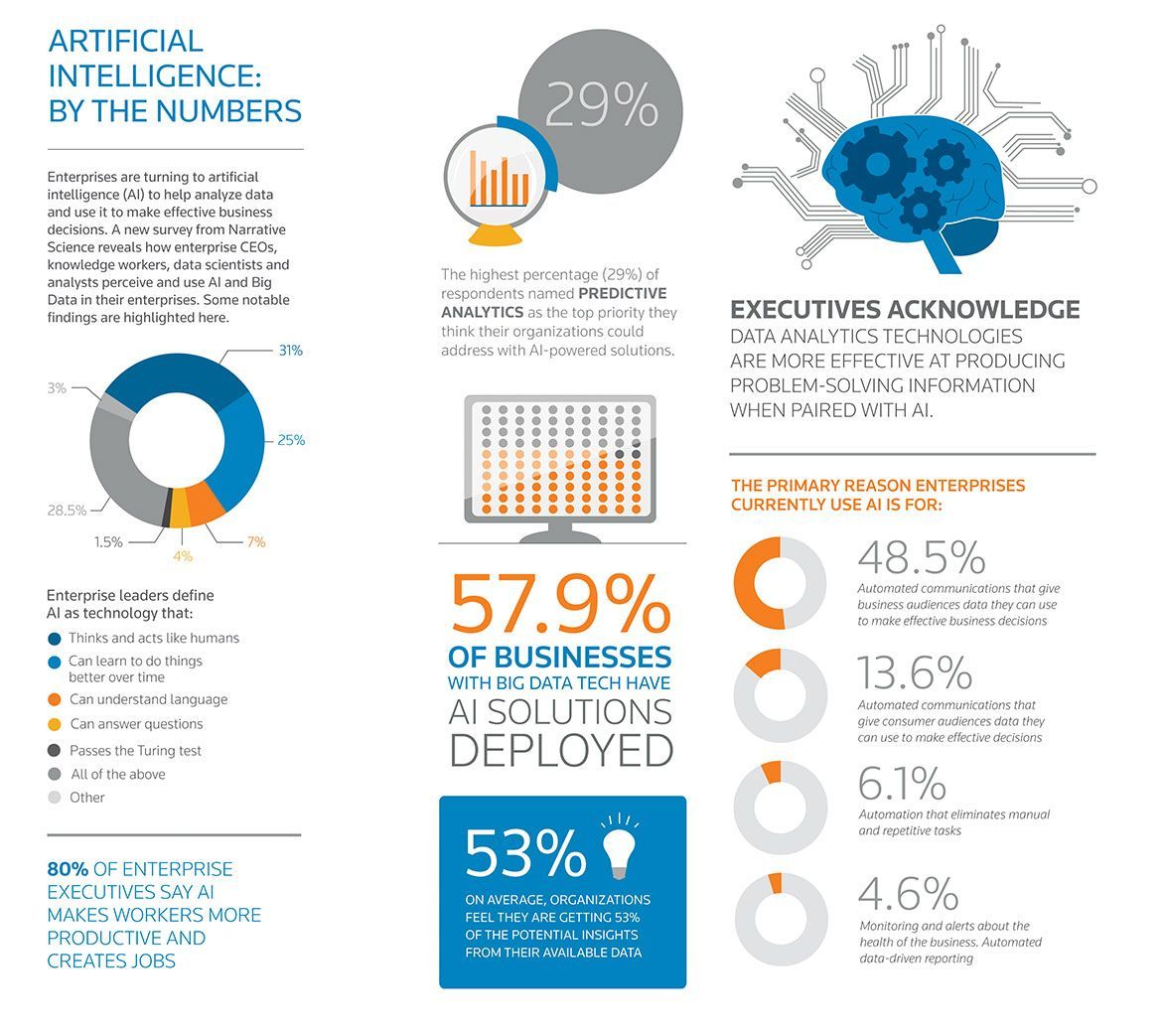
AI is getting more and more complex as the years go by, benefiting us in our lives directly or indirectly. Link >> buff.ly/2ZACKg3 @DataScienceUS via @lindagrass0 #ArtificialIntelligence #EmergingTechnologies
30
29
29 Apr 2019
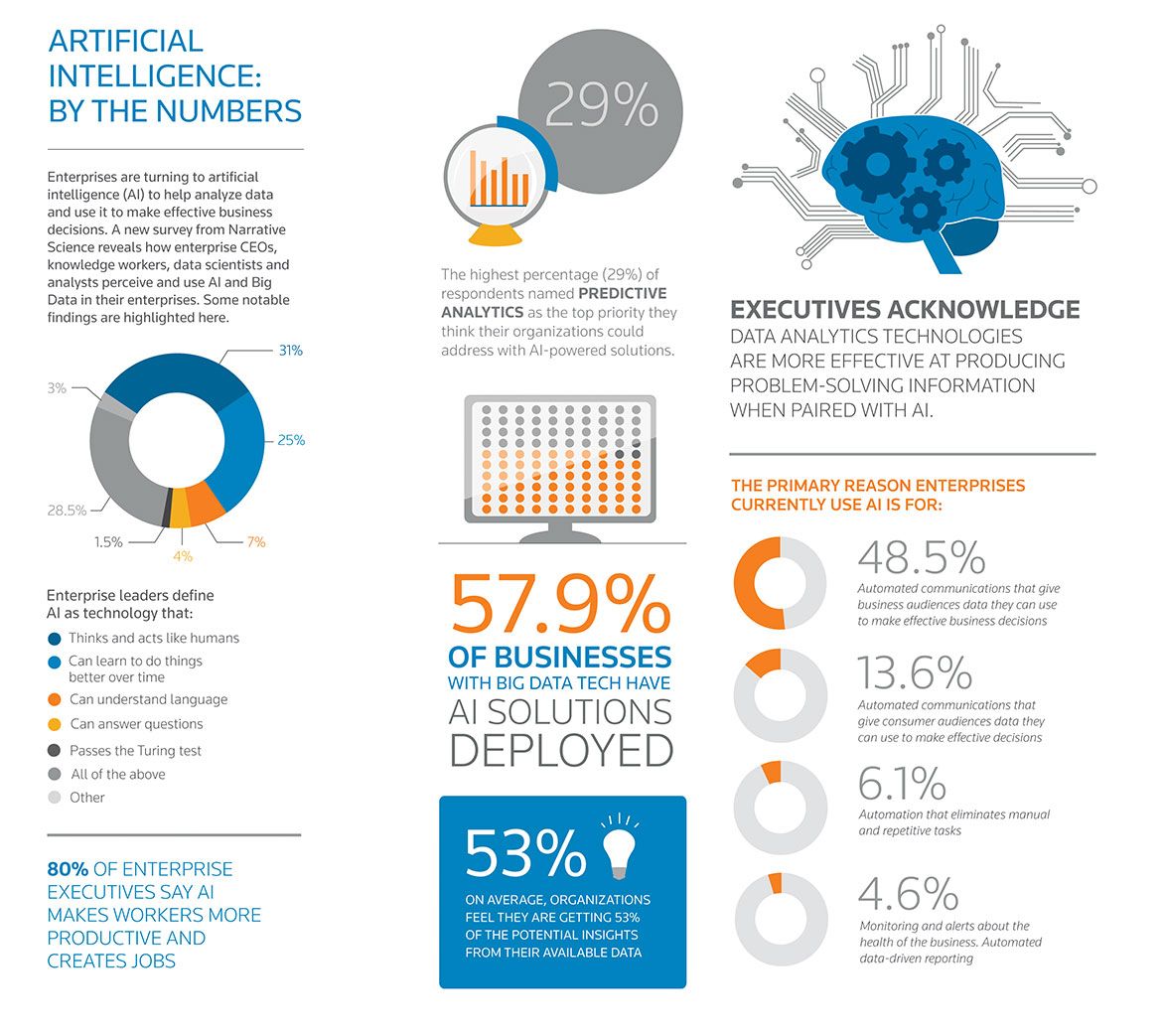
AI is getting more and more complex as the years go by, benefiting us in our lives directly or indirectly. Link >> buff.ly/2ZACKg3 @DataScienceUS via @lindagrass0 #ArtificialIntelligence #EmergingTechnologies
13
17

23 Mar 2019
Are you an Aspiring #DataScientist? Here are 6 recommendations for you by @bgweber
#CloudComputing #DataScience #HiringNow #Analytics
@tunguz @DataScienceUS @mitulmakadia @Julez_Norton @DD_FaFa_ @libertymadison @BigCloudTeam
towardsdatascience.com/six-r…

1
3

#AI
👇
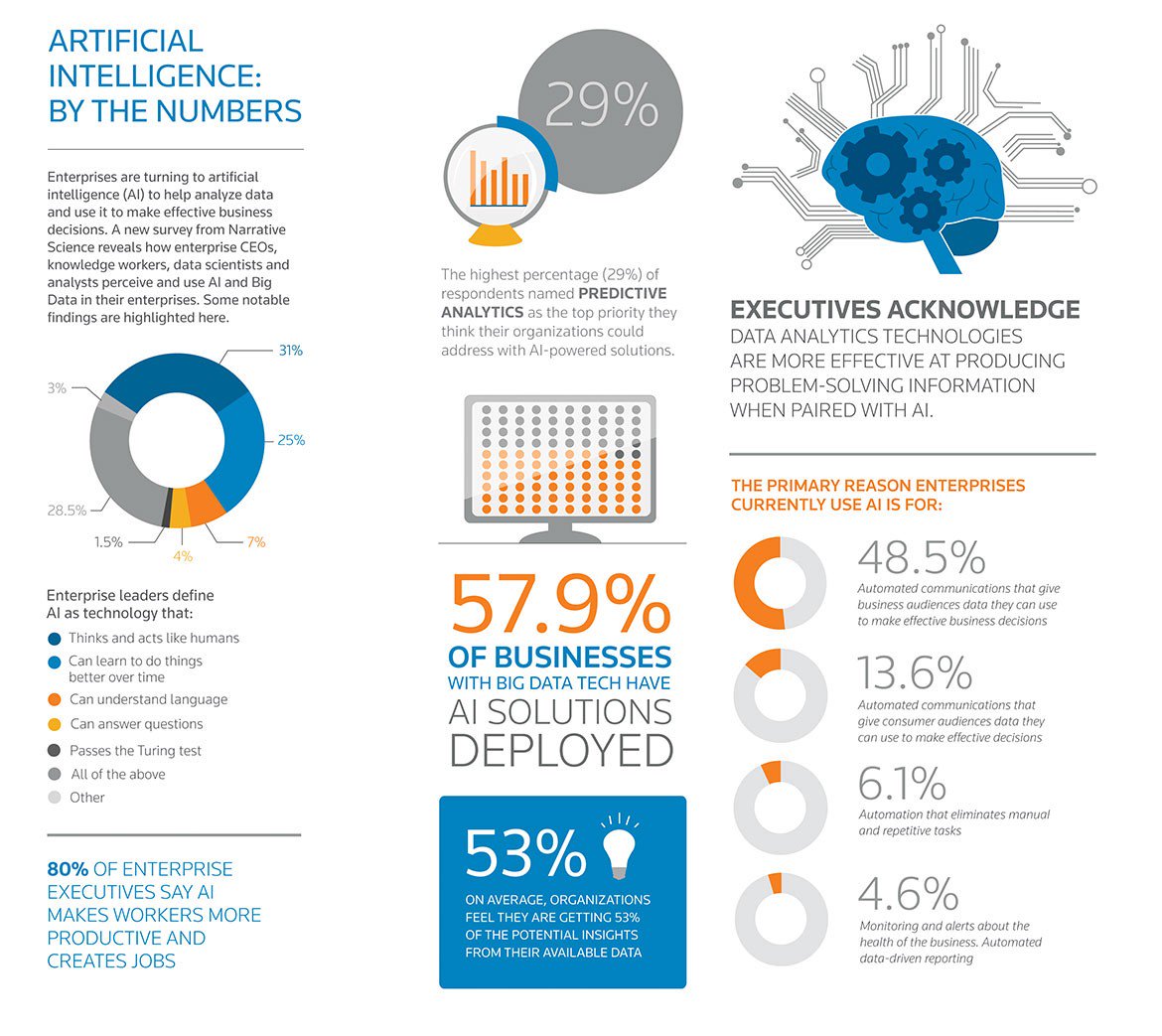
#ArtificialIntelligence- What can it do for us?
AI is getting more and more complex as the years go by, benefiting us in our lives directly or indirectly.
👉#Health and safety services.
👉Better #CyberSecurity
👉Detect fraud
v/@DataScienceUS
bit.ly/2HCgYlJ
1
2

21 Feb 2019
Wanna see a cool infographic anticipating the future of technology? Of course you do! Check out @DataScienceUS and their predictions of ingestible robots and underwater cities ➡️ myumi.ch/Lo3Rn
1

3 Dec 2018
@RoszykAdam on how will Instagram look like with the power of @magicleap - Check his prototype video | #3D #VirtualReality #VR #Disruption #DigitalTransformation #Innovation #Digitalization #Industry40 #DataScience #AI @DataScienceUS
4
4
2 Dec 2018
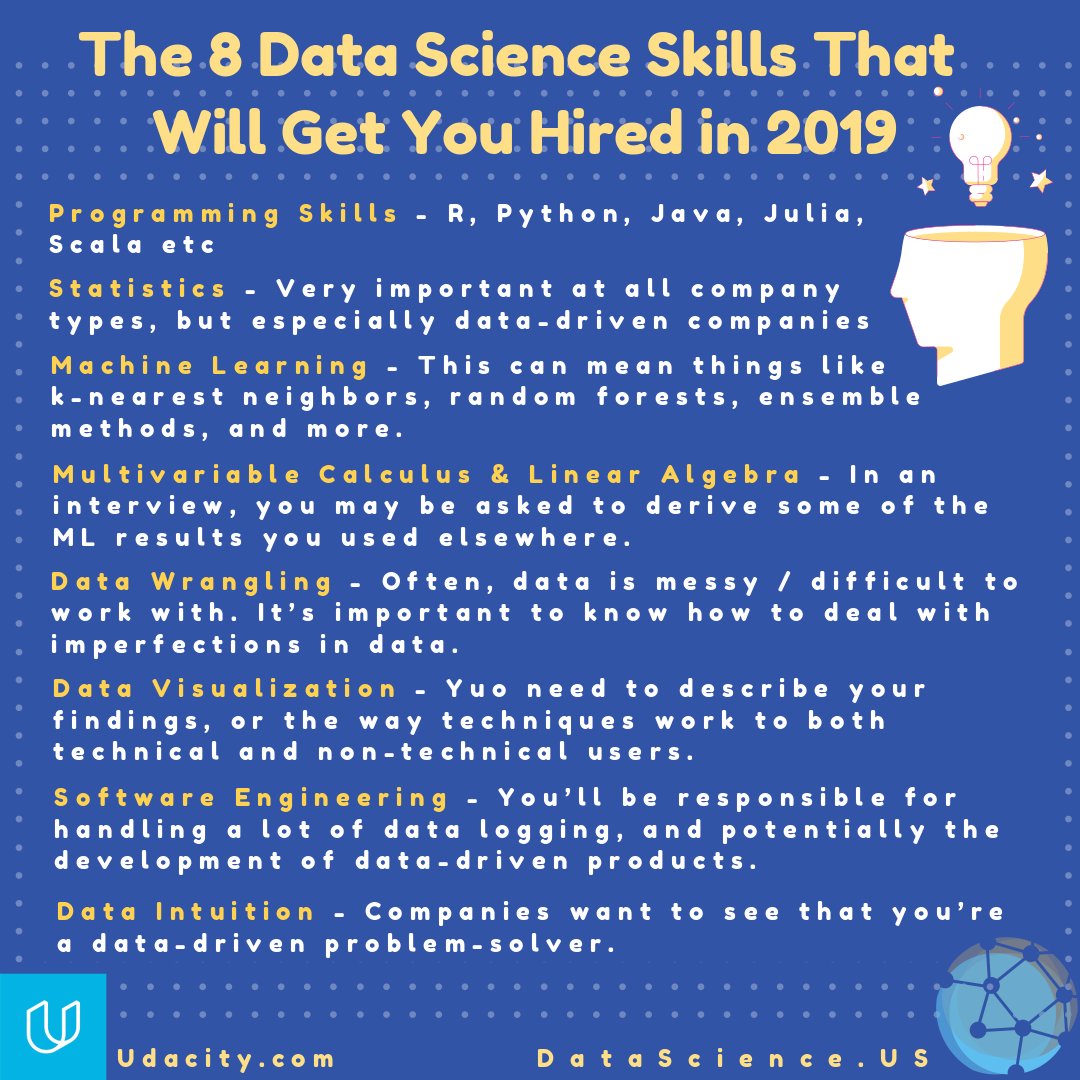
@udacity identified a core set of 8 data science competencies you should develop | @DataScienceUS #Learning #ML #MachineLearning #AI #ArtificialIntelligence #Predictiveanalytics #DeepLearning #BigData #IoT #Python #R #statistics
8
4
30 Nov 2018
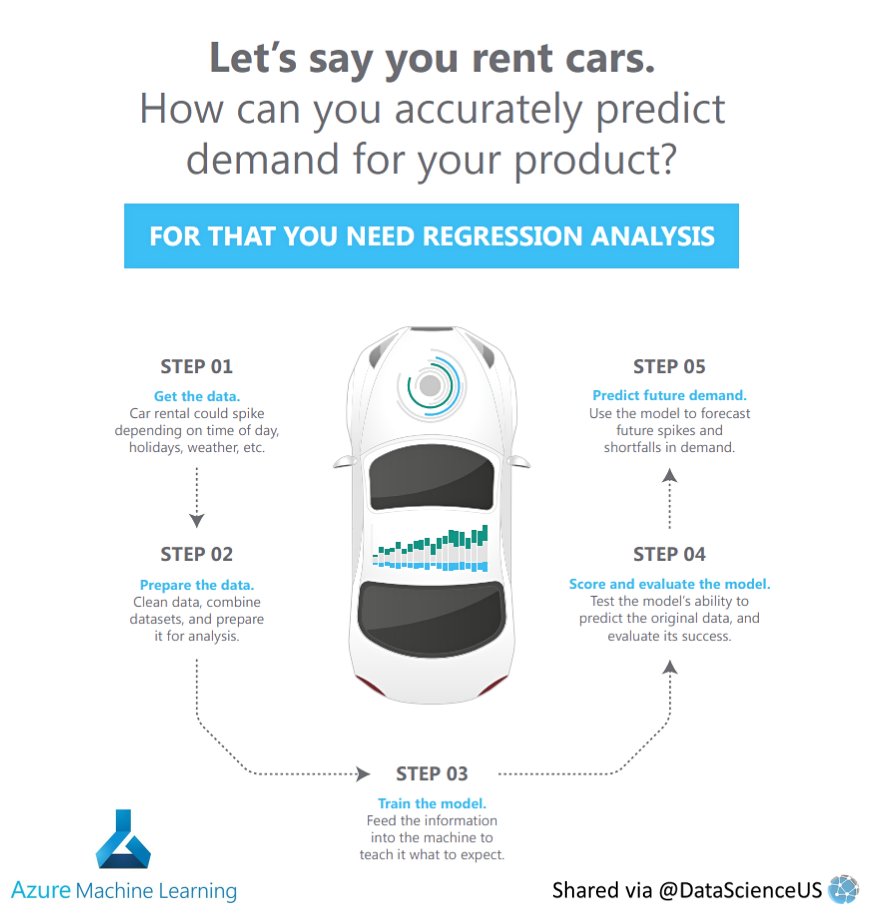
#MachineLearning models are helping businesses to predict the demand for their products, making an impact on their #future strategies | @Microsoft @Azure @DataScienceUS #Azure #DataScience #ML #AI #ArtificialIntelligence #Predictiveanalytics #DeepLearning #Disruption
2
30 Nov 2018
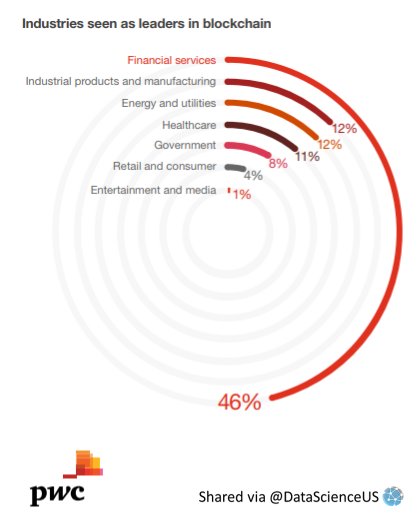
Distributed ledger #technology and #digital #tokens are rewiring #commerce. But lack of trust and regulatory uncertainty means few businesses have fully committed | @PwCUS @DataScienceUS #Disruption #Innovation #Blockchain #financial #Manufacturing #Utilities #Energy #Healthcare
1
4
30 Nov 2018
#Stan, the parking #robot, is equipped with #artificialintelligence which allows it to optimize #parking space. The #algorithm is able to park #cars tightly to create new spaces | @StanleyRobotics DataScienceUS #DataScience #ML #AI #IoT #Disruption #Innovation #Robotics
1
2
30 Nov 2018
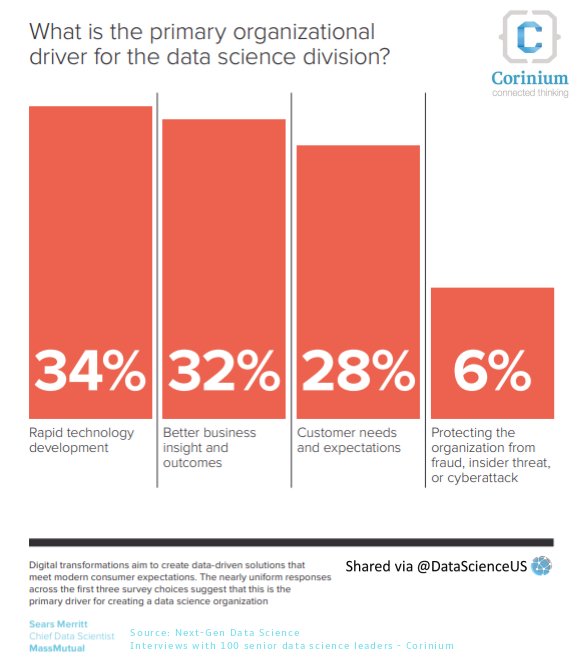
What is the primary organizational driver for the #datascience division at your #company ? Hard to tell, since we are in an early adoption, but with a rapid upcoming growth in #2019 | @CoriniumGlobal @DataScienceUS #ML #AI #Disruption #DigitalTransformation #Innovation
1
3
28 Nov 2018
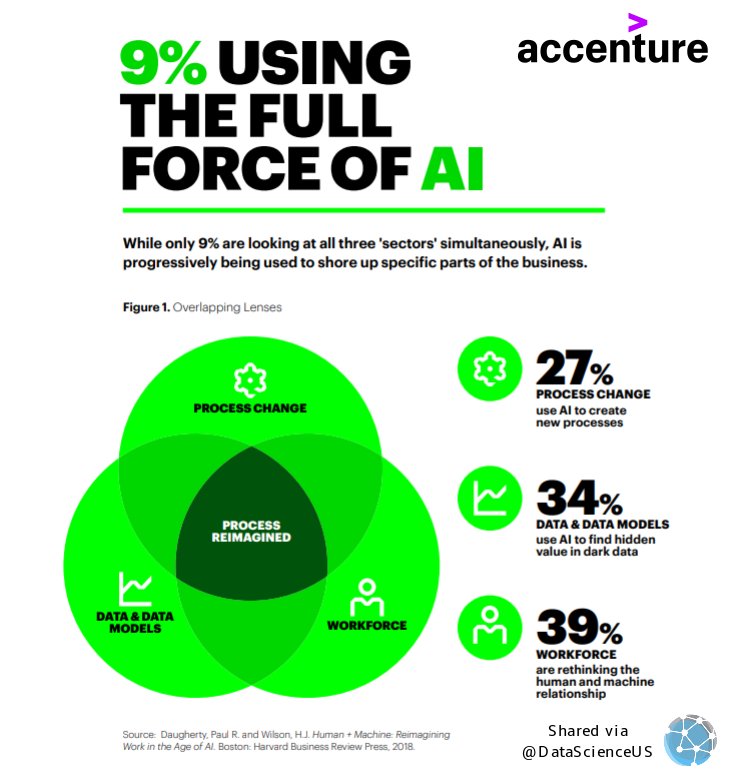
While only 9% are looking at all three 'sectors' simultaneously, #AI is progressively being used to shore up specific parts of the business | @Accenture @DataScienceUS #DataScience #MachineLearning #ArtificialIntelligence #Predictiveanalytics #DeepLearning #BigData #Disruption
1
4
28 Nov 2018
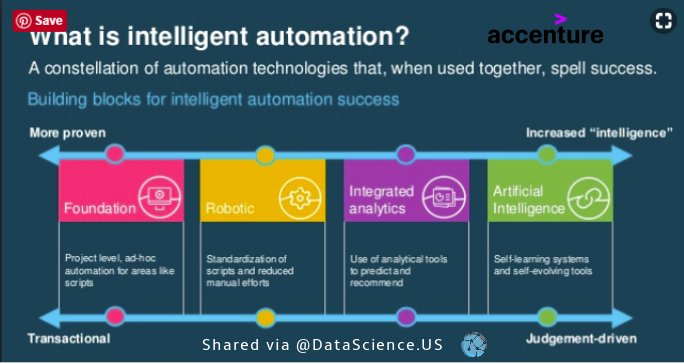
#Intelligentautomation brings fundamental changes to how #businesses and individuals work. #Machines have different strengths and capabilities that complement their #human supervisors | @Accenture @DataScienceUS #AI #ArtificialIntelligence #Automation #FutureofWork #IPA
2
27 Nov 2018
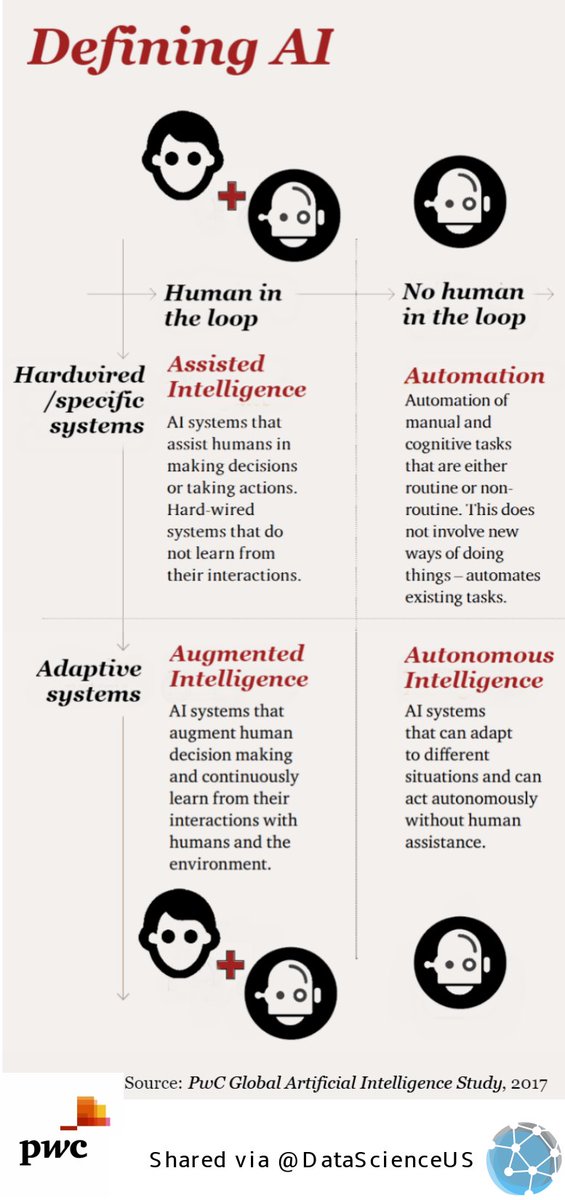
#AI, #IoT, and #robotics technologies to be key drivers of global #business #transformation in the next 3 years | @PwC @DataScienceUS | #DataScience #ML #MachineLearning #ArtificialIntelligence #Predictiveanalytics #BigData #Disruption #DigitalTransformation #Innovation
4
3