
Founder & MD Hembram I.T Solutions Pvt. Ltd | 🧑💻CSE Student | 🌐Cybersecurity Enthusiast | Social Activist | Innovating at the crossroads of tech and change
Joined August 2024
- Tweets 1,520
- Following 996
- Followers 118
- Likes 7,684
333 Photos and videos












Pinned Tweet

10 Dec 2025
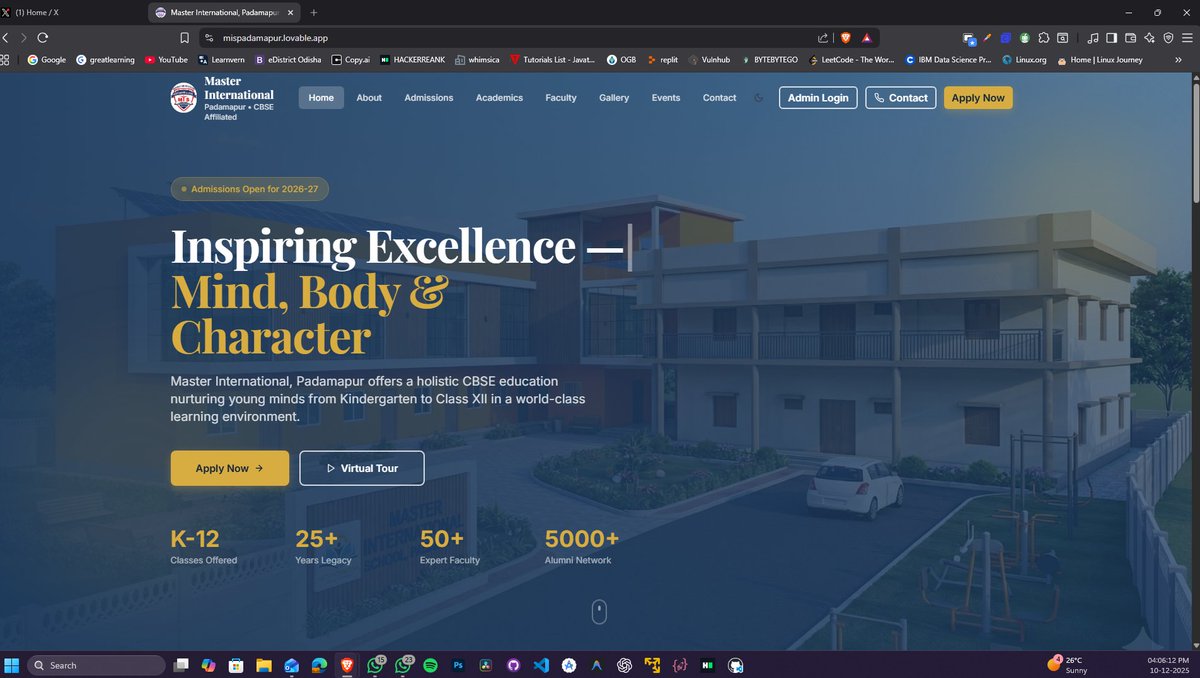
🚀 Proud to share my 3rd Client Project!
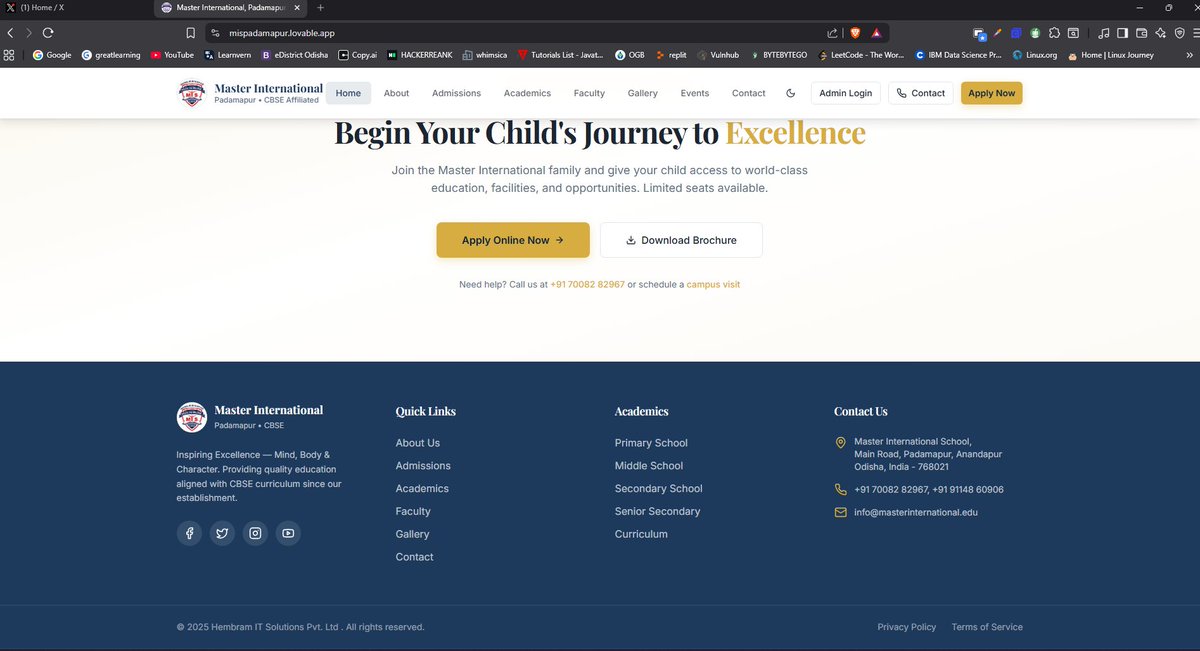
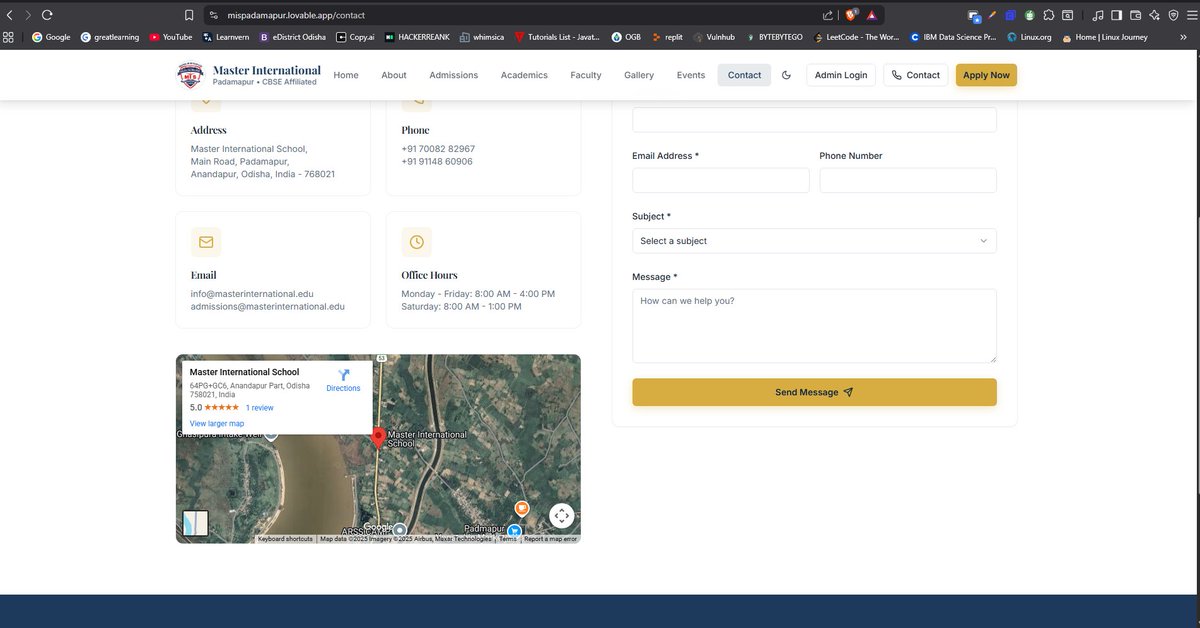
Just completed the official website for Master International School, Padmapur — a modern, clean and performance-focused site built for a CBSE institution shaping young minds.
From design to development, the goal was simple:
✨ Fast
✨ User-friendly
✨ Mobile Responsive
✨ Professional CBSE-standard UI
🔹 Key Features:
Modern Hero Section with impactful typography
✓ Full responsive layout (mobile desktop)
✓ Admissions, Academics, Faculty, and Events pages
✓ Apply Now & Admin Login modules
✓ Gallery integration
✓ Fast loading, optimized UI/UX
✓ Clean and professional school branding
This project was built with the goal of creating a high-quality digital presence for a reputed CBSE school, ensuring parents and students get a seamless browsing experience.
🔧 Tech Used:
HTML, CSS, JavaScript, React / Next.js, Tailwind CSS (adjust as per your real tech stack)
Live Now: mispadamapur.lovable.app
#WebDevelopment #SoftwareEngineer #PintuHembram #CBSE #SchoolWebsite #ClientProject

1
16
1,297
Pintu Hembram 🧑💻 retweeted

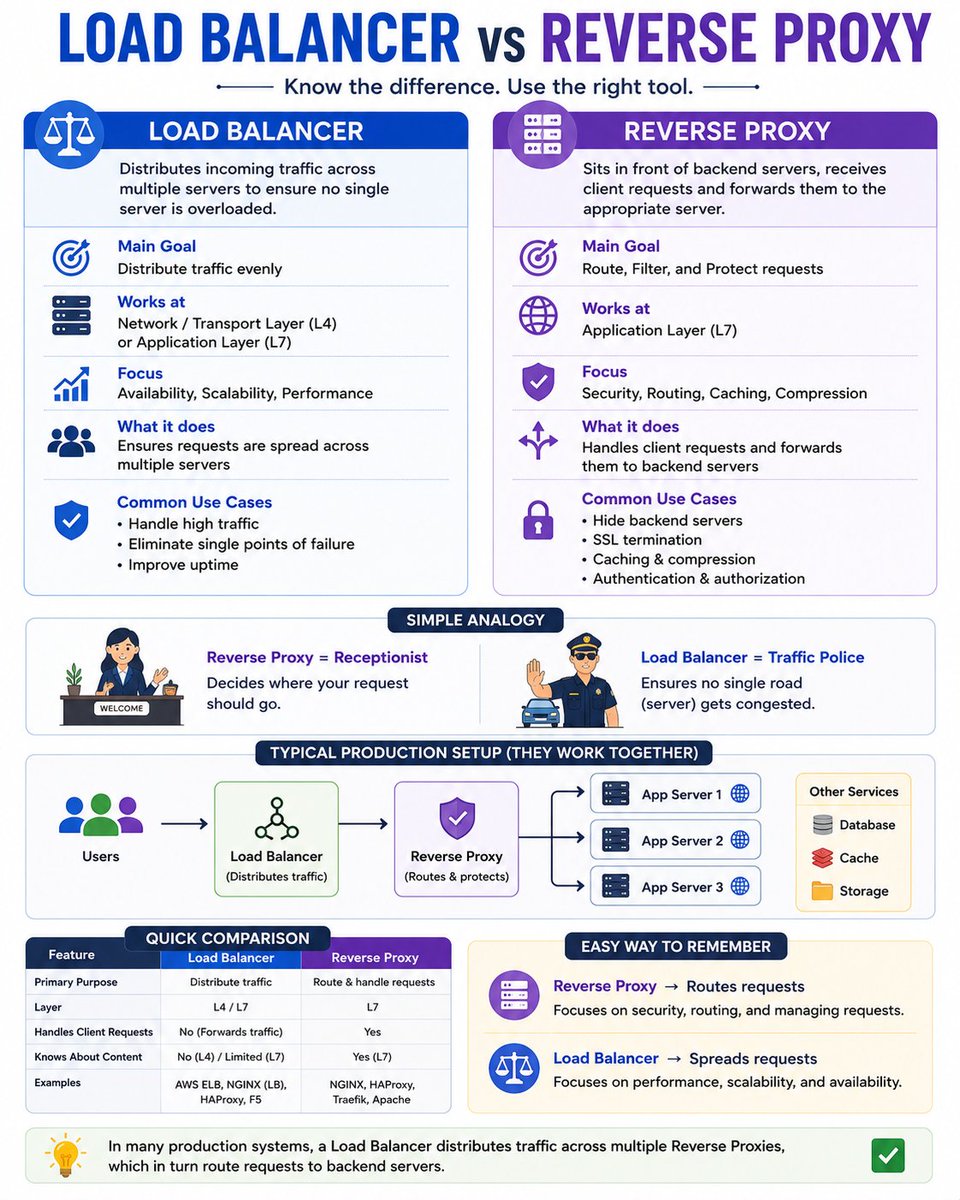
Most developers use these terms interchangeably:
❌ Load Balancer
❌ Reverse Proxy
But they solve different problems.
Here's the simplest explanation 👇
⚖️ Load Balancer
- Distributes traffic across multiple servers
- Prevents one server from getting overloaded
- Improves scalability and high availability
Think: "Spread the load."
🔄 Reverse Proxy
- Sits in front of your backend servers
- Receives client requests and forwards them
- Can also handle SSL termination, caching, compression, and security
Think: "Route and protect requests."
Real-world analogy:
👮 Load Balancer = Traffic police directing cars to different lanes.
🛎️ Reverse Proxy = Receptionist deciding which department should handle your request.
Production architecture:
Users
│
▼
Load Balancer
│
▼
Reverse Proxy
│
├── App Server 1
├── App Server 2
└── App Server 3
Easy way to remember:
- Load Balancer → Distributes traffic
- Reverse Proxy → Routes and manages traffic
Many large-scale systems use both together to build applications that are secure, scalable, and highly available.
1
3
14
345
Pintu Hembram 🧑💻 retweeted

ବିକାଶର ଧାରା, ଓଡ଼ିଶା ସାରା...
ରାଜ୍ୟର ଛାତ୍ରଛାତ୍ରୀଙ୍କୁ କୌଶଳଭିତ୍ତିକ ଶିକ୍ଷା ସହ ଯୋଡ଼ି ସେମାନଙ୍କର ଭବିଷ୍ୟତକୁ ସୁଦୃଢ଼ କରିବା ପାଇଁ ଡବଲ ଇଞ୍ଜିନ ସରକାର ବୃତ୍ତିମୂଳକ ଶିକ୍ଷାକୁ ବ୍ୟାପକ ଭାବେ ପ୍ରୋତ୍ସାହିତ କରୁଛନ୍ତି। ଏହି କ୍ରମରେ ବର୍ତ୍ତମାନ ୧୨ଟି ସେକ୍ଟରରେ ଭୋକେସନାଲ୍ ଶିକ୍ଷା ପ୍ରଦାନ କରାଯାଉଥିବା ବେଳେ ଏହା ୧,୩୦୦ଟି ସ୍କୁଲରେ ସଫଳତାର ସହ ଚାଲୁ ରହିଛି। ଶିକ୍ଷାର ଏହି ପ୍ରସାରକୁ ଆହୁରି ବଢ଼ାଇବା ପାଇଁ ଆସନ୍ତା ଶିକ୍ଷାବର୍ଷରେ ଅତିରିକ୍ତ ୪୮୦ଟି ସ୍କୁଲକୁ ଏଥିରେ ସାମିଲ କରିବା ପାଇଁ ସମସ୍ତ ପ୍ରକ୍ରିୟା ଶେଷ ହୋଇଛି, ଯାହା ପିଲାମାନଙ୍କୁ ଆତ୍ମନିର୍ଭରଶୀଳ ହେବାରେ ବିଶେଷ ସହାୟକ ହେବ।
#2YearsofLokankaSarakar
#BikasharaDharaOdishaSara

152
49
44
982
Pintu Hembram 🧑💻 retweeted

Jun 12
🐧 Day 11/30 — #Linux
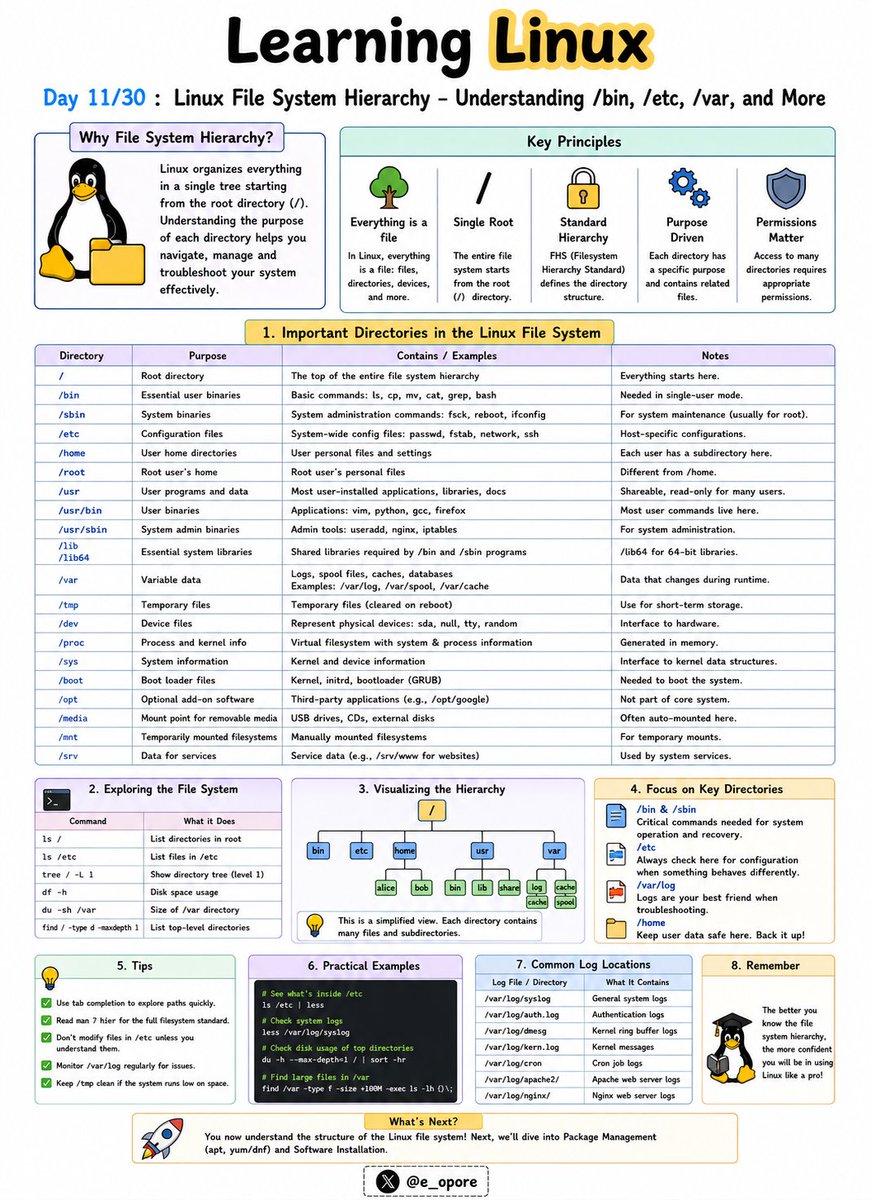
Everything in Linux is organized within a single directory tree that starts at the root directory (/).
Understanding the Linux file system hierarchy is essential for navigating, configuring, and troubleshooting Linux systems.
Linux File System Hierarchy – Understanding /bin, /etc, /var, and More
Unlike Windows, Linux does not use drive letters like C: or D:.
Instead, all files and directories exist under a unified hierarchy.
Important Linux Directories:
→ /
The root directory.
Everything on the system starts from here.
→ /bin
Contains essential command-line utilities such as:
→ ls
→ cp
→ mv
→ cat
These commands are required for basic system operation.
→ /etc
Stores system-wide configuration files.
Examples:
→ /etc/passwd
→ /etc/hosts
→ /etc/ssh/
Administrators frequently work in this directory.
→ /home
Contains personal directories for users.
Examples:
→ /home/john
→ /home/admin
This is where user files, documents, and settings are stored.
→ /var
Stores variable data that changes frequently.
Examples:
→ Logs
→ Cache files
→ Mail queues
→ Databases
Important log files are commonly found in:
→ /var/log/
→ /tmp
Stores temporary files created by applications and users.
Files here may be automatically removed by the system.
→ /usr
Contains installed software, libraries, and user applications.
Many programs are stored under:
→ /usr/bin
→ /usr/lib
→ /dev
Contains device files representing hardware components.
Examples:
→ Hard drives
→ USB devices
→ Printers
→ /proc
A virtual filesystem that provides information about running processes and system resources.
Why Understanding the File System Matters:
→ Navigate Linux efficiently
→ Locate configuration files quickly
→ Troubleshoot system issues
→ Manage servers effectively
→ Understand how Linux organizes data
Mastering the Linux file system hierarchy makes it much easier to administer servers, manage applications, and work confidently from the command line.
🐧 Grab Linux Ebook: codewithdhanian.gumroad.com/…
#Linux #LinuxTutorial #LinuxCommands #FileSystem #SystemAdministration #DevOps #CloudComputing #OpenSource #Programming #100DaysOfCode
Jun 11

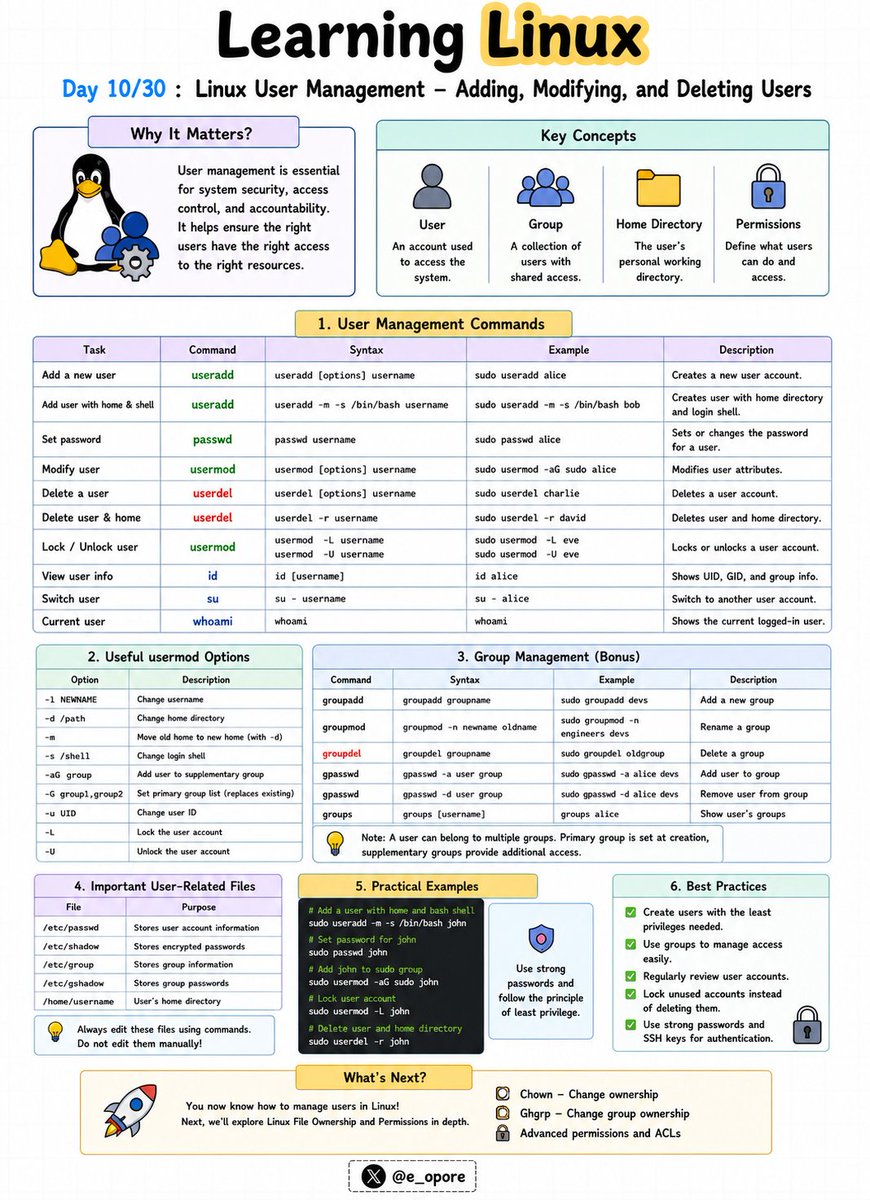
🐧 Day 10/30 — #Linux
Linux is a multi-user operating system designed to allow multiple people and services to work securely on the same machine.
Managing users properly is one of the most important responsibilities of a Linux administrator.
Linux User Management – Adding, Modifying, and Deleting Users
Every user in Linux has a unique username, user ID (UID), home directory, and set of permissions.
Essential User Management Commands:
→ useradd
→ passwd
→ usermod
→ userdel
→ id
→ whoami
Adding a User
→ sudo useradd john
Creates a new user named john.
To set a password:
→ sudo passwd john
Linux will prompt you to create and confirm a password.
Viewing User Information
→ id john
Displays the user's UID, GID, and group memberships.
→ whoami
Displays the currently logged-in user.
Modifying a User
→ sudo usermod -l johnny john
Changes the username from john to johnny.
→ sudo usermod -aG developers john
Adds the user john to the developers group.
Deleting a User
→ sudo userdel john
Removes the user account.
→ sudo userdel -r john
Removes the user account and deletes the user's home directory.
Understanding User Groups
Groups simplify permission management by allowing multiple users to share access to files and resources.
Examples:
→ developers
→ admins
→ docker
Instead of assigning permissions individually, administrators can manage access through groups.
Why User Management Matters:
→ Improve system security
→ Control resource access
→ Manage team environments
→ Protect sensitive files
→ Administer Linux servers effectively
Mastering user management is a foundational skill for Linux administrators, DevOps engineers, cloud engineers, and cybersecurity professionals.
🐧 Grab Linux Ebook: codewithdhanian.gumroad.com/…
#Linux #LinuxTutorial #LinuxCommands #UserManagement #SystemAdministration #DevOps #CloudComputing #CyberSecurity #OpenSource #100DaysOfCode
14
74
1,940

Pintu Hembram 🧑💻 retweeted

Jun 12
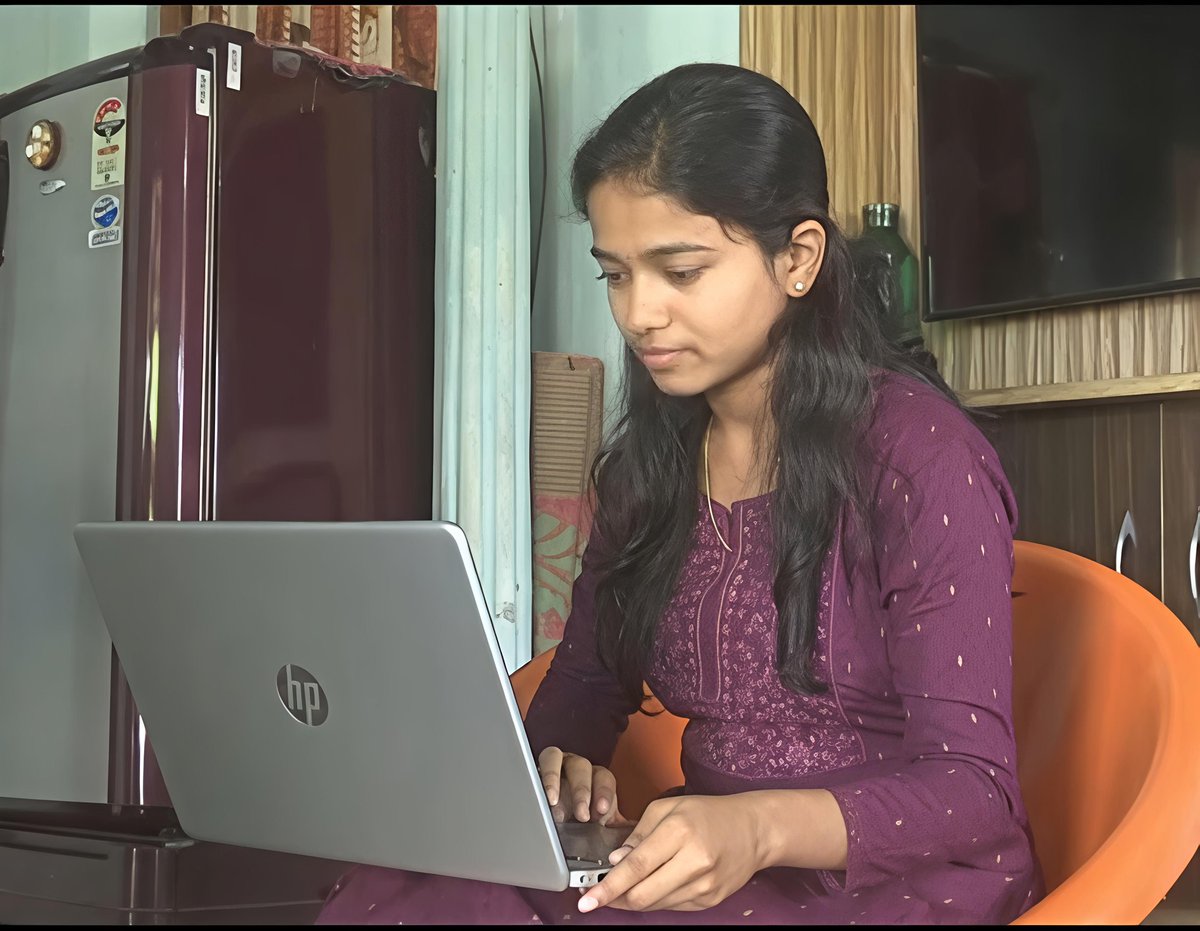
Meet Ashritha Reddy, who completed her B.Tech in 2022 in the ECE branch from a Tier-3 engineering college. A farmer's daughter from Telangana, she has secured a job at NVIDIA with a package of ₹52 lakhs per annum.
Born and raised in a small village in Telangana, Ashritha grew up in a family where farming was the only source of income. Her parents had no formal education and worked tirelessly to support the family.
Instead of being defined by her circumstances, Ashritha used them as motivation to aim higher. After completing her B.Tech in ECE, she decided to prepare for the GATE exam which opens doors to masters in top engineering institutes
In her first attempt, she secured an All India Rank of 3,000 in GATE. In her second attempt the following year, she achieved an outstanding AIR 36 at the national level. She then joined IISc Bengaluru to pursue her M.Tech.
Now, she has been selected by NVIDIA with a salary package of ₹52 lakh per annum.

52
159
2,008
178,391
Pintu Hembram 🧑💻 retweeted

Jun 11
🔐 Introducing B.Cyber. at IIT Kanpur — a first-of-its-kind undergraduate program designed to create future cybersecurity leaders.
From rigorous academic foundations to real-world cybersecurity challenges, the program offers a unique pathway to build expertise in protecting critical digital systems.
Admission to the program will be based on a special selection process involving shortlisting through JEE Main performance and demonstrated prior work in cybersecurity, followed by a test that includes a hackathon.
🎥 Watch @Director_IITK, Prof. @agrawalmanindra share the vision behind this new initiative.
@EduMinOfIndia | @wadhwanif | @IndiaDST | @HubC3i | @ugc_india | @AICTE_INDIA | #IITKanpur #BCyber #Cybersecurity #FutureOfTechnology #IITK
34
117
481
67,004
Pintu Hembram 🧑💻 retweeted

Jun 11
Paid Internship 2026-27 @DRDO_India Dehradun
🎓 Eligibility
• Final-year B.E./B. Tech. students in Electronics & Communication, Computer Science, or Mechanical Engineering
• Recommendation from Head/Dean/Principal required.
📅 Last Date to Apply: 30 June 2026
Official page: drdo.gov.in/drdo/en/offering…
Notification: drdo.gov.in/drdo/sites/defau…
An opportunity to gain hands-on experience in Software Defined Radio, Satellite Communication, Data Links, and Defence Technologies at DRDO's premier laboratory.
#DRDO #Internship #BTech #EngineeringStudents #ResearchInternship #DefenceTechnology #ProfGRSinha #CareerOpportunity

5
37
207
17,482
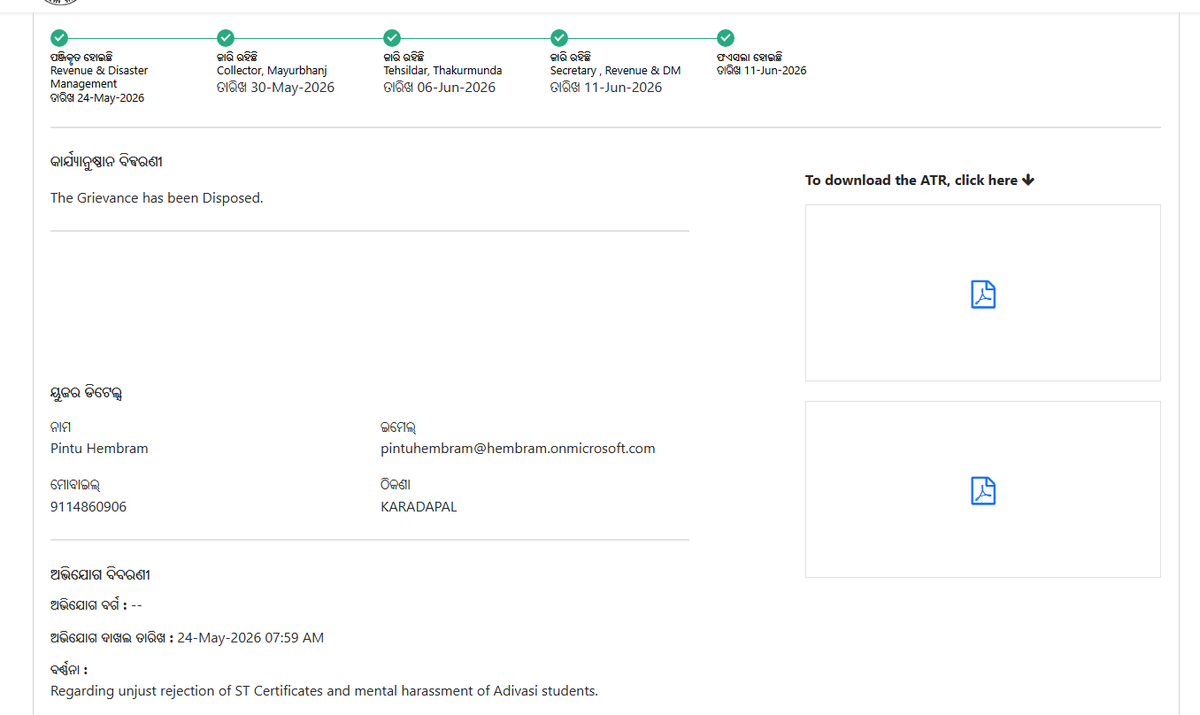
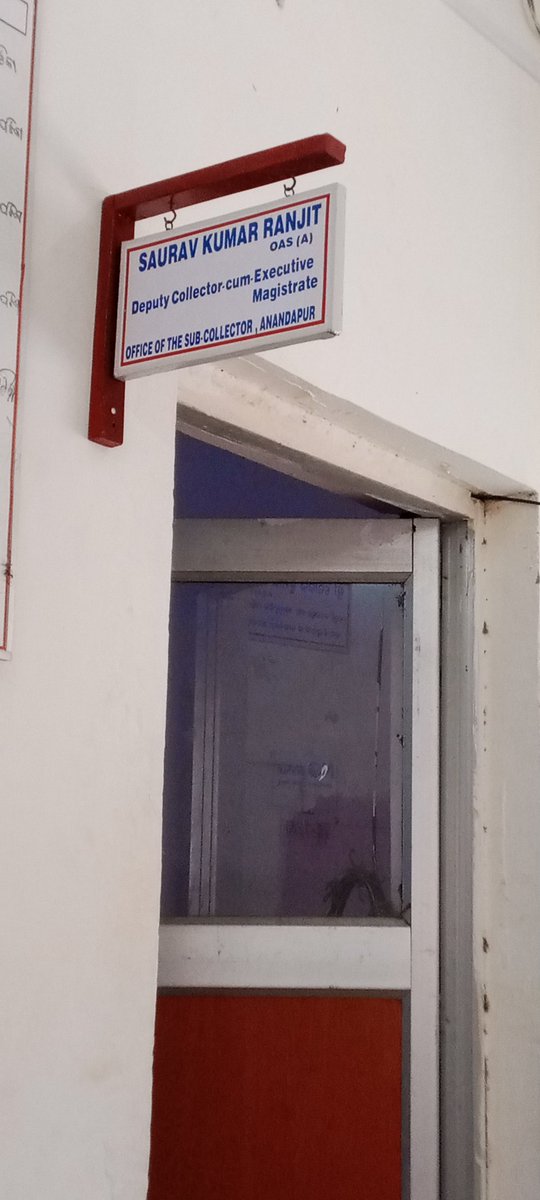
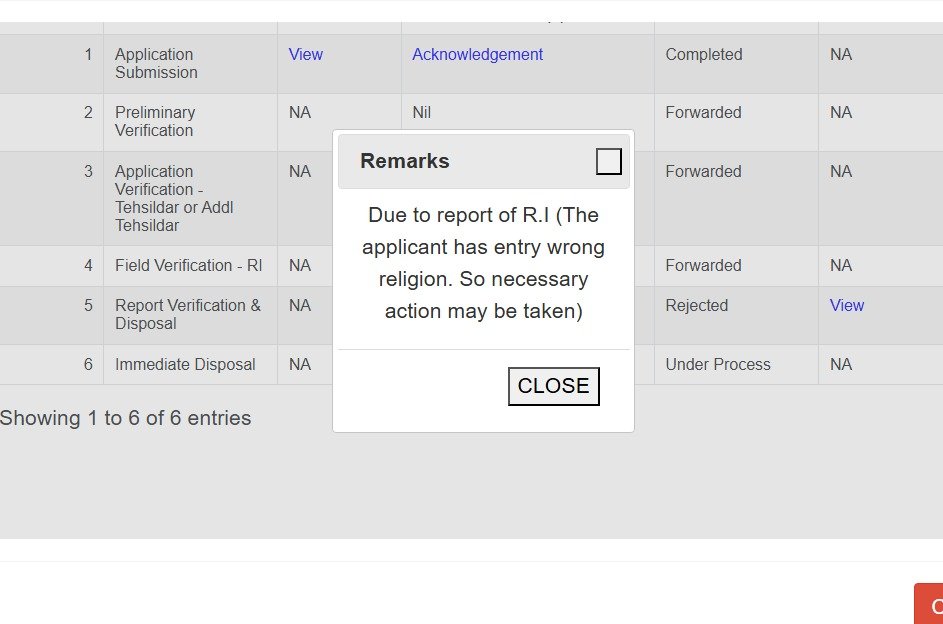
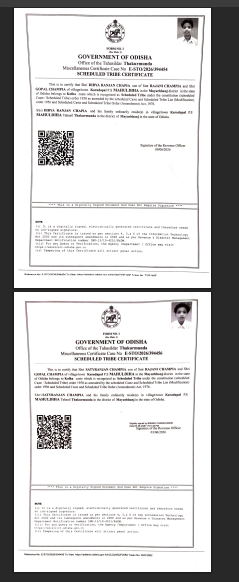
ଆଦିବାସୀ ହେବା ସତ୍ତ୍ୱେ ST Certificate ପାଇବାରୁ ବଞ୍ଚିତ କରାଯାଉଛି।
ଥାକୁରମୁଣ୍ଡା ତହସିଲର RI ଓ Tahasildar ଙ୍କ ଏହି ମନୋଭାବ ଗଭୀର ଚିନ୍ତାର ବିଷୟ।
“Wrong religion entry” କହି ST application reject କରିଦେବା କେତେ ଯୁକ୍ତିସଂଗତ?
ଆଦିବାସୀ ମାନେ ST ଏହା କି ସେଠାକାର ଅଧିକାରୀମାନେ ଜାଣିନାହାନ୍ତି?
@sureshkpujari
13
5
10
278
Pintu Hembram 🧑💻 retweeted

Jun 11
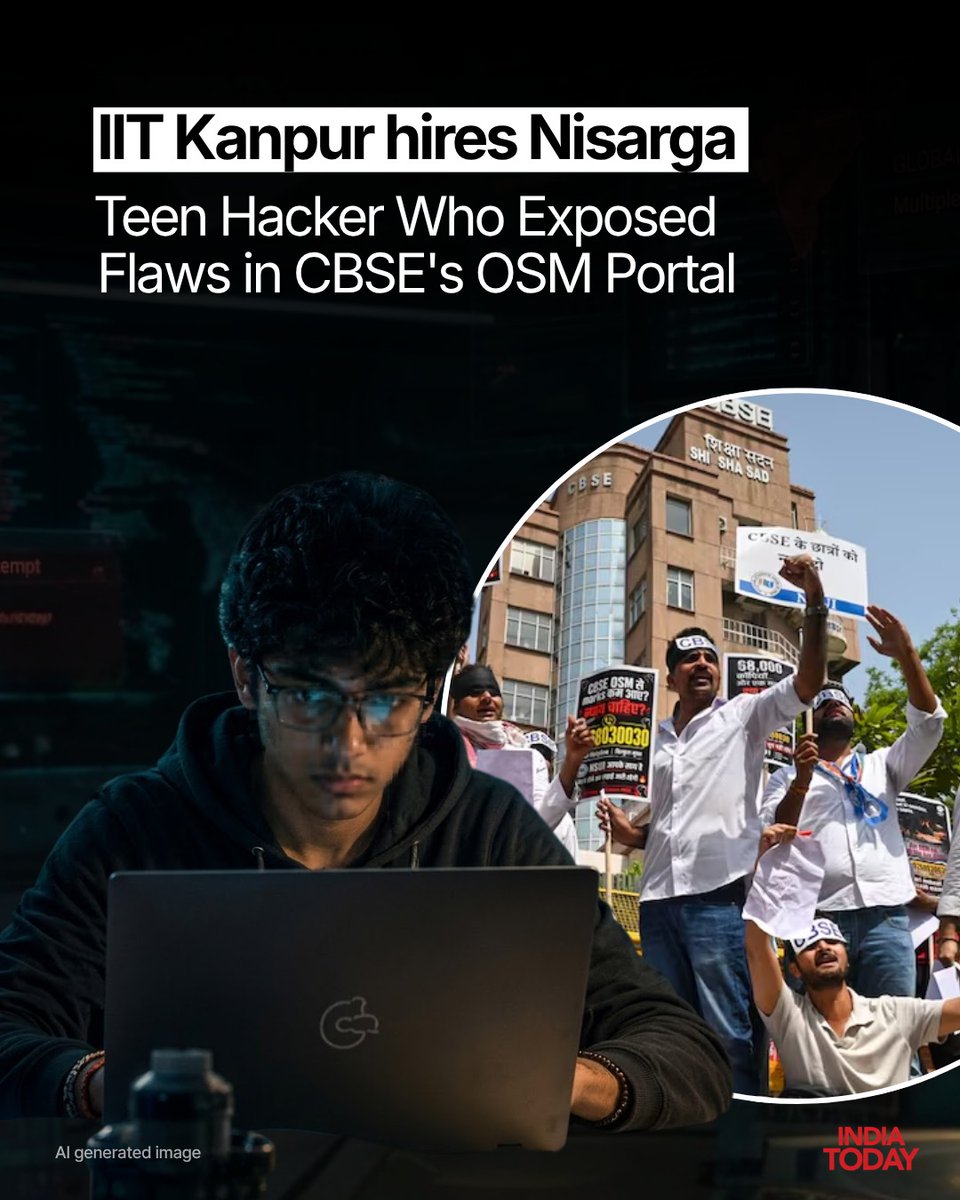
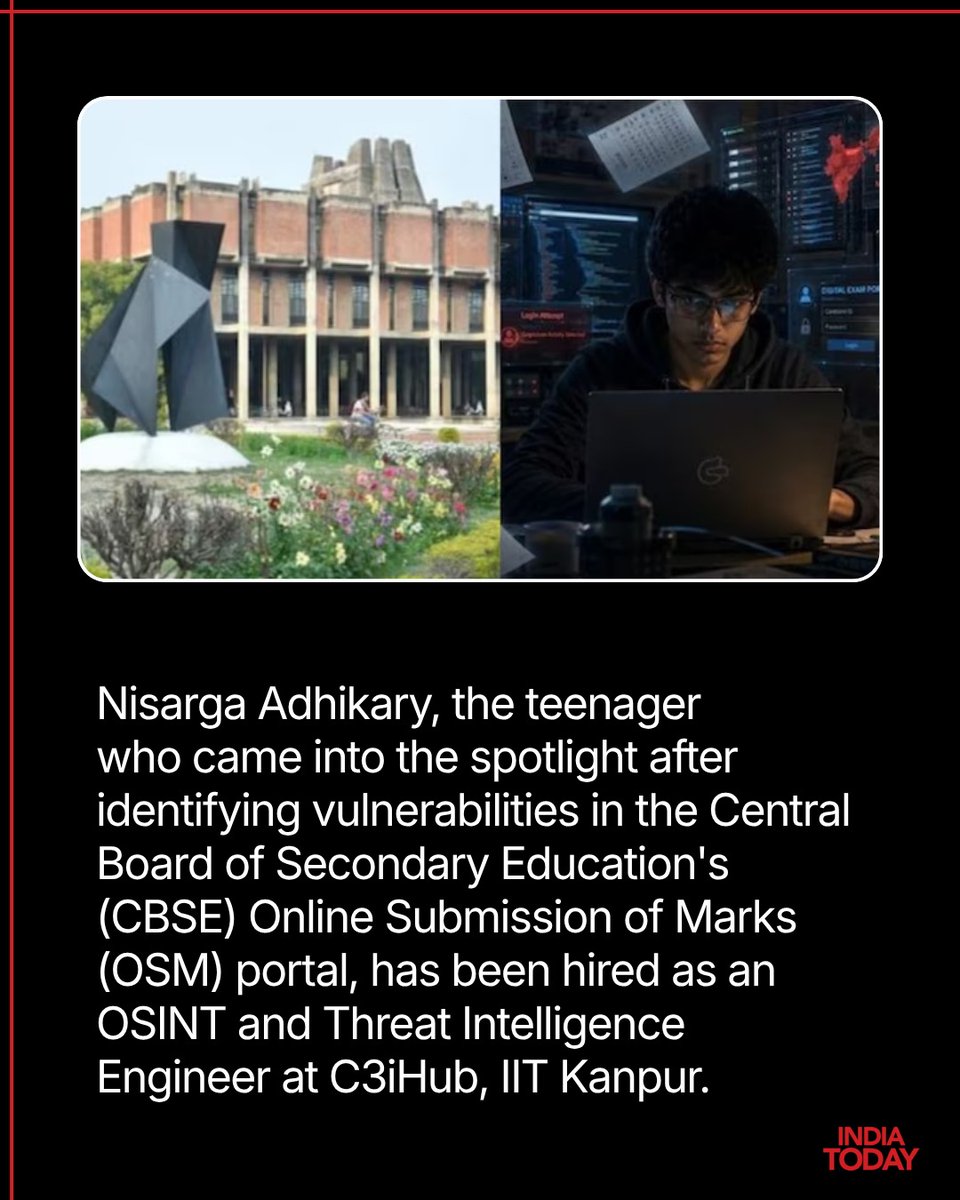
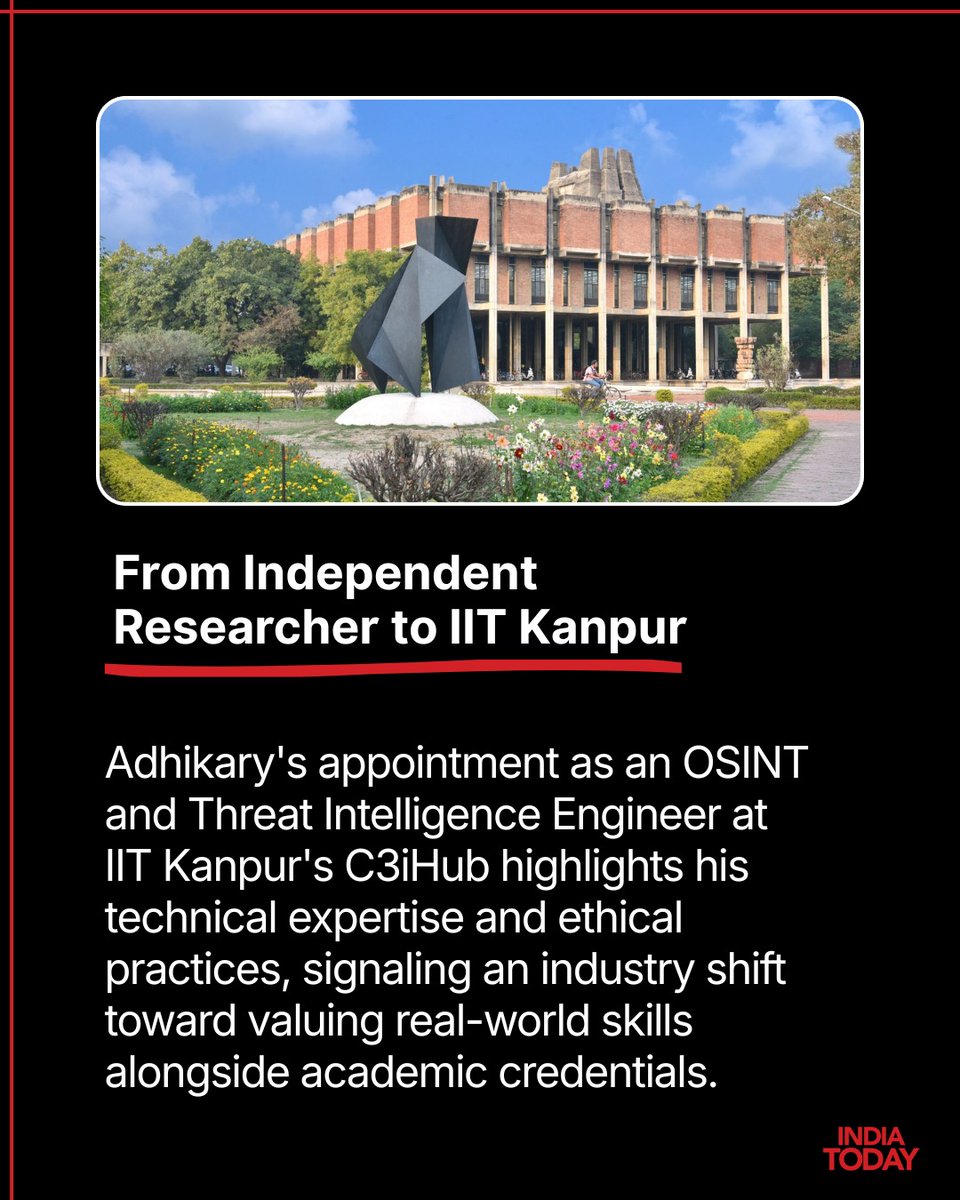
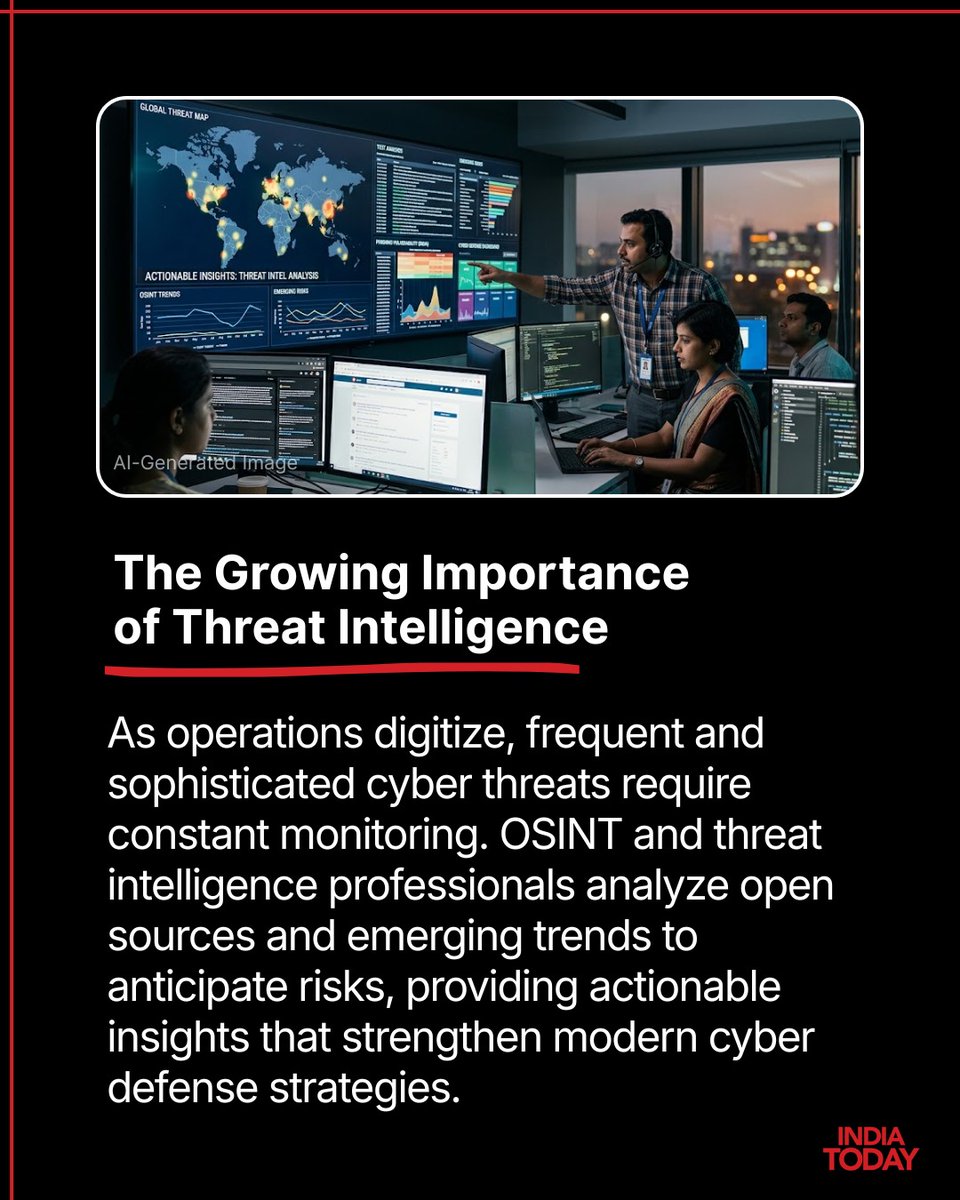
Teenage researcher Nisarga Adhikary, who gained national attention for identifying security flaws in the CBSE's Online Submission of Marks (OSM) portal and demonstrating vulnerabilities by playing the viral "Bad Apple" animation on a CBSE portal, has been appointed as an OSINT and Threat Intelligence Engineer at IIT Kanpur's C3iHub. This significant milestone transitions his responsible vulnerability disclosures into a professional role at one of India's premier cyber defense research centers. Adhikary's recruitment reflects a broader industry shift that increasingly values demonstrated, real-world skills and ethical practices alongside traditional academic credentials. His journey serves as a powerful example for aspiring professionals, proving that age is no barrier to making meaningful, responsible contributions to India's rapidly expanding cybersecurity sector.
Read More: intdy.in/nbsyt1
#NisargaAdhikary #IITKanpur #C3iHub #OSINT #ThreatIntelligence #CyberSecurityIndia #EthicalHacking #InfoSec #CyberDefense #TechNews #SkillsOverDegrees #YouthInTech
8
38
4,582
Pintu Hembram 🧑💻 retweeted

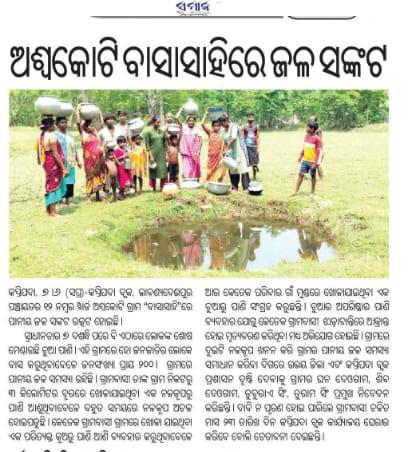
ମୟୂରଭଞ୍ଜ ଜିଲ୍ଲା କପ୍ତିପଦା ବ୍ଲକ ଲାବଣ୍ୟଦେଈପୁର ପଞ୍ଚାୟତ ଅଶ୍ୱକୋଟି ବାସାସାହିରେ ପାନୀୟ ଜଳ ସଂକଟ, ଲୋକଙ୍କ ଶୋଷ ମେଣ୍ଟାଉଛି ଚୁଆ ପାଣି । ଗ୍ରାମରେ ଦୁଇ ଗୋଟି ନଳକୂପ ଖନନ ଦାବି , ଦାବି ନ ପୂରଣ ହୋଇ ପାରିଲେ ଗ୍ରାମବାସୀଙ୍କ ଦ୍ଵାରା ଜୁନ ୨୩ ତାରିଖ ଦିନ କପ୍ତିପଦା ବ୍ଲକ କାର୍ଯ୍ୟାଳୟ ଘେରାଉ କରାଯିବ @RWSS_Odisha @DM_Mayurbhanj



2
3
52
Pintu Hembram 🧑💻 retweeted

Jun 9
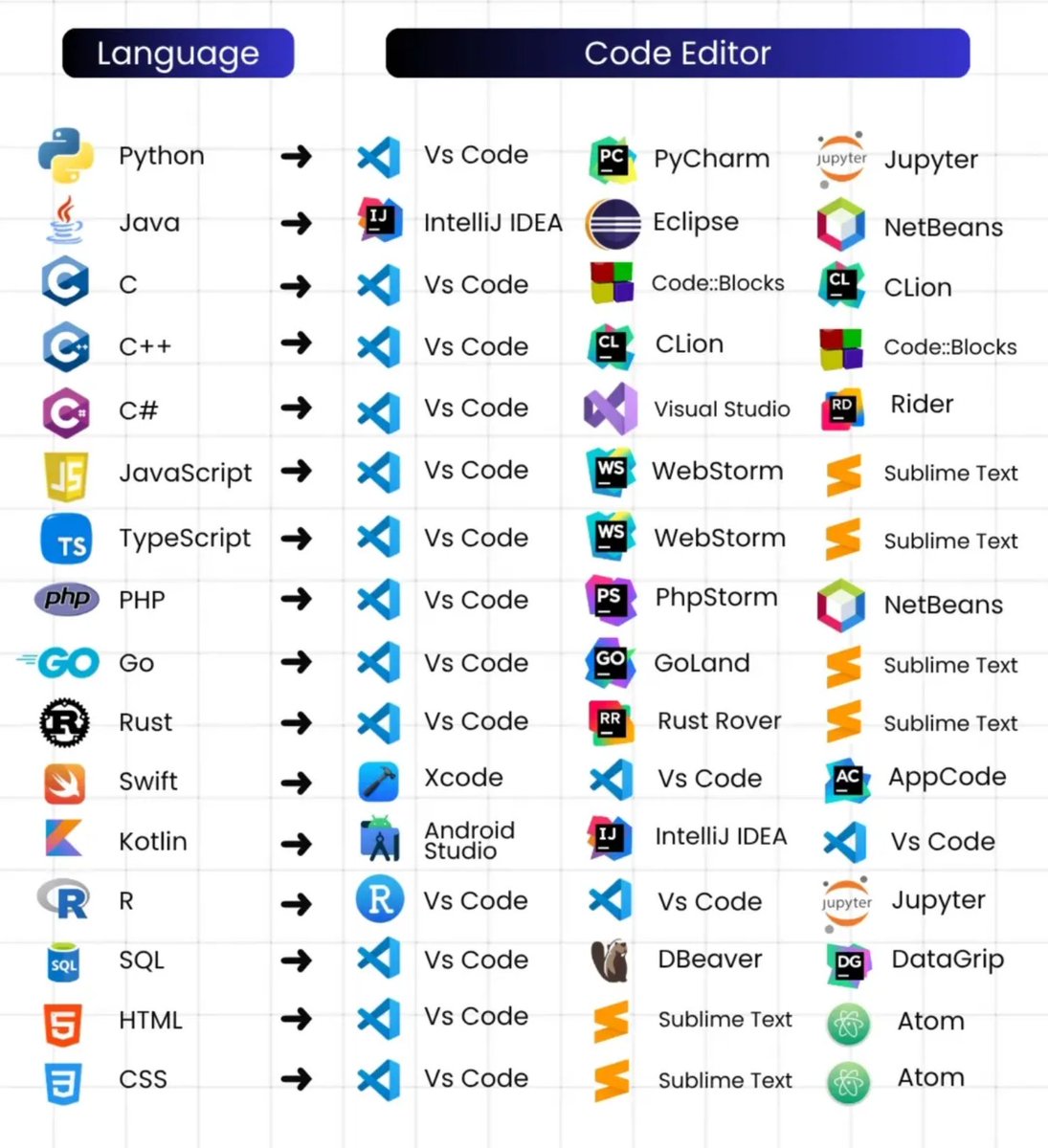
🧠 Most developers spend hours choosing a programming language...
But almost nobody talks about the best editor for each one. 🚀
The right IDE can make you code faster, debug easier, and become more productive every single day.
📌 Save this chart. It might save you weeks of trial and error.
#Programming #VSCode #DeveloperTools #Coding #SoftwareDevelopment
8
58
307
7,602
Pintu Hembram 🧑💻 retweeted

Jun 9
ପୋଲିସକୁ ଗାଇଡ୍ କରିବେ ସାଇବର ଏକ୍ସପର୍ଟ,୧୧୭ ପୋଷ୍ଟ ପାଇଁ ମିଳିଲା ମଞ୍ଜୁରୀ | Cyber Crime Expert to Help Police
#cyberfraud #cyberexpert #prameyanews7 #odishapolice #cybercrime
1
5
425
Pintu Hembram 🧑💻 retweeted
ନିଖୋଜ ବାଳକ ଶିବ ସିଂ ଦେଓଗାମଙ୍କୁ ଖୋଜି ଆଣିବାକୁ ଗୁହାରି। ଶରତ ଥାନା ଅଞ୍ଚଳର ଜଣେ ଅସହାୟ ବୃଦ୍ଧ ଘନ ସିଂ ଦେଓଗାମଙ୍କ ଏହା ଆକୁଳ ନିବେଦନ, ଏସଂକ୍ରାନ୍ତରେ ଶରତ ଥାନାରେ ଏକ ନିଖୋଜ ମାମଲା ୩ ବର୍ଷ ପୂର୍ବରୁ ରୁଜୁ ହୋଇଛି । ଉକ୍ତ ମାମଲାର ପୁନଃ ତଦନ୍ତ ପାଇଁ ଆକୁଳ ନିବେଦନ କରୁଛନ୍ତି ନିଖୋଜ ବାଳକଙ୍କ ପିତା
@spmayurbhanj @DGPOdisha




1
3
81
Pintu Hembram 🧑💻 retweeted

Jun 8
#ଛେଳି_ଚରାଇଲେ_କଲେଜ_ଯିବି
ଧନୀ ଜିଲ୍ଲା କେନ୍ଦୁଝରରୁ ଆସିଲା ଗରିବୀର ବିକଳ ଚିତ୍ର । ଉଚ୍ଚଶିକ୍ଷା ପାଇଁ ସଂଘର୍ଷ କରୁଛନ୍ତି ମେଧାବୀ ଛାତ୍ର ମାନସ ଦେହୁରୀ । ଯୁକ୍ତ ୩ ନାମଲେଖା ପାଇଁ ଜଙ୍ଗଲରେ ଚରାଉଛନ୍ତି ଛେଳି
#Odisha #KanakNews #Keonjhar
1
1
24
1,236
Pintu Hembram 🧑💻 retweeted

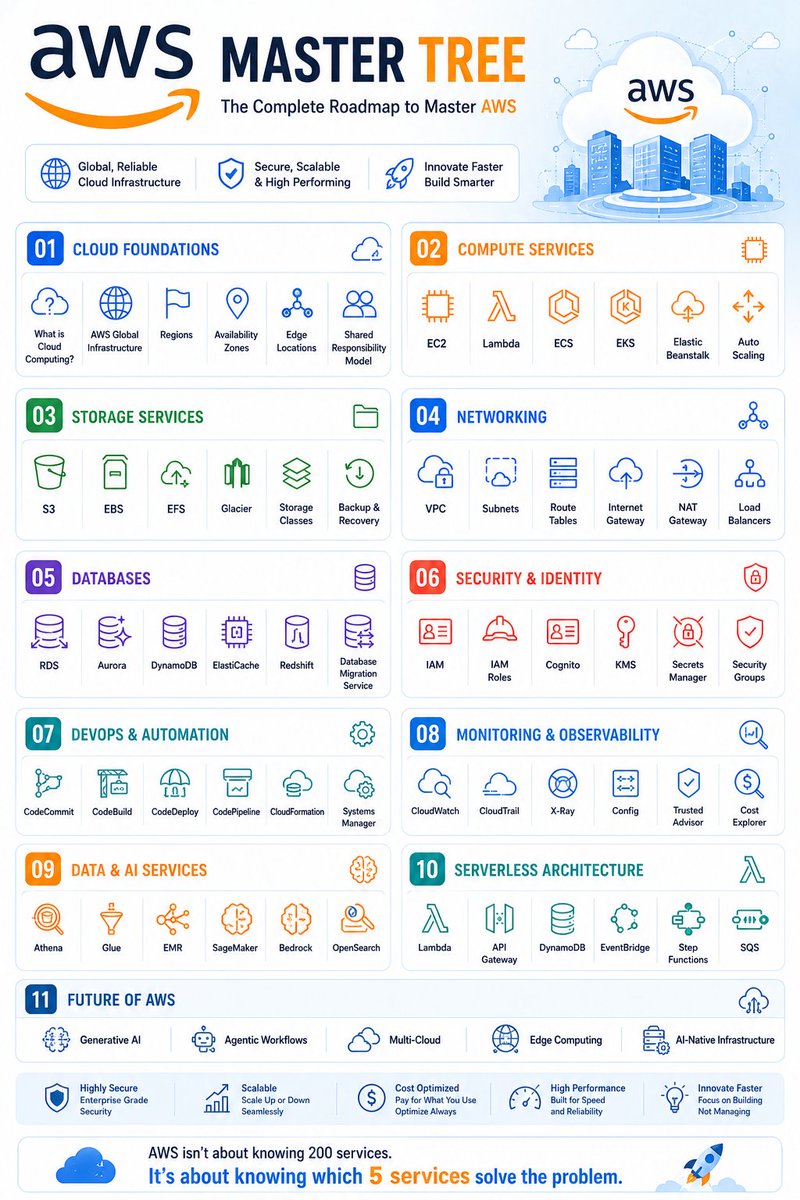
AWS — MASTER TREE ☁️
AWS
│
├── 01. Cloud Foundations
│ ├── What is Cloud Computing?
│ ├── AWS Global Infrastructure
│ ├── Regions
│ ├── Availability Zones
│ ├── Edge Locations
│ └── Shared Responsibility Model
│
├── 02. Compute Services
│ ├── EC2
│ ├── Lambda
│ ├── ECS
│ ├── EKS
│ ├── Elastic Beanstalk
│ └── Auto Scaling
│
├── 03. Storage Services
│ ├── S3
│ ├── EBS
│ ├── EFS
│ ├── Glacier
│ ├── Storage Classes
│ └── Backup & Recovery
│
├── 04. Networking
│ ├── VPC
│ ├── Subnets
│ ├── Route Tables
│ ├── Internet Gateway
│ ├── NAT Gateway
│ └── Load Balancers
│
├── 05. Databases
│ ├── RDS
│ ├── Aurora
│ ├── DynamoDB
│ ├── ElastiCache
│ ├── Redshift
│ └── Database Migration Service
│
├── 06. Security & Identity
│ ├── IAM
│ ├── IAM Roles
│ ├── Cognito
│ ├── KMS
│ ├── Secrets Manager
│ └── Security Groups
│
├── 07. DevOps & Automation
│ ├── CodeCommit
│ ├── CodeBuild
│ ├── CodeDeploy
│ ├── CodePipeline
│ ├── CloudFormation
│ └── Systems Manager
│
├── 08. Monitoring & Observability
│ ├── CloudWatch
│ ├── CloudTrail
│ ├── X-Ray
│ ├── Config
│ ├── Trusted Advisor
│ └── Cost Explorer
│
├── 09. Data & AI Services
│ ├── Athena
│ ├── Glue
│ ├── EMR
│ ├── SageMaker
│ ├── Bedrock
│ └── OpenSearch
│
├── 10. Serverless Architecture
│ ├── Lambda
│ ├── API Gateway
│ ├── DynamoDB
│ ├── EventBridge
│ ├── Step Functions
│ └── SQS
│
└── 11. Future of AWS
├── Generative AI
├── Agentic Workflows
├── Multi-Cloud
├── Edge Computing
└── AI-Native Infrastructure
Most people learn AWS services.
Top cloud engineers learn how services work together. ☁️🚀
6
25
105
2,645
Pintu Hembram 🧑💻 retweeted
Jun 8
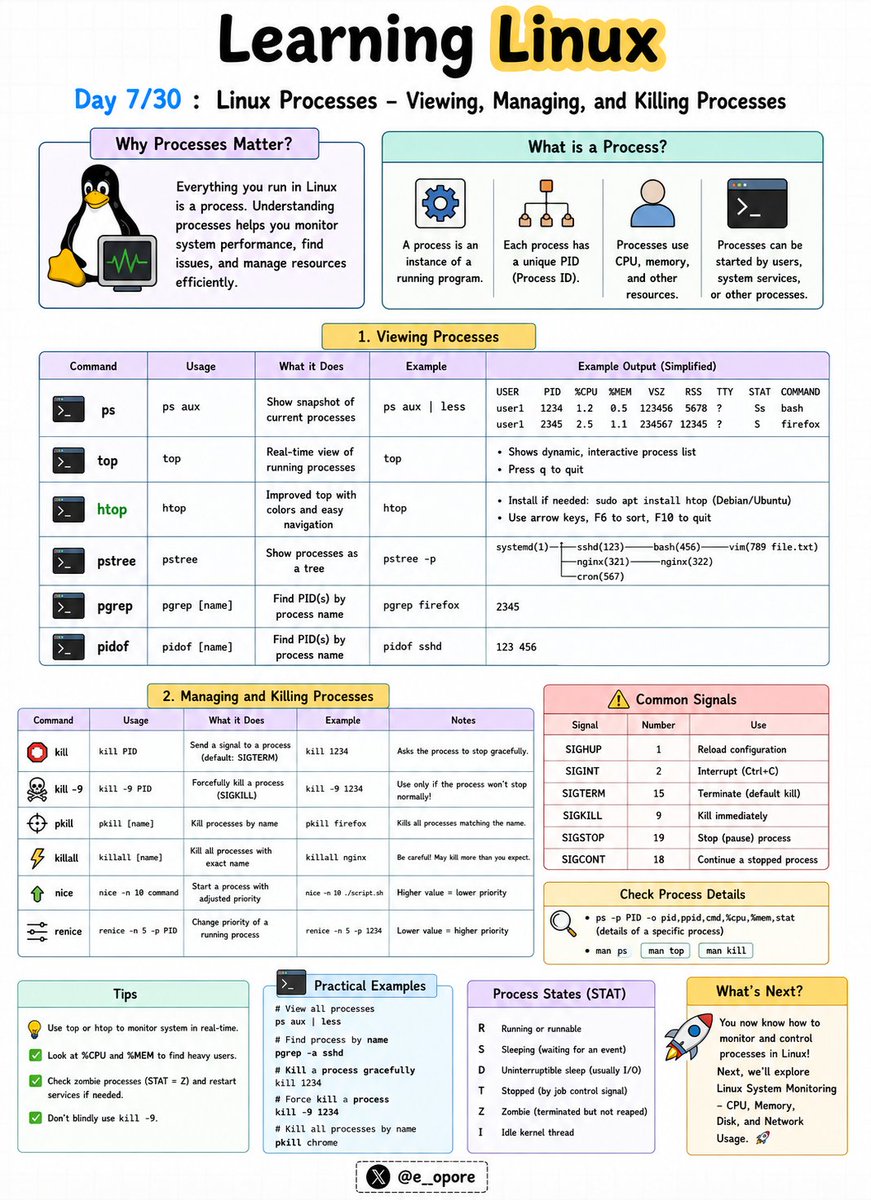
🐧 Day 7/30 — #Linux
Every application running on Linux is a process.
Understanding how to view, manage, and stop processes is a critical skill for developers, system administrators, and DevOps engineers.
Linux Processes – Viewing, Managing, and Killing Processes
A process is simply a program that is currently running on your system.
Each process is assigned a unique Process ID (PID) that Linux uses to track and manage it.
Essential Process Commands:
→ ps
→ top
→ htop
→ pidof
→ kill
→ killall
Viewing Processes
→ ps
Displays currently running processes.
→ ps aux
Shows detailed information about all running processes.
→ top
Provides a real-time view of CPU usage, memory usage, and active processes.
→ htop
An interactive and user-friendly alternative to top.
Finding Process IDs
→ pidof nginx
Returns the PID of a running process.
Stopping Processes
→ kill PID
Sends a termination signal to a specific process.
Example:
→ kill 1234
Stops the process with PID 1234.
Force Killing a Process
→ kill -9 PID
Immediately terminates a process that refuses to stop.
Example:
→ kill -9 1234
Killing Processes by Name
→ killall firefox
Terminates all Firefox processes.
Why Process Management Matters:
→ Monitor system performance
→ Troubleshoot application issues
→ Free system resources
→ Manage server workloads
→ Control background services effectively
Mastering process management is essential because Linux systems constantly run hundreds of processes behind the scenes.
🐧 Grab the Linux Ebook: codewithdhanian.gumroad.com/…
#Linux #LinuxTutorial #LinuxCommands #SystemAdministration #DevOps #OpenSource #Terminal #CloudComputing #Programming #100DaysOfCode
Jun 7
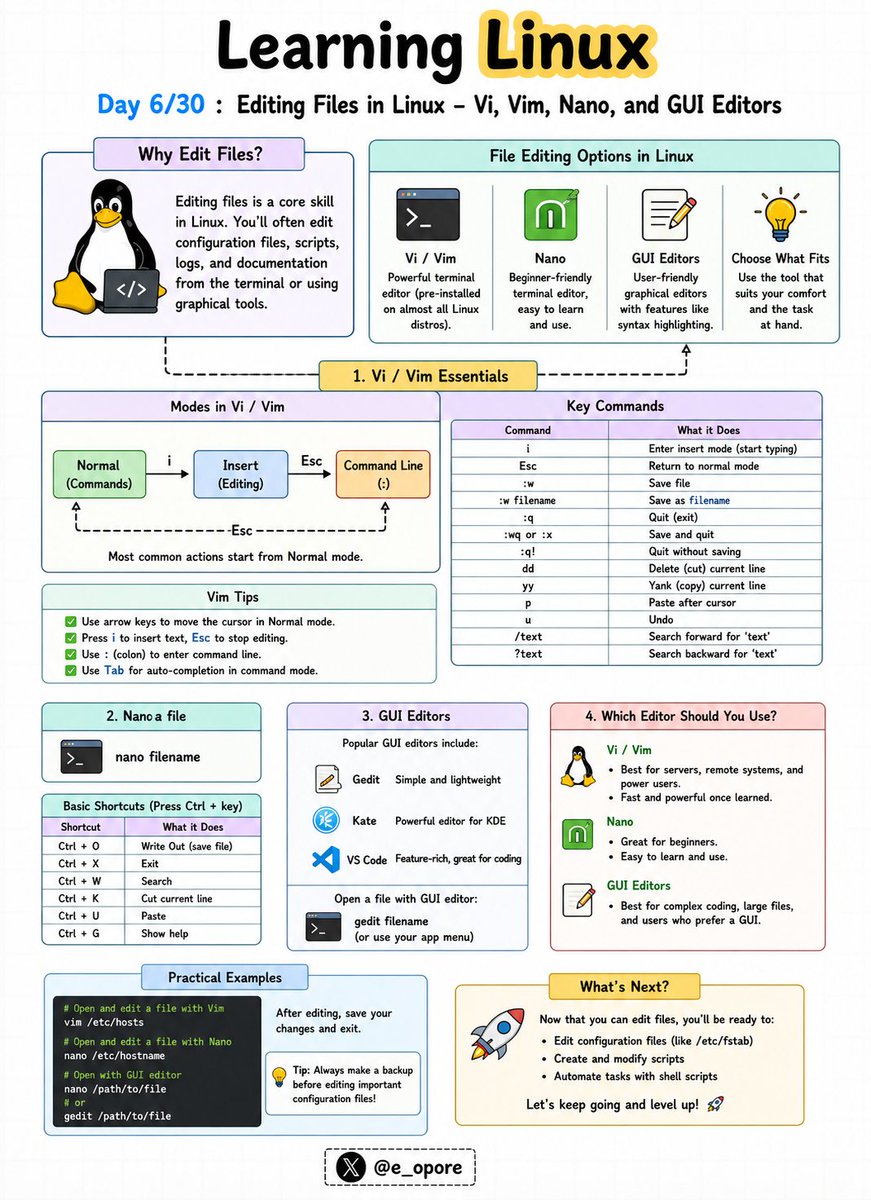
🐧 Day 6/30 — #Linux
Every Linux user eventually needs to edit configuration files, scripts, logs, and application settings.
Knowing how to use a text editor is a fundamental Linux skill.
Editing Files in Linux – Vi, Vim, Nano, and GUI Editors
Linux offers both terminal-based and graphical text editors, each designed for different workflows and experience levels.
Popular Linux Editors:
→ Vi
→ Vim
→ Nano
→ GUI Editors
Vi Editor
Vi is the classic text editor found on almost every Linux system.
Benefits:
→ Lightweight
→ Available by default on most distributions
→ Useful for server administration
Basic Commands:
→ i = Enter insert mode
→ Esc = Exit insert mode
→ :w = Save file
→ :q = Quit editor
→ :wq = Save and quit
Vim Editor
Vim (Vi Improved) extends Vi with advanced features.
Benefits:
→ Syntax highlighting
→ Auto-completion
→ Powerful navigation shortcuts
→ Plugin ecosystem
Many developers and system administrators prefer Vim for daily work.
Nano Editor
Nano is one of the easiest Linux text editors for beginners.
Basic Commands:
→ Ctrl O = Save file
→ Ctrl X = Exit editor
→ Ctrl K = Cut line
→ Ctrl U = Paste line
Nano is ideal if you're new to Linux and want a simple editing experience.
GUI Editors
Desktop Linux distributions also provide graphical editors such as:
→ Gedit
→ Kate
→ Mousepad
These editors work similarly to Notepad or other desktop text editors.
Why This Matters:
→ Edit configuration files
→ Write shell scripts
→ Manage server settings
→ Update application files
→ Become comfortable working entirely from the terminal
Learning at least one terminal editor is essential because many Linux servers operate without a graphical interface.
🐧 Grab Linux Ebook: codewithdhanian.gumroad.com/…
#Linux #LinuxTutorial #Vim #Vi #Nano #Terminal #OpenSource #DevOps #SystemAdministration #100DaysOfCode
9
44
203
10,097
Pintu Hembram 🧑💻 retweeted

Jun 8
सेंट्रल बोर्ड ऑफ़ सेकेंडरी एजुकेशन यानी सीबीएसई के 12वीं बोर्ड के नतीजों और खासतौर से 'ओएसएम' को लेकर हाल ही में बड़ा विवाद देखने को मिला. ऑनस्क्रीन मार्किंग सिस्टम यानी ओएसएम, एक डिजिटल मूल्यांकन प्रक्रिया है जिसे सीबीएसई ने 12वीं बोर्ड की आंसर शीट्स जांचने के लिए इस्तेमाल किया था. लेकिन सिस्टम में काफ़ी गड़बड़ियां पाई गईं. तीन छात्रों ने कुछ ऐसी बातें सामने रखीं जिसके बाद शिक्षा मंत्रालय को सीबीएसई के चेयरमैन का तबादला करने जैसे बड़े कदम उठाने पडे़. इन छात्रों में से एक सार्थक सिद्धांत भी थे जिनसे बीबीसी संवाददाता @bbcprerana ने बात की है और जानने की कोशिश की है कि पूरा विवाद क्या था और गड़बड़ियां कैसे पकड़ी गईं.
वीडियो एडिटर: सदफ़ ख़ान
16
261
918
20,619
Pintu Hembram 🧑💻 retweeted

May 31
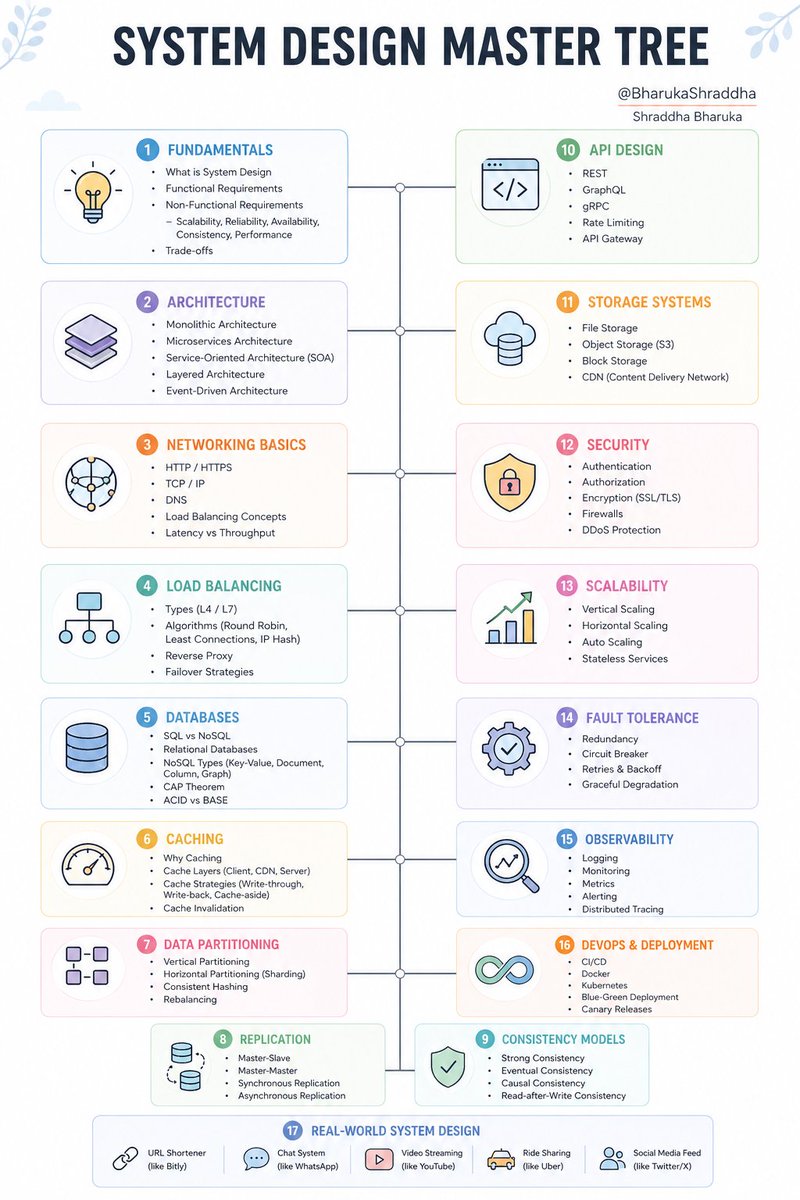
MASTER SYSTEM DESIGN
SYSTEM DESIGN MASTER TREE
│
├── 1. Fundamentals
│ ├── What is System Design
│ ├── Functional Requirements
│ ├── Non-Functional Requirements
│ │ ├── Scalability
│ │ ├── Reliability
│ │ ├── Availability
│ │ ├── Consistency
│ │ └── Performance
│ └── Trade-offs
│
├── 2. Architecture Basics
│ ├── Monolithic Architecture
│ ├── Microservices Architecture
│ ├── Service-Oriented Architecture (SOA)
│ ├── Layered Architecture
│ └── Event-Driven Architecture
│
├── 3. Networking Basics
│ ├── HTTP / HTTPS
│ ├── TCP / IP
│ ├── DNS
│ ├── Load Balancing Concepts
│ └── Latency vs Throughput
│
├── 4. Load Balancing
│ ├── Types (L4 / L7)
│ ├── Algorithms
│ │ ├── Round Robin
│ │ ├── Least Connections
│ │ └── IP Hash
│ ├── Reverse Proxy
│ └── Failover Strategies
│
├── 5. Databases
│ ├── SQL vs NoSQL
│ ├── Relational Databases
│ ├── NoSQL Types
│ │ ├── Key-Value
│ │ ├── Document
│ │ ├── Column
│ │ └── Graph
│ ├── CAP Theorem
│ └── ACID vs BASE
│
├── 6. Caching
│ ├── Why Caching
│ ├── Cache Layers
│ │ ├── Client-side
│ │ ├── CDN
│ │ ├── Server-side
│ ├── Cache Strategies
│ │ ├── Write-through
│ │ ├── Write-back
│ │ └── Cache-aside
│ └── Cache Invalidation
│
├── 7. Data Partitioning
│ ├── Vertical Partitioning
│ ├── Horizontal Partitioning (Sharding)
│ ├── Consistent Hashing
│ └── Rebalancing
│
├── 8. Replication
│ ├── Master-Slave
│ ├── Master-Master
│ ├── Synchronous Replication
│ └── Asynchronous Replication
│
├── 9. Consistency Models
│ ├── Strong Consistency
│ ├── Eventual Consistency
│ ├── Causal Consistency
│ └── Read-after-Write Consistency
│
├── 10. Messaging Systems
│ ├── Message Queues
│ ├── Pub/Sub Systems
│ ├── Kafka / RabbitMQ
│ ├── Event Streaming
│ └── Exactly-once / At-least-once Delivery
│
├── 11. API Design
│ ├── REST
│ ├── GraphQL
│ ├── gRPC
│ ├── Rate Limiting
│ └── API Gateway
│
├── 12. Storage Systems
│ ├── File Storage
│ ├── Object Storage (S3)
│ ├── Block Storage
│ └── CDN (Content Delivery Network)
│
├── 13. Security
│ ├── Authentication
│ ├── Authorization
│ ├── Encryption (SSL/TLS)
│ ├── Firewalls
│ └── DDoS Protection
│
├── 14. Scalability
│ ├── Vertical Scaling
│ ├── Horizontal Scaling
│ ├── Auto Scaling
│ └── Stateless Services
│
├── 15. Fault Tolerance
│ ├── Redundancy
│ ├── Circuit Breaker
│ ├── Retries & Backoff
│ └── Graceful Degradation
│
├── 16. Observability
│ ├── Logging
│ ├── Monitoring
│ ├── Metrics
│ ├── Alerting
│ └── Distributed Tracing
│
├── 17. Deployment & DevOps
│ ├── CI/CD
│ ├── Docker
│ ├── Kubernetes
│ ├── Blue-Green Deployment
│ └── Canary Releases
│
└── 18. Real-World System Design
├── URL Shortener (like Bitly)
├── Chat System (like WhatsApp)
├── Video Streaming (like YouTube)
├── Ride Sharing (like Uber)
└── Social Media Feed (like Twitter/X)
@BharukaShraddha
Thanks for sharing, great work 👏
17
80
487
14,617
Pintu Hembram 🧑💻 retweeted
Jun 8
Speaking exclusively to India Today, Sarthak Sidhant rejected the label of "whistleblower", saying he is neither a CBSE insider nor someone driven by personal grievances. He said his interest in the CBSE OSM controversy stemmed from curiosity and concerns raised about alleged vulnerabilities in the OnMark platform used by Coembs Edutech. Sarthak maintained that his inquiry was motivated by questions over why a system affecting millions of students was entrusted to a platform facing security concerns, and not by dissatisfaction with his own exam results.
#CBSE #OSMRow #SarthakSidhant #EducationNews #CBSEResults | @sardesairajdeep
12
48
188
17,347
Pintu Hembram 🧑💻 retweeted

Jun 7
People of Odisha are not fools. Sack the Corrupt Officer from Odisha Cadre. #NoToDhimanChakma in Odisha.
@GovernorOdisha @CMO_Odisha @MohanMOdisha @SecyChief @OdishaVigilance

Appeal to Hon'ble President of India Smt. Droupadi Murmu ji, to take a decision for #India and sack the corrupt IAS Officer!
Why are we reinstating the corrupt IAS officer Dhiman Chakma?
neutralodishanews.live/obses…
#IAS #CorruptIAS #IASCorruption #IncompetentIAS #DhimanChakmaCorruptIAS #DhimanChakma

22
323
774
8,761